





1. TL;DR
AI trip planner app development is the process of building a web or mobile product that turns a traveler’s dates, budget, and interests into a day-by-day itinerary, using a large language model, live travel APIs, and map data. The core feature set covers preference profiles, a conversational assistant, itinerary generation, interactive maps with route ordering, and flight, hotel, and activity search.
A focused MVP typically costs $30,000 to $60,000 and takes 12 to 16 weeks with an offshore team, while a full platform with booking, group planning, and offline access runs $120,000 to $250,000 or more over 7 to 10 months. Companies such as Aalpha Information Systems approach AI trip planner app development across product discovery, UI/UX design, application development, AI and API integration, cloud deployment, testing, and subsequent product iterations.
The model itself is rarely the hard part. Stale data, restricted API access, and itineraries that read well but fail on the ground cause most of the rework. Privacy work centers on location data, GDPR and CCPA consent, and the EU AI Act rule that users must be told they are talking to an AI. Most products make money through booking commissions, affiliate links, and subscriptions.
2. Understanding AI Trip Planner Apps
An AI trip planner app takes loose travel intent, such as “five days in Lisbon with two kids and a mid-range budget,” and returns a day-by-day plan the traveler can adjust and book. It combines a language model for understanding and writing, travel APIs for prices and availability, and map services for routing. The user describes goals instead of filling search forms.
2.1 What Is an AI Trip Planner App?
An AI trip planner app is software that builds a travel plan from a conversation. The traveler states where they want to go, when, with whom, and what they care about. The app returns an itinerary with places to stay, things to do, where to eat, and how to get between them.
A good one does more than write a pleasant list. It checks that the museum is open on Tuesday, that the walk between two stops is 12 minutes and not 45, and that the hotel sits inside the stated budget. It keeps the plan editable, so moving one dinner does not break the rest of the day.
The output quality depends far more on the data behind the model than on the model. An app with a strong language model and weak place data produces confident, attractive itineraries that send people to closed restaurants. That is the first design constraint to accept.
2.2 How AI-Powered Planning Differs from Traditional Travel Apps
Traditional travel apps are search tools. The user already knows they want a flight from Mumbai to Dubai on March 12, types it in, and compares results. Each vertical, whether flights, hotels, or tours, lives on its own screen, and the traveler assembles the trip in their head or a spreadsheet.
An AI planner starts one step earlier, at the “where should we go and what should we do” stage. It works across verticals and produces a finished plan the user can react to.
The two differ at every stage of the interaction. A traditional app takes input through structured search forms, while an AI planner accepts a natural language request or a chat. A traditional search covers one vertical at a time, while an AI planner handles flights, stays, activities, and routes together. The traditional output is a list of results to compare. The AI output is a sequenced itinerary with a reason for each choice.
Personalization and editing work differently too. Traditional apps rely on filters and saved searches, and every change means a new search. An AI planner uses learned preferences and trip context, and users change an existing plan through conversation.
The costs show up in speed and in how each one fails. A search app usually responds in under 2 seconds, and its worst failure is poor ranking. An AI planner often needs 5 to 20 seconds for a full itinerary, and its worst failure is a plausible but wrong recommendation.
That last difference is the real trade-off. AI planning is slower and can be wrong in ways that look right. Search tools are dull but predictable. Most successful products keep structured search available alongside the assistant for users who already know what they want.
2.3 Common Types of AI Travel Planning Solutions
AI travel planning products fall into a handful of categories, and each one changes the feature list, the data sources, and the business model.
Consumer itinerary planners serve leisure travelers and earn through affiliate commissions and subscriptions. Assistants inside OTA or airline apps serve existing booking customers and pay off through higher conversion and ancillary sales. Corporate travel assistants serve employees and travel managers, usually on per-seat SaaS fees.
Destination and tourism board planners serve visitors to one region and are funded by public budgets or partner fees. Tour operator and DMC planning tools serve agents building custom packages, sold as a SaaS license that pays for itself in time saved per quote. White-label planners serve banks, card issuers, and loyalty programs, which pay license fees plus a share of bookings.
Consumer planners compete for attention and must be good at inspiration. Embedded assistants already have inventory and customers, so the AI only has to lift conversion. Agent tools are the least glamorous and often the fastest to revenue, because a travel agent who saves two hours per custom quote will pay a monthly fee without much persuasion.
2.4 How an AI Trip Planner Generates Personalized Itineraries
An AI trip planner generates an itinerary through a pipeline, not a single prompt. Asking a model to “plan five days in Rome” in one call produces text that cannot be checked or booked. A production system breaks the work into stages.
- The request parser converts the user’s message into structured constraints: destination, dates, party size, budget, pace, interests, and hard rules such as “no early flights” or “wheelchair accessible.”
- The profile service adds stored preferences and past trip behavior, with the user’s consent.
- The retrieval layer pulls candidate hotels, attractions, restaurants, and transport options from travel APIs and the app’s own place database.
- A scoring step filters the candidates by opening hours, price, distance, ratings, and fit with stated interests.
- The language model drafts the day-by-day plan using only the shortlisted candidates, returning structured JSON rather than free text.
- A route and schedule optimizer orders the stops within each day and inserts realistic travel times.
- A validator checks the result against the hard rules and flags conflicts, such as two stops scheduled 40 minutes apart that need an hour of travel.
- The app presents the plan, the user edits it in conversation, and the pipeline reruns only the parts that changed.
Step 5 is where most prototypes stop, and step 7 is where production products earn trust. Restricting the model to a verified shortlist is the single most effective defence against invented places.
2.5 Benefits for Travelers and Travel Businesses
For travelers, the gain is time and fewer open tabs. Planning a multi-city trip usually means cross-checking maps, review sites, hotel prices, and opening hours by hand. An AI planner does the first draft in under a minute and lets the traveler spend their effort on choices rather than research. Plans also adapt: if rain is forecast for Thursday, the museum day can swap with the beach day in one message.
For travel businesses, the gain is conversion and data. A traveler who receives a plan with a specific hotel already in it is closer to booking than one browsing a results page. Every conversation also records intent that search boxes never capture, such as “we want quiet neighborhoods” or “my father cannot manage stairs.” That data improves recommendations and marketing.
The downside for businesses is cost per session. A search query costs a fraction of a cent to serve. A full itinerary with follow-up edits costs several cents in model and API fees, which matters when most sessions never convert. Section 8.4 works through the numbers.
3. Market Opportunities and AI Trip Planner Use Cases
The strongest opportunities for AI trip planners are in trips that are hard to plan with search alone: families with mixed needs, groups, multi-stop road trips, accessible travel, and business trips with policy rules. Each use case shifts the feature priorities, so pick one primary segment for the MVP rather than serving every traveler at launch.
-
3.1 Leisure and Family Vacation Planning
Family trips carry the most constraints per booking. Children need nap windows and early dinners. Teenagers want different activities from grandparents. Hotel rooms must fit five people without two bookings.
An AI planner handles this well because the constraints are easy to state in conversation and tedious to apply through filters. “Keep afternoons free for the pool and nothing more than 30 minutes by car from the hotel” is one sentence for a parent and a dozen filter settings in a normal app.
Features that matter most here are family-room search, pace controls, kid-friendly tagging on attractions, and budget tracking across the whole trip. The difficulty is data: “kid-friendly” is rarely a clean field in any API, so the app needs its own tagging, built from reviews and manual curation for the top destinations.
-
3.2 Business Travel Management
Business travel planning is less about inspiration and more about rules. Employees must book within policy, use preferred airlines and hotels, and stay close to the office or client site. Travel managers want visibility and cost control.
An AI assistant can take “I need to be at the client’s Frankfurt office by 9am Tuesday and back by Wednesday night” and return compliant options in one step. It can also rebook automatically when a meeting moves.
The catch is integration. Corporate buyers expect connections to their travel management company, expense tools, and single sign-on. Without them, the product is a demo. Sales cycles are also long, often 3 to 9 months, so this segment suits teams with runway or an existing B2B channel.
-
3.3 Group and Collaborative Trip Planning
Group trips fail on coordination, not information. Eight friends have eight budgets, four sets of dates, and one shared group chat full of links nobody reads.
An AI planner can collect each member’s preferences separately, find the overlap, and propose a plan that shows who wanted what. Voting on options, splitting costs, and assigning bookings to individuals turn the planner into the place where the trip gets decided.
This use case has natural virality, since every trip brings new users into the app. It also has the highest engineering cost among consumer segments, because real-time shared editing, permissions, and conflict handling add weeks to the build.
-
3.4 Road Trip Planning
Road trips depend on geography more than on inventory. The planner must work out driving times, fuel or charging stops, overnight locations, and detours worth taking.
AI helps by turning “drive from Bengaluru to Goa over three days, via a couple of waterfalls, no more than five hours driving a day” into a route with stops, stays, and timings. Electric vehicle owners add charger locations and range as hard constraints.
The main technical load sits on the routing and maps side, not the language model. Route matrix calls get expensive as stops increase, and offline access matters because mobile coverage drops on rural roads.
-
3.5 Adventure and Activity-Based Travel
Trekking, diving, skiing, and safari trips are built around one activity with strict conditions. Season, permits, fitness level, gear, and certified operators decide whether the trip works at all.
An AI planner for this segment needs deep, curated data about a narrow set of activities and destinations. Generic place APIs will not tell you that a trail closes during monsoon or that a dive site requires advanced certification.
This makes adventure planning a strong niche for a founder with domain knowledge. The audience is smaller but spends more per trip and trusts specialist tools. The risk is safety: wrong information about conditions can hurt someone, which is why section 9.6 covers human review.
-
3.6 Budget and Backpacking Travel
Budget travelers care about cost per day above everything else. They compare hostels, overnight buses, rail passes, and free walking tours, and they change plans often.
An AI planner that keeps a running daily budget and suggests cheaper swaps, such as an overnight train that also saves a hostel night, gives real value here. Multi-country trips with flexible dates suit conversational planning well.
The commercial problem is revenue per user. Commissions on hostels and buses are small, and this audience resists subscriptions. Products in this segment usually rely on high volume, affiliate partnerships, and a low-cost AI setup that uses smaller models for most requests.
-
3.7 Accessible and Senior-Friendly Travel
Travelers with disabilities and older travelers face constraints that standard apps ignore: step-free access, lift availability, accessible bathrooms, walking distance limits, medical needs, and rest breaks.
An AI planner can apply these as hard rules across every recommendation. It can limit daily walking, prefer hotels with verified accessible rooms, and schedule rest time.
The obstacle is data quality. Accessibility information in mainstream APIs is thin and often wrong. Serious products in this space combine API data with user-submitted verification and partnerships with accessibility organizations. The accuracy bar is also higher, because a wrong “step-free” label ruins a trip rather than inconveniencing it.
-
3.8 Corporate and White-Label Travel Solutions
Many companies want an AI travel planner without building one. Banks and card issuers add planners to premium card apps. Airlines and hotel groups add them to loyalty apps. Travel agencies want a branded tool for their clients.
A white-label product serves all of them from one codebase, with per-client branding, inventory sources, commission settings, and content rules.
This is often the most profitable path, because each contract brings a user base the vendor did not have to acquire. The engineering cost is multi-tenant architecture, per-client configuration, and enterprise security reviews. Expect each new client to request something custom, and price that in from the start.
4. Essential Features of an AI Trip Planner App
An AI trip planner app needs preference profiles, a conversational assistant, itinerary generation, recommendations, travel search, budget tracking, maps with route ordering, live updates, sharing, and an admin dashboard. Booking, offline access, multilingual support, and reviews can follow after launch. Not every feature belongs in the first release.
In the MVP. Registration and preference profiles, the conversational assistant, personalized itinerary generation, destination and activity recommendations, interactive maps with route ordering, and the admin dashboard all belong in the first release. Several other features start in a lighter form: flight, hotel, and transport search with redirects to partners, budget estimates, weather alerts, read-only itinerary sharing, currency display, and basic notifications.
In version 2. The lighter features grow up. Search gains in-app booking, budget estimates gain expense tracking, and weather alerts expand to traffic and disruptions. Read-only sharing becomes shared editing, currency display extends to additional languages, and basic notifications become context-aware. Full booking, payment, and cancellation management, offline itinerary access, and ratings and reviews also arrive at this stage.
-
4.1 User Registration and Preference Profiles
Registration should be fast: email, Google, or Apple sign-in, with guest mode allowed for the first itinerary. Forcing sign-up before users see any value loses a large share of first-time visitors.
The preference profile is where personalization starts. Collect travel style, pace, budget range, dietary needs, accessibility needs, and interests through a short, skippable onboarding flow. Then learn the rest from behavior: which suggestions users keep, delete, or replace.
Store explicit preferences separately from inferred ones. Users should be able to see and correct what the app believes about them. That transparency also helps with GDPR access requests later. Sensitive fields, such as medical or religious dietary needs, deserve explicit consent and separate handling.
-
4.2 Conversational AI Travel Assistant
The assistant is the main interface, so it has to handle vague requests, follow-up edits, and questions about the plan. “Make day two less rushed” and “is there anything to do near the hotel in the evening” should both work without the user repeating context.
Good assistants ask one clarifying question when a request is ambiguous instead of guessing, show progress while an itinerary builds, and offer tappable suggestions so users do not have to type everything.
Keep structured controls next to the chat. Date pickers, budget sliders, and a visible itinerary panel are faster than typing for many edits. A chat-only interface looks modern in a demo and frustrates people who want to change one date. The assistant must also identify itself as AI at the start of the conversation, which is a legal requirement for EU users under the AI Act.
-
4.3 Personalized Itinerary Generation
Itinerary generation turns constraints and candidates into a structured, day-by-day plan. Each item needs a place ID, a time window, travel time from the previous stop, estimated cost, and a short reason it was chosen.
Store itineraries as structured data, not as generated text. This is the difference between a plan the app can edit, reorder, share, and book, and a paragraph the app can only regenerate.
Support partial regeneration. If the user swaps one afternoon, only that block should change. Regenerating the whole trip on every edit costs more, takes longer, and annoys users by moving things they liked. Also offer pace settings. Some travelers want six stops a day and others want two, and a single default pleases neither group.
-
4.4 Destination and Activity Recommendations
Recommendations cover where to go and what to do once there. For undecided travelers, the app suggests destinations that match budget, season, flight time, and interests. For decided travelers, it suggests attractions, restaurants, tours, and neighborhoods.
Show the reason for each recommendation. “Suggested because you liked street food in Bangkok and this market is 8 minutes from your hotel” builds more trust than a star rating.
Mix popular choices with lesser-known ones. A planner that only surfaces the top ten attractions in every city adds nothing over a guidebook. A planner that only surfaces hidden gems frustrates first-time visitors who want to see the famous sights. A tunable ratio, influenced by the user’s profile, handles both.
-
4.5 Flight, Hotel, and Transportation Search
Travel search connects the plan to real inventory. The MVP usually shows live prices with links to partner sites. Later versions book inside the app.
Flight search needs origin, destination, dates, cabin class, and passenger counts, with results normalized across suppliers. Hotel search needs location, dates, rooms, occupancy, and price, shown on a map relative to the itinerary. Ground transport covers trains, buses, transfers, car rental, and ride-hailing estimates.
Prices change between search and booking, often within minutes. Always revalidate price and availability before showing a final total, and label any cached price with its age. Showing a $180 hotel that turns out to cost $240 at checkout does more damage to trust than any AI error.
-
4.6 Budget Planning and Expense Tracking
Budget planning estimates total trip cost before booking. It adds flights, stays, activities, local transport, and a daily allowance for food, scaled to the destination and the user’s spending style.
Show the estimate by category and by day, and let users set a ceiling that the planner respects. “Keep the whole trip under $3,000” should shape hotel and activity choices rather than only trigger a warning.
Expense tracking during the trip is a separate feature and can come later. It needs manual entry, receipt capture, currency conversion, and, for groups, cost splitting. Budget estimates are only as good as the price data behind them, so present them as ranges rather than single figures.
-
4.7 Interactive Maps and Route Optimization
The map shows each day’s stops, the route between them, and nearby alternatives. Users should be able to drag stops, see travel times update, and switch between walking, public transport, and driving.
Route optimization orders the stops to reduce travel time while respecting opening hours, reservations, and meal times. For three or four stops a simple approach works. For eight stops with time windows, the app needs a proper solver, covered in section 5.6.
Maps are also a large line item in API costs. Every route calculation, place lookup, and map load is a billable request with most providers. Cache place details, batch route calculations, and load map tiles only when the map view is open.
-
4.8 Real-Time Weather, Traffic, and Travel Updates
Live updates keep the plan useful after it is created. Weather forecasts inform which days suit outdoor activities. Traffic data adjusts travel times on the day. Flight status, strikes, closures, and local events can all break a plan.
The useful part is the response, not the alert. A message that says “heavy rain forecast Thursday, want to swap the beach day with Friday’s museum visit?” is worth more than a weather icon.
Be selective with sources and frequency. Polling every data feed for every active trip every few minutes is expensive. Most apps check weather daily, flight status at set intervals before departure, and traffic only on the travel day.
-
4.9 Collaborative Planning and Itinerary Sharing
Sharing starts simple: a read-only link that shows the itinerary to friends or family. Collaboration adds shared editing, comments, voting on options, and role-based permissions such as organizer and participant.
For group trips, let each member submit preferences privately. People are more honest about budgets when the rest of the group cannot see their answer.
Real-time collaboration needs conflict handling when two people edit the same day, presence indicators, and change history. It adds noticeable engineering time, so most MVPs launch with read-only sharing and add editing once usage shows demand.
-
4.10 Booking, Payment, and Cancellation Management
In-app booking lets users pay for flights, hotels, and activities without leaving the planner. It raises commission revenue and keeps the trip in one place. It also brings supplier contracts, payment handling, customer support, refunds, and legal liability.
Use a payment provider such as Stripe, Adyen, or Razorpay with tokenized card handling, so card data never touches your servers. Handle partial failures carefully: a trip where the flight books and the hotel fails needs a clear recovery flow.
Cancellation management must reflect each supplier’s policy exactly. Show deadlines, fees, and refund amounts before the user confirms. Most teams should delay full booking until the planner has proven that people use it, as section 6.3 explains.
-
4.11 Multilingual and Multicurrency Support
Travelers plan in their own language and pay in their own currency, even when the destination uses neither. Multilingual support covers the interface, the assistant’s replies, and place content such as descriptions and reviews.
Language models handle conversation in many languages well. Interface text, legal copy, and payment screens should use professional translation, because machine translation errors in cancellation terms create disputes.
Multicurrency support needs daily exchange rates, clear display of the original and converted amounts, and correct rounding. Charge in the currency the supplier requires, and state any conversion fee before payment.
-
4.12 Offline Itinerary Access
Offline access matters because travelers lose connectivity in airports, on trains, in rural areas, and abroad without roaming. The itinerary, confirmation numbers, addresses, maps for each day, and saved directions should be available without a signal.
Store the itinerary locally on the device and sync changes when the connection returns. Downloadable map areas require a maps provider that permits offline use under its terms, which not all do.
The AI assistant itself will not work offline unless a small on-device model is included. Most apps accept this and make the offline mode a read-only view of the plan, with edits queued for later.
-
4.13 Notifications and Automated Reminders
Notifications turn the plan into an assistant during the trip. Useful examples include check-in reminders, “leave in 20 minutes to reach the museum before your timed entry,” document reminders before departure, and alerts when a booked price drops.
Every notification should be tied to an action or a decision. Generic “explore more destinations” messages teach users to switch off notifications, and the useful ones go with them.
Give users control by category and respect time zones. A reminder that arrives at 3am local time because the server runs on UTC is a common and avoidable bug.
-
4.14 Ratings, Reviews, and Travel Feedback
Ratings and reviews serve two purposes: helping other users and training the recommendation system. After each trip, ask short questions about specific stops, such as whether the restaurant was worth it or the tour ran on time.
Feedback on AI suggestions is just as valuable. Thumbs up or down on individual recommendations, and the reason for removing a stop, tell the system what to change.
Moderate user reviews for spam, abuse, and fake entries. Also check the terms of any third-party review content you display. Most review providers restrict storage, modification, and use of their content for training models.
-
4.15 Admin Dashboard and Analytics
The admin dashboard lets the operations team manage users, content, partners, and AI behavior. It should cover user management, curated place data, partner and commission settings, prompt and model configuration, content moderation, and support tools.
Analytics should track itineraries created, edits per itinerary, booking clicks, conversions, revenue by partner, AI cost per session, and error rates. Section 12.1 lists the metrics that matter most after launch.
Include an AI review queue. Flagged conversations, low-rated itineraries, and validator failures should land in a place where a human can inspect them. Without it, the team learns about bad recommendations from app store reviews.
5. How Artificial Intelligence Powers Trip Planning
AI powers trip planning through several separate techniques working together. Natural language processing reads requests, machine learning personalizes results, generative models write itineraries, recommendation engines rank options, optimization algorithms order stops, and retrieval-augmented generation keeps answers tied to real data. A language model alone covers only part of this list, which is why pure chatbot planners disappoint.
5.1 Natural Language Processing for User Requests
Natural language processing turns a free-text request into fields the system can act on. From “a relaxed week in Bali in late August with my wife, around $2,500, no hostels,” the parser extracts destination, approximate dates, party size, budget, pace, and an exclusion rule.
Modern language models handle this extraction well when asked to return JSON against a fixed schema. The practical work is in the edge cases: relative dates such as “next long weekend,” ambiguous places such as “Georgia,” currencies implied by the user’s location, and requests that change halfway through a conversation.
Always confirm extracted constraints that are expensive to get wrong. Showing “7 nights, August 24 to 31, 2 adults, up to $2,500” before generating the plan catches misreadings in one glance. Aalpha Information Systems covers this kind of work in its natural language processing services.
5.2 Machine Learning-Based Personalization
Machine learning personalization adjusts results based on what the app learns about each user. Explicit signals come from the profile. Implicit signals come from behavior: stops kept or removed, time spent reading details, bookings made, and ratings given.
Early on, there is too little data for learned models to beat simple rules. Start with rule-based scoring on stated preferences, then add learned ranking once there are thousands of itineraries with edit and booking history.
Personalization has a known failure mode: it narrows. A user who liked two food tours gets only food tours. Build in deliberate variety and let users reset or adjust what the system has learned about them.
5.3 Generative AI for Itinerary Creation
Generative AI writes the itinerary: selecting from candidates, grouping them into days, adding timing, and explaining choices in readable language. This is the part that feels like magic in a demo.
Treat the model as a planner working from a shortlist, not as a source of facts. Pass it verified candidates with IDs, hours, prices, and coordinates, and require structured output that references those IDs. Reject any item without a valid ID.
Model choice involves trade-offs. Larger models from Anthropic, OpenAI, and Google plan multi-day trips with fewer logical errors but cost more and respond slower. Smaller models are fast and cheap for extraction, short answers, and edits. Most production apps route requests: a small model for simple tasks, a larger one for full itinerary generation. Section 7.5 compares options.
5.4 Recommendation Engines
Recommendation engines rank hotels, attractions, restaurants, and destinations for each user. The main approaches are content-based filtering, which matches item attributes to user preferences, and collaborative filtering, which uses the behavior of similar users.
Travel data makes collaborative filtering harder than in music or shopping. People travel a few times a year, not daily, so each user produces little signal. Most travel apps rely on content-based scoring and embeddings, adding collaborative signals as volume grows.
Embeddings help here. Converting place descriptions and user preferences into vectors lets the system match “quiet, local, not touristy” to places described in similar terms, even when no tag says so.
5.5 Predictive Pricing and Demand Forecasting
Predictive pricing estimates whether a fare or hotel rate is likely to rise or fall, so the app can advise booking now or waiting. Demand forecasting predicts busy periods for destinations and attractions.
Both need historical price data collected over months. A new app does not have it, and buying it is expensive. Most MVPs skip prediction and show simpler signals: price compared with the recent average for that route, or a price-drop alert.
Be careful with the promise. A “book now, prices will rise” message that proves wrong a few times damages trust in every other recommendation. Present predictions as likelihoods with a confidence level, never as certainties.
5.6 Route and Schedule Optimization
Ordering a day’s stops is a version of the traveling salesman problem with time windows. Each stop has opening hours, a visit duration, and sometimes a fixed booking time. Travel time depends on mode and time of day.
Language models are poor at this. They produce sequences that look sensible and zigzag across the city. Use a solver instead. Open-source tools such as Google OR-Tools handle realistic day plans with 5 to 15 stops in well under a second.
The usual design is: the model chooses what to include, the solver decides the order and timing, and the model writes the final description. Each component does what it is good at.
5.7 Sentiment Analysis of Reviews
Sentiment analysis extracts opinions from reviews at a finer level than star ratings. A 4.2-star restaurant might have excellent food and consistently slow service. A hotel might be praised for location and criticized for noise.
Aspect-level sentiment lets the planner match these details to user priorities. A light sleeper should see the noise complaints. A foodie can ignore slow service.
Check license terms before processing third-party reviews. Many providers prohibit storing, analysing, or deriving data from their review content. First-party reviews collected in the app carry no such restriction and become more valuable over time.
5.8 Context-Aware and Location-Based Recommendations
Context-aware recommendations change with the traveler’s situation: location, time of day, weather, energy level, and what is already planned. At 4pm near the old town with rain starting, the right suggestion is a covered market or café, not a viewpoint.
This requires location permission, which users grant more readily when the benefit is clear and the tracking stops when the trip ends. Use approximate location where precise location is not needed.
Context-aware features work best as suggestions the user can accept or ignore. Automatically rewriting someone’s plan because they walked slower than expected feels intrusive.
5.9 Retrieval-Augmented Generation for Reliable Travel Answers
Retrieval-augmented generation, or RAG, gives the language model relevant, current documents before it answers. Instead of relying on training data that may be years old, the model reads verified content retrieved at request time.
For travel, the retrieved content includes place details, opening hours, visa and entry rules, local transport information, curated destination guides, and the app’s own policies. The system stores this content as embeddings in a vector database and retrieves the closest matches for each question.
RAG reduces invented answers but does not remove them. The model can still misread a document or combine two sources wrongly. Pair RAG with citations shown to the user, freshness dates on every document, and validation for high-risk facts. Aalpha’s guide on integrating AI agents into SaaS platforms covers RAG pipelines and vector stores in more depth.
5.10 AI Agents for Search, Comparison, and Booking Tasks
AI agents go beyond answering. They take multi-step actions: searching several suppliers, comparing results, holding a fare, filling passenger details, and completing a booking after user approval.
An agent planner might receive “find me the cheapest way to get from Lisbon to Seville on Friday, train or bus, arriving before 6pm,” call three APIs, compare timings and prices, and return two options with a book button.
Agents add risk in proportion to their permissions. Searching is safe. Spending the user’s money is not. Require explicit confirmation before any booking, payment, or cancellation, log every action, and cap spend per session. Aalpha’s article on AI agent development cost explains how agent scope changes budgets.
6. AI Trip Planner App Development Process
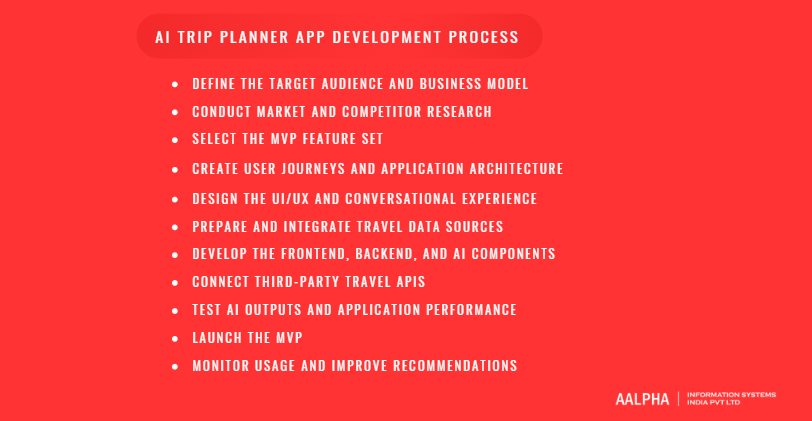
Building an AI trip planner follows eleven stages: define the audience and business model, research competitors, select MVP features, map user flows and architecture, design the interface and conversation, prepare data sources, build the frontend, backend, and AI layers, connect travel APIs, test AI outputs, launch, and improve from real usage. Data and API access decisions should come before design work.
-
6.1 Define the Target Audience and Business Model
Start with one audience and one way to make money. “Everyone who travels” produces a vague product with no clear acquisition channel.
Write down who the first users are, what trip they are planning, what they use today, and why they would switch. Then choose the primary revenue model: affiliate commissions, booking margin, subscriptions, or B2B licensing. The model shapes the product. An affiliate app needs high traffic and redirects. A subscription app needs features people pay for every trip. A B2B tool needs admin controls and integrations.
These two decisions also determine which travel APIs you can access. Several suppliers approve partners based on traffic, business type, and expected volume.
-
6.2 Conduct Market and Competitor Research
Research what existing planners do well and where users complain. Read app store reviews for the main AI travel planners and the AI assistants inside large booking platforms. Complaints are more useful than feature lists, because they point to gaps.
Common complaints in this category include wrong opening hours, recommendations for closed places, unrealistic daily schedules, generic suggestions, and prices that change at checkout.
Also check supply-side realities. Confirm which flight, hotel, and activity APIs your business can get approved for before committing to features that depend on them. A competitor’s in-app booking may rely on contracts a new startup cannot obtain in its first year.
-
6.3 Select the MVP Feature Set
The MVP should prove one thing: that your target users get better plans from your app than from their current method, and that some of them click through to book.
A sensible MVP includes guest access and simple profiles, a conversational assistant, structured itinerary generation, recommendations with reasons, map view with ordered stops, hotel and activity search with partner redirects, basic budget estimates, weather, read-only sharing, and an admin dashboard.
Leave out in-app booking and payment, real-time collaboration, predictive pricing, offline maps, and expense tracking. Each adds weeks and operational burden before you know whether people want the core product. The downside of redirect-based booking is lower revenue per conversion and less control over the post-booking experience, which is acceptable at validation stage. Aalpha’s MVP development services follow this scope-first approach.
-
6.4 Create User Journeys and Application Architecture
Map the main user flows before any screen design: first visit to first itinerary, editing a plan, sharing with a companion, clicking to book, and returning to a saved trip. Each flow reveals data needs and failure points.
Then define the architecture. A typical setup has a mobile and web client, an API gateway, a core backend for users, trips, and bookings, an AI orchestration service, a travel integration layer that normalizes supplier data, a place database with a vector index, a cache, and background workers for alerts and data refresh.
Keep the travel integration layer separate from everything else. Suppliers change APIs, raise prices, and shut down programs. When Amadeus decommissioned its Self-Service developer portal on July 17, 2026, apps that had wired it directly into their business logic faced far bigger rewrites than apps with an adapter layer. Section 7.10 shows the recommended structure.
-
6.5 Design the UI/UX and Conversational Experience
Design two interfaces that work together: the chat and the plan. Most successful layouts show the conversation on one side, or in a bottom sheet on mobile, and the live itinerary with a map on the other.
Design the conversation deliberately. Write the assistant’s opening message, clarifying questions, loading states, error messages, and refusal wording. Decide how it handles off-topic requests and what it says when it does not know something.
Show progress while itineraries generate. A 12-second wait with a blank screen feels broken. The same wait with “finding hotels near the old town, checking opening hours for day two” feels like work being done. Aalpha’s UI/UX design team typically prototypes both the chat and plan views before development starts.
-
6.6 Prepare and Integrate Travel Data Sources
Data preparation decides whether recommendations are accurate. The app needs place data such as locations, hours, prices, categories, and accessibility; inventory data for flights, hotels, and activities; destination content covering neighborhoods, safety, customs, and transport; and rules data for visas, entry requirements, and local regulations.
No single provider covers all of it. Combine map and places APIs, supplier APIs, licensed content, open data such as OpenStreetMap, and your own curated database for launch destinations.
Normalize everything into one internal schema with a source and last-updated date on every record. Deduplicate places that appear under slightly different names in different sources. Plan a refresh schedule: opening hours need frequent checks, while neighborhood descriptions change rarely.
-
6.7 Develop the Frontend, Backend, and AI Components
Development usually runs in parallel streams. The frontend team builds the chat, itinerary, map, search, and profile screens. The backend team builds authentication, trip storage, integration adapters, caching, and admin tools. The AI team builds prompts, structured output schemas, the retrieval pipeline, model routing, the optimizer connection, and validators.
Build the AI orchestration as its own service with versioned prompts and configuration. Prompts change weekly in the first months, and those changes need testing and rollback like any code change.
Work in two-week sprints with a demo at the end of each. AI features in particular look finished in a demo and fall apart on real requests, so each demo should include a set of messy, realistic test prompts.
-
6.8 Connect Third-Party Travel APIs
Connect APIs through the integration layer, one adapter per supplier, each mapping supplier data to the internal schema. Handle authentication, rate limits, retries, timeouts, and error mapping inside the adapter.
Start partner applications early. Some approvals take weeks. Booking.com’s Demand API, for example, requires registration as a Managed Affiliate Partner and Partner Centre access before development credentials are issued.
Build against sandbox environments first, but test against production data before launch. Sandbox data is often unrealistic, with fake hotels, fixed prices, and missing edge cases. Log every supplier request and response for debugging, while stripping personal and payment data from those logs.
-
6.9 Test AI Outputs and Application Performance
AI testing needs its own method on top of normal functional, performance, and security testing. Build an evaluation set of 200 or more realistic requests across destinations, budgets, party types, and edge cases. Run it on every prompt or model change.
Score results automatically where possible: valid JSON, all place IDs verified, opening hours respected, travel times realistic, budget respected, no duplicate stops. Then have people review a sample for quality: does the plan make sense, is the pacing reasonable, would a local agree?
Test performance under load. Itinerary generation involves several model and API calls, and response times degrade quickly when suppliers throttle. Aalpha’s software testing services include this kind of load and integration testing.
-
6.10 Launch the MVP
Launch to a limited audience first: a waitlist, one market, or a small set of destinations. A narrow launch keeps data quality high and support manageable.
Before launch, confirm monitoring and alerting for errors, API failures, model latency, and cost per session. Set spending caps with model and map providers. Publish a clear privacy policy and AI disclosure. Prepare app store listings, screenshots, and a support channel.
Expect the first weeks to surface problems no test set predicted. Plan a stabilization sprint right after launch rather than scheduling new features.
-
6.11 Monitor Usage and Improve Recommendations
After launch, watch what users do with the plans. Edits show where the AI got preferences wrong. Removed stops show weak recommendations. Booking clicks show what converts. Abandoned conversations show where the assistant confused people.
Review low-rated itineraries and validator failures weekly. Group problems by cause: bad data, poor prompt, wrong model choice, or missing feature. Fix the data problems first, because they affect every user.
Retest the evaluation set after each change and add new cases from real failures. Over a few months, this set becomes the most valuable quality asset the product has.
7. Technology Stack and Third-Party Integrations
A typical AI trip planner stack uses Flutter or React Native for mobile, Next.js for web, Node.js or Python for the backend, PostgreSQL with pgvector for data and embeddings, Redis for caching, one or more commercial language models, a maps provider, and travel APIs for flights, stays, and activities, deployed on AWS, Google Cloud, or Azure.
7.1 Native vs. Cross-Platform App Development
Cross-platform development suits most AI trip planners. The app is mainly chat, lists, maps, and forms, which frameworks such as Flutter and React Native handle well from one codebase.
The practical differences come down to cost, speed, and platform access. Native development in Swift and Kotlin means two codebases and a build cost roughly 1.5 to 1.8 times higher. Cross-platform development means one codebase with some platform-specific code, a lower build cost, and a faster route to market.
Native apps get full access to maps, location, and AR features, along with the best access to Core ML and other on-device models. Cross-platform apps reach maps and location through plugins, which work well. Their AR support is workable but more limited, and on-device AI needs extra integration work.
Choose native when AR navigation, heavy on-device AI, or deep platform features are central to the product. The downside of cross-platform is dependency on plugins for maps, location, and payments, which occasionally lag behind operating system updates.
7.2 Frontend Technologies
For mobile, Flutter and React Native are the practical defaults. Flutter gives consistent rendering across platforms. React Native suits teams that already work in React and want to share logic with the web app.
For web, Next.js with React is a strong choice. Server rendering helps SEO for destination and itinerary pages, which matter for acquisition, and streaming responses let the assistant’s replies appear as they generate.
Supporting libraries include a maps SDK, a state management library, a streaming chat component, and an offline storage layer such as SQLite on mobile.
7.3 Backend Technologies
Node.js with NestJS or Python with FastAPI are the common backend choices. Node.js handles many concurrent API calls and streaming connections efficiently. Python has the stronger AI and data science library base.
Many teams split the work: Node.js for the main application backend and a Python service for AI orchestration, retrieval, and optimization. This adds one more service to operate, which is the price of using each language where it is strongest.
Use a job queue for slow tasks such as data refresh, price alerts, and bulk itinerary checks, and WebSockets or server-sent events for streaming AI responses to the client.
7.4 Databases, Vector Databases, and Caching
PostgreSQL works well as the primary database for users, trips, bookings, and place records. Travel data is relational: trips have days, days have stops, stops reference places and bookings.
For embeddings, the pgvector extension keeps vectors in the same PostgreSQL database, which is simpler to run and fast enough for most apps up to millions of vectors. Dedicated vector databases such as Pinecone, Qdrant, or Weaviate make sense at larger scale or when advanced filtering performance matters.
Redis handles caching of API responses, session data, and rate limiting. Caching is a major cost lever: place details, weather forecasts, and destination content can be reused across users for hours or days, subject to each provider’s terms.
7.5 Large Language Models and AI Frameworks
Most AI trip planners use commercial models through APIs rather than training their own. The main choices are Anthropic’s Claude, OpenAI’s GPT models, and Google’s Gemini, each with larger models for complex planning and smaller models for fast, cheap tasks. Open-weight models such as Llama, Mistral, and Qwen suit teams that need self-hosting or lower costs at high volume.
Each option has a clear strength and a clear cost. Large commercial models give the best multi-day planning and reasoning, but they carry the highest cost per request and respond slower. Small commercial models are fast and cheap for extraction and edits, but they make more logic errors on complex trips. Open-weight, self-hosted models offer data control and predictable cost at scale, in exchange for GPU infrastructure and machine learning operations work.
Frameworks such as LangGraph, LlamaIndex, and the Vercel AI SDK help with orchestration, retrieval, and streaming. Keep your own abstraction over model providers so you can switch or route between them. Model prices and rankings change every few months. The Model Context Protocol is also worth considering for agent designs, since it gives models a standard way to call external tools.
7.6 Maps, Geolocation, and Navigation APIs
Google Maps Platform, Mapbox, and HERE are the main commercial options, with OpenStreetMap data as an open alternative. The app needs map display, geocoding, place search and details, routing, route matrices for travel times between many stops, and location services.
Google Maps Platform offers the richest place data in most markets. Since March 1, 2025, it has replaced the old monthly credit with free usage caps per SKU: 10,000 billable events a month for Essentials SKUs, 5,000 for Pro, and 1,000 for Enterprise. Place details with rich fields often fall into higher tiers, so field selection directly affects cost.
Mapbox is often cheaper for map display and offers more styling control, with less detailed place data. Many apps mix providers: one for maps and routing, another for place content.
7.7 Flight, Hotel, and Activity Booking APIs
Travel inventory APIs vary widely in access rules, pricing, and coverage. Check eligibility before designing around any of them.
For flights, Duffel offers self-serve access with public pricing of $3 per confirmed order, 1% of order value on managed content, $1 per paid ancillary, and a search fee of $0.005 per search beyond a 1,500 to 1 search-to-book ratio. Amadeus decommissioned its Self-Service portal on July 17, 2026 and now serves developers through its Enterprise offering only. Travelport and Sabre also require commercial agreements.
For hotels, options include Booking.com’s Demand API for approved affiliate partners, Expedia’s Rapid API, and wholesalers such as Hotelbeds. For activities, Viator and GetYourGuide run partner APIs with commission models.
Every supplier contract has display, caching, and branding rules. Read them before building, because they limit how you can store prices, show content, and train on data.
7.8 Weather, Currency, Translation, and Payment APIs
Supporting APIs fill in the rest of the experience. Weather data can come from OpenWeather, Open-Meteo, Tomorrow.io, or Google’s Weather API. Currency rates can come from Open Exchange Rates or a payment provider’s own FX service. Translation for interface and content can use DeepL or Google Cloud Translation, while conversational replies come directly from the language model.
Payments run through Stripe, Adyen, Braintree, or Razorpay for Indian users, with tokenized card handling so card data never reaches your servers. This keeps PCI DSS scope small.
Each additional API adds a failure point. Design every non-critical integration to fail gracefully. A missing weather forecast should hide a widget, not block itinerary generation.
7.9 Cloud Infrastructure and DevOps
AWS, Google Cloud, and Azure all run AI trip planners well. Pick based on team skills, credits, and any AI services you want nearby, such as Amazon Bedrock, Vertex AI, or Azure OpenAI.
A standard setup uses containers on a managed service such as ECS, Cloud Run, or Kubernetes, a managed PostgreSQL instance, managed Redis, object storage for images and exports, a CDN, and a secrets manager for API keys.
The DevOps baseline includes infrastructure as code, CI/CD pipelines with automated tests and AI evaluation runs, staging environments with sandbox supplier credentials, centralized logging, and cost alerts. AI and map spend can spike without warning after a marketing push, so set budget alerts at several thresholds. Aalpha’s DevOps consulting team sets up these pipelines for new products.
7.10 Recommended Architecture for Scalability
A scalable AI trip planner separates concerns into services that can scale and change independently.
- The client layer includes mobile apps and a web app, calling a single API gateway.
- The API gateway handles authentication, rate limiting, and routing.
- The core application service manages users, profiles, trips, sharing, and notifications.
- The AI orchestration service handles prompt management, model routing, retrieval, structured output validation, and conversation state.
- The planning engine runs route and schedule optimization and rule validation.
- The travel integration layer holds one adapter per supplier, normalizing data and handling rate limits and failures.
- The data layer combines PostgreSQL with pgvector, Redis cache, and object storage.
- Background workers handle data refresh, price and weather alerts, and analytics jobs.
- Observability covers logs, metrics, traces, AI evaluation dashboards, and cost monitoring.
Start as a modular monolith for the MVP, with these boundaries enforced in code, and split into separate services only when load or team size requires it. Jumping straight to microservices slows an early team down without delivering a benefit it can use yet.
8. AI Trip Planner App Development Cost and Timeline
An AI trip planner app costs $30,000 to $60,000 for an MVP, $60,000 to $120,000 for a mid-complexity product, and $120,000 to $250,000 or more for a full platform with booking, collaboration, and offline access. These figures assume an offshore team at a blended rate of $25 to $40 per hour. Timelines range from 12 weeks for an MVP to 10 months for a full platform.
8.1 Factors Affecting Development Cost
The biggest cost drivers are platform count, feature scope, AI complexity, and the number of travel integrations.
Platforms. An Android and iOS app plus a web app costs more than a single web app. Cross-platform frameworks reduce the gap but do not remove it.
Feature scope. In-app booking, payments, real-time collaboration, and offline maps each add several weeks. They are the difference between a mid-range and an advanced budget.
AI complexity. A single-model itinerary generator is far cheaper than a system with model routing, RAG, an optimizer, validators, and booking agents.
Integrations. Each supplier API needs an adapter, error handling, and testing. Suppliers with poor documentation or unusual data formats can take twice as long as expected.
Data curation. Curating place data for launch destinations is often underestimated. Tagging accessibility, family suitability, or adventure conditions for even 20 cities takes real effort.
Team location. The same scope costs roughly three to four times more with a US or Western European agency billing $120 to $180 per hour than with an offshore team at $25 to $40 per hour. The trade-off is time zone overlap and the effort needed to vet the vendor properly.
8.2 Cost by Application Complexity
Complexity | What it includes | Estimated cost | Timeline |
Simple (MVP) | Chat planner, itinerary generation, recommendations, maps, search with redirects, weather, sharing links, admin | $30,000 to $60,000 | 12 to 16 weeks |
Medium | MVP plus expense tracking, richer personalization, multiple suppliers, notifications, multilingual support, basic collaboration | $60,000 to $120,000 | 4 to 6 months |
Advanced | Medium plus in-app booking and payments, real-time group planning, offline access, predictive pricing, booking agents, white-label support | $120,000 to $250,000+ | 7 to 10 months |
Assumptions: cross-platform mobile app plus web app, one primary market at launch, commercial language models through APIs, and an offshore team at $25 to $40 per hour. Costs exclude supplier contract fees, marketing, and ongoing running costs.
8.3 MVP vs. Full-Scale Platform Cost
A typical MVP breaks down into eight workstreams that together cost $30,000 to $60,000.
Discovery, UX research, and UI design account for $2,500 to $5,000. The cross-platform mobile app is the largest single item at $7,000 to $13,000, and the web app adds $3,000 to $6,000. The backend, database, and admin dashboard cost $5,000 to $10,000.
The AI orchestration, retrieval, and validation layer costs $6,000 to $11,000, and maps, travel, and weather integrations add $3,000 to $6,000. QA and AI evaluation cost $2,000 to $4,500, while project management, DevOps, and launch work cost $1,500 to $4,500.
A full-scale platform adds modules on top of the MVP, each priced separately.
In-app booking, payments, and cancellations are the most common addition at $15,000 to $30,000. Real-time collaborative planning costs $8,000 to $15,000, and offline itineraries and maps cost $5,000 to $10,000. A multilingual interface and content add $4,000 to $8,000, and expense tracking with cost splitting adds $5,000 to $10,000.
The AI-heavy modules cost more. Predictive pricing and price alerts run $10,000 to $25,000, as do learned personalization models. Booking agents with approval flows cost $12,000 to $25,000. Multi-tenant white-label support is the largest module at $15,000 to $35,000.
Not every platform needs every module. A B2B tool for travel agents may skip offline maps and group planning entirely and spend the budget on white-label support and supplier integrations instead.
8.4 Cost of AI Models and Third-Party APIs
Running costs scale with usage, so model them per planned trip. Here is a worked example with stated assumptions.
Assume one full itinerary uses 6,000 input tokens (constraints, profile, and shortlisted places) and 2,500 output tokens. Assume four follow-up edits at 3,000 input and 500 output tokens each. At an assumed price of $3 per million input tokens and $15 per million output tokens for a larger model, generation costs about $0.056 and the edits about $0.066. That is roughly $0.12 per planned trip. Routing edits and extraction to a smaller model can cut this by 40% to 60%. Check each provider’s current rate card before budgeting, because prices change often.
At 10,000 planned trips a month, total running costs land between $1,350 and $4,800. Language models with model routing account for $600 to $1,500 of that. Maps, places, and routing APIs cost $300 to $1,500, depending on which SKUs the app uses and how much it caches. Weather, currency, and other supporting APIs add $50 to $300, and cloud hosting, database, cache, and monitoring add $400 to $1,500.
Booking APIs add per-transaction fees. Duffel, for example, charges $3 per confirmed flight order plus 1% of order value on managed content. These fees come out of booking margin rather than the monthly infrastructure bill, but they need to be in the unit economics from day one.
8.5 Ongoing Maintenance and Infrastructure Expenses
Plan for annual maintenance of 15% to 20% of the initial build cost, on top of running costs. An $80,000 build therefore needs roughly $12,000 to $16,000 a year.
Maintenance in AI travel apps runs higher than in many other app categories because the dependencies move. Suppliers change APIs and access rules. Model providers retire model versions, which forces prompt retesting. iOS and Android releases break plugins. Place data goes stale. Security patches and dependency updates never stop.
Budget separately for content upkeep, customer support, and AI quality review, which are operational costs rather than development. Aalpha’s software maintenance plans cover the development side of this work.
8.6 Typical Development Timeline
An MVP takes 12 to 16 weeks in total. Discovery and planning take 2 weeks, UX and UI design 3 weeks, development and integrations 7 to 9 weeks, testing and AI evaluation 2 to 3 weeks, and launch and stabilization 1 week.
A medium product takes 4 to 6 months. Discovery grows to 3 weeks, design to 4 to 5 weeks, development and integrations to 12 to 16 weeks, testing to 3 to 4 weeks, and launch to 2 weeks.
An advanced platform takes 7 to 10 months. It needs 4 weeks of discovery, 6 weeks of design, 20 to 28 weeks of development and integrations, 5 to 6 weeks of testing, and 2 to 3 weeks for launch and stabilization.
Phases overlap in practice. Design continues into early development, and testing runs throughout. The timeline most often slips on supplier approvals and data preparation, not on coding.
8.7 Ways to Control Cost Without Weakening the Product
Launch with fewer destinations. Curating 15 cities well beats covering 500 badly. It also cuts data work and makes AI quality easier to control.
Use redirects before in-app booking. Affiliate redirects validate demand at a fraction of the cost. The downside is lower revenue per booking and less control over the customer experience.
Route between models. Use smaller models for extraction, short answers, and edits, and reserve larger models for full itinerary generation.
Cache aggressively. Reuse place details, weather, and destination content across users where supplier terms allow. Provider-side prompt caching also cuts cost on repeated system prompts.
Build the evaluation set early. It feels like overhead in week three. It saves weeks of regression bugs by month three.
Run a paid discovery phase. A two to three week product discovery engagement confirms API access, data sources, and scope before full development spending starts. It costs money upfront but prevents the far larger cost of building around an API you cannot get.
9. Data Privacy, Security, Compliance, and AI Accuracy
AI trip planners handle location history, travel dates, passport details, payment data, and sometimes health or accessibility information. Protecting that data requires minimal collection, encryption, tokenized payments, and clear consent. Accuracy requires grounding the AI in verified data, validating output, and human review for visas, safety, and other high-risk information. EU users must also be told they are talking to an AI.
9.1 Protecting Personal and Location Data
Location data reveals where people live, work, and sleep, and when their homes are empty. Treat it as sensitive even where the law does not.
Collect location only when a feature needs it, use approximate location where precise coordinates add nothing, and stop tracking when the trip ends. Encrypt personal data in transit with TLS and at rest with managed keys. Restrict internal access by role and log every access to personal records.
Separate identity data from trip and behavior data where possible. Analytics and model improvement rarely need names or email addresses, and pseudonymized data reduces the damage of any breach.
9.2 Secure Payments and Booking Information
Never store raw card numbers. Use a payment provider’s hosted fields or SDK so card data goes straight to the provider, and store only tokens. This keeps PCI DSS obligations to the smallest practical scope.
Support strong customer authentication, such as 3-D Secure, where regulations require it, including for most card payments in the European Economic Area.
Flight bookings often need passport numbers, dates of birth, and nationality. Encrypt these fields separately, limit who can view them, and delete them once the booking and any legal retention period end. Booking confirmations and PNRs should never appear in URLs, logs, or analytics events.
9.3 GDPR, CCPA, and Regional Privacy Requirements
Privacy law follows the user, not the company’s headquarters. An app based in India serving travelers from Europe, California, and the Gulf may fall under several regimes at once.
The GDPR applies to people in the EU and requires a lawful basis for processing, data minimization, user rights to access and deletion, and breach notification, with fines up to €20 million or 4% of global annual turnover. The California Consumer Privacy Act, as amended, gives California residents rights to know, delete, and opt out of the sale or sharing of personal data. India’s Digital Personal Data Protection Act, 2023 sets consent and notice obligations for Indian users.
AI adds a separate layer. Under Article 50 of the EU AI Act, transparency obligations have applied since August 2, 2026, so a chatbot serving EU users must make clear that people are interacting with AI. Penalties for breaching these obligations reach €15 million or 3% of worldwide annual turnover. This section is general guidance, not legal advice, and teams should confirm obligations with counsel in each target market.
9.4 API and Account Security
API keys for suppliers, maps, and models must never ship inside the mobile app, where they can be extracted in minutes. Route all supplier calls through your backend and keep keys in a secrets manager with regular rotation.
Protect user accounts with secure sign-in, optional multi-factor authentication, and rate-limited login. Require multi-factor authentication for all admin accounts, since admin access exposes every user’s trips.
AI features bring their own attack surface. Prompt injection happens when text in a review, a web page, or a user message instructs the model to ignore its rules. Treat all retrieved content as data, never as instructions, restrict what tools the model can call, and require user confirmation for any action that spends money or shares data.
9.5 Preventing AI Hallucinations and Outdated Recommendations
A hallucination in travel looks like a restaurant that closed two years ago, a train route that does not exist, or a museum listed as open on its weekly closing day. Language models produce these because their training data is old and they are built to produce fluent answers.
The main defenses are architectural. Restrict the model to a shortlist of verified places with IDs. Validate every item in the output against the database and drop anything unmatched. Store a last-verified date on every record and exclude or flag stale data. Check opening hours against the scheduled day and time, not just the date.
Show users where information came from and when it was checked. A line such as “hours checked 3 days ago, confirm before visiting” is more honest and more useful than false certainty.
9.6 Human Verification for High-Risk Travel Information
Some information is too consequential to leave to automated systems. Visa and entry requirements, health and vaccination rules, safety advisories, accessibility claims, and conditions for adventure activities can cause denied boarding, injury, or legal trouble if wrong.
For these topics, the assistant should summarize and link to official government or operator sources instead of generating answers from training data. Curated content on these topics needs editorial review on a set schedule and whenever rules change.
Build escalation into the product. When a user asks about a medical condition at altitude or a complex visa case, the right answer points to an authority or offers a human expert, not a confident paragraph.
9.7 Consent, Data Retention, and User Controls
Ask for consent separately for each purpose: personalization, location use, marketing, and use of data to improve AI models. Bundling them into one checkbox fails GDPR standards and annoys users.
Set a retention period for each data type. Keep account and profile data until the user deletes the account. Delete precise location history at the end of the trip, or within 30 days after it. Hold passport and identity details only until the booking ends, plus any legal minimum. Keep conversation logs for 90 days to 12 months in pseudonymized form. Store payment tokens only while the payment method stays saved. Aggregated analytics can be kept indefinitely, provided they carry no personal identifiers.
Give users a privacy screen where they can view stored preferences, download their data, delete conversations, withdraw consent, and delete the account. These controls cost little to build and answer most privacy requests without support tickets.
9.8 Responsible and Explainable Recommendations
Travelers trust recommendations they understand. Show a short reason for every suggestion, based on real factors such as distance, stated interests, price, and ratings.
Label sponsored and commission-based placements clearly. If a partner hotel ranks higher because it pays more, users must be able to tell. Hidden commercial bias destroys trust once discovered and can breach consumer protection rules.
Watch for bias in outputs. Recommendations can drift toward expensive options, tourist-heavy areas, or businesses with more online reviews, which disadvantages smaller local operators. Monitor the spread of recommended businesses and correct for it deliberately.
10. Monetization Models for AI Trip Planner Apps
AI trip planner apps make money through booking commissions, subscriptions, freemium upgrades, affiliate links, sponsored placements, white-label licensing, B2B services, and premium concierge support. Most successful products combine two or three. Early-stage apps usually start with affiliate revenue and a freemium subscription, then add direct booking or B2B licensing once usage is proven.
The models differ sharply in effort and payoff. Booking commissions earn medium to high revenue per user but take high effort to launch, because of supplier contracts, support, and liability. Subscriptions earn medium revenue for moderate effort but churn between infrequent trips. Freemium plans earn low to medium revenue for moderate effort, since most users never upgrade.
Affiliate links are the easiest to launch and earn the least, with small payouts and lost attribution. Sponsored placements earn low to medium revenue for moderate effort and put recommendation trust at risk.
The B2B models earn the most per client. White-label licensing earns high revenue per client but takes high effort, with custom requests and long sales cycles. B2B planning services earn high revenue per client for medium to high effort and need a sales team and integrations. Premium concierge earns high revenue for moderate effort, with human staffing as its main cost.
10.1 Booking Commissions
Booking commissions come from suppliers when travelers book through the app. Hotels and activities usually pay a percentage of booking value. Flight margins are thin, so apps often add a service fee or earn on ancillaries such as seats and bags.
Commissions align revenue with value: the app earns when the plan turns into a real trip. They also carry the heaviest operational load, including supplier agreements, payment handling, refunds, cancellations, and customer support when things go wrong on the trip.
10.2 Subscription Plans
Subscriptions charge a monthly or annual fee for premium planning features. Typical premium features include unlimited itineraries, group planning, offline access, price alerts, and priority support.
The challenge is frequency. Most people take a few trips a year, so monthly plans churn between trips. Annual plans and trip passes, which open premium features for a single trip, often fit travel behavior better. Frequent travelers, digital nomads, and travel agents are the most reliable subscriber groups.
10.3 Freemium Features
Freemium gives core planning away and charges for extras. The free tier must be good enough to impress and limited enough to create a reason to upgrade.
Common limits include the number of saved trips, itinerary length, collaboration features, offline access, and AI message volume. Limiting AI usage also caps the cost of free users, which matters because every free itinerary costs real money in model and API fees. The risk is making the free tier so restricted that users leave before they see value.
10.4 Affiliate Revenue
Affiliate revenue comes from sending users to partner sites that pay for bookings. Booking.com, Expedia, Viator, GetYourGuide, travel insurance providers, and eSIM sellers all run affiliate programs.
This is the easiest model to launch, since partners handle booking, payment, and support. The downsides are lower payouts than direct booking, cookie windows that lose attribution, and no control over the checkout experience. It works best as the starting model while the product proves demand.
10.5 Sponsored Recommendations and Advertising
Sponsored recommendations let hotels, restaurants, tour operators, and tourism boards pay for visibility inside itineraries or search results.
Handled carefully, sponsorship can work: a clearly labeled “featured” option that still fits the user’s constraints. Handled badly, it turns the planner into an ad catalog and destroys the trust that makes AI recommendations useful. Never let payment override hard constraints such as budget, accessibility, or dietary needs, and always label paid placements.
10.6 White-Label Licensing
White-label licensing sells the planner to other businesses under their own brand. Banks, card issuers, airlines, hotel groups, travel agencies, and loyalty programs all want AI planning for their customers.
Pricing typically combines a setup fee, a monthly license, and a share of booking revenue. One contract can deliver thousands of users without consumer marketing spend. The cost is enterprise sales cycles, security reviews, custom branding and inventory rules, and service level commitments.
10.7 B2B Travel Planning Services
B2B services sell planning capability to travel businesses as a tool rather than a branded app. Travel agents use it to build custom itineraries faster. Tour operators use it to create package variations. Corporate travel teams use it for policy-compliant trip planning.
Per-seat or per-itinerary pricing works well here because the value is measurable in staff time saved. B2B customers also tolerate a less polished interface if the tool fits their workflow, and they churn less than consumers.
10.8 Premium Concierge Services
Premium concierge pairs the AI planner with human travel experts. The AI drafts the plan and handles routine changes, and a human reviews complex trips, handles special requests, and helps during disruptions.
This model charges high fees per trip or per membership and suits honeymoons, luxury travel, and complex multi-country trips. The AI keeps human costs manageable by doing most of the research. Staffing, training, and support hours across time zones are the constraints on scale.
11. Development Challenges and Practical Solutions
The main challenges in AI trip planner development are incomplete travel data, fast-changing prices, unrealistic itineraries, privacy trade-offs, API costs, repetitive recommendations, complex multi-city trips, disruptions, and user trust. Each has a practical fix, and most of the fixes sit in data and architecture rather than in the choice of language model.
11.1 Incomplete or Inconsistent Travel Data
The problem. No single source has complete, accurate data. Opening hours differ between providers, place names vary across languages, small businesses are missing, and attributes such as accessibility or kid-friendliness are rarely recorded.
The solution. Combine several sources, deduplicate into one internal place record, and store the source and last-updated date for each field. When sources disagree, prefer the most recent verified value and flag the conflict. Curate launch destinations manually and collect user corrections through a simple “report an issue” button on every place.
11.2 Real-Time Availability and Pricing Changes
The problem. Hotel rates and airfares change constantly. A price shown in an itinerary created this morning may be gone by the afternoon.
The solution. Separate planning prices from booking prices. Show estimated prices in itineraries with a clear timestamp, then check live price and availability when the user moves to book. Cache search results only for short windows and follow each supplier’s caching rules. If a price changes at checkout, show the new amount before charging and explain why.
11.3 Producing Realistic and Feasible Itineraries
The problem. AI-generated plans often pack too much into a day, ignore travel time, schedule visits outside opening hours, and forget meals and rest.
The solution. Give the model hard limits and verify the result in code. Set maximum stops per day by pace, include visit durations, calculate real travel times with a routing API, check opening hours against the scheduled time, and insert meal breaks. A validator should reject any plan that breaks these rules and send it back for correction before the user sees it.
11.4 Balancing Personalization with Privacy
The problem. Better personalization needs more data, and more data raises privacy risk and user discomfort.
The solution. Ask for preferences directly and explain how each one is used. Learn from in-app behavior rather than tracking users across the web. Keep inferred preferences visible and editable, and let users plan without an account. Most travelers will share a lot when the benefit is clear and the control is theirs.
11.5 Managing API Costs and Usage Limits
The problem. Model tokens, place details, route calculations, and travel searches all cost money. A viral week or a badly written loop can produce a bill that exceeds monthly revenue.
The solution. Track cost per session from launch. Cache shared data, request only the place fields you display, batch route calculations, and route simple AI tasks to smaller models. Set hard spend caps and alerts with every provider, and rate-limit free users. Review the most expensive sessions weekly, since a small share of users or bugs usually drives a large share of cost.
11.6 Avoiding Biased or Repetitive Recommendations
The problem. Recommendation systems tend to surface the same popular places, favor businesses with more reviews, and repeat suggestions a user has already seen.
The solution. Add diversity rules to ranking, such as limits on the same category per day and a minimum share of lesser-known places for users who want them. Track what each user has already been shown. Monitor the distribution of recommended businesses by price, area, and size, and adjust weights when a narrow group dominates.
11.7 Supporting Complex Multi-City Trips
The problem. Multi-city trips multiply the planning problem. The app must decide city order, nights per city, and transport between cities, while matching flights, trains, and hotel check-in dates.
The solution. Plan in two levels. First, solve the high-level route: which cities, in what order, how many nights each, and how to travel between them. Then plan each city’s days separately. Lock confirmed segments, such as a booked flight, so edits elsewhere do not move them. Show the whole trip on a timeline so date conflicts are obvious.
11.8 Handling Cancellations and Unexpected Disruptions
The problem. Flights get canceled, attractions close, weather turns, and travelers get sick. A static itinerary becomes useless the moment one piece fails.
The solution. Monitor booked flights, weather, and closures, and alert users with a proposed fix rather than just the problem. Keep backup options for weather-sensitive activities. Show cancellation policies for every booking in the itinerary. For booked trips, provide human support for disruptions, because a traveler stranded at an airport will not accept a chatbot as the only option.
11.9 Building User Trust in AI Recommendations
The problem. Many travelers have already seen AI make up facts. One wrong recommendation can make users doubt every other suggestion.
The solution. Show sources, verification dates, and reasons for every recommendation. Label AI-generated content and sponsored placements. Let users rate suggestions and act on that feedback visibly. Admit uncertainty when data is thin. Trust grows when the app is right about small things, such as a correct walking time or an accurate closing day, trip after trip.
12. Launch, Growth, and Future Opportunities
After launch, AI trip planner growth depends on measuring the right metrics, feeding user feedback back into recommendations, and building acquisition through SEO, app stores, and supplier partnerships. The next wave of features includes voice planning, autonomous booking agents, augmented reality guidance, and planning that accounts for personal context and environmental impact.
12.1 Metrics to Track After Launch
Track metrics that show whether plans are useful and whether usefulness turns into revenue.
Engagement quality. Itinerary completion rate shows the share of started conversations that produce a full plan. Edits per itinerary show how close the first draft was to what users wanted. Stops removed or replaced reveal which recommendations miss, and saved or shared itineraries show whether plans are worth keeping.
Commercial results. Booking click-through and conversion show whether plans turn into trips. Revenue per planned trip measures the commercial value of each session, and AI and API cost per planned trip measures unit economics.
Quality and retention. Validator failure rate shows how often the AI produces broken plans. Return rate for the next trip is the clearest measure of long-term retention.
Compare revenue per planned trip against cost per planned trip every month. If cost is higher, the product is growing its losses along with its users.
12.2 Improving Recommendations Through User Feedback
User behavior is the best training signal an AI trip planner has. Every kept stop, removed stop, swap, rating, and booking says something about what works.
Collect explicit feedback with light touches: a thumbs up or down on suggestions, a one-tap reason when a stop is removed, and a short post-trip survey about specific places. Collect implicit feedback from edits and bookings.
Feed this back in stages. First, use it to fix data and adjust ranking weights. Then add removed places and user corrections to the evaluation set. Once volume is large enough, train learned ranking models. Keep people reviewing the changes, because feedback also contains noise, spam, and one-off preferences.
12.3 SEO, App Store Optimization, and User Acquisition
Travel planning starts in search, so SEO is a natural acquisition channel. Public destination guides and sample itineraries, such as “3 days in Jaipur with kids,” match how people search and give users a starting plan to customize. Generate these pages from verified data with editorial review. Thin, auto-generated pages at scale tend to get ignored by search engines and AI answer engines alike.
Structured data, FAQ content, and clear, quotable answers also help the app get cited in AI-generated search results, which increasingly shape travel research.
For app stores, optimize titles, keywords, screenshots showing a real itinerary, and review volume. Paid acquisition works best when targeted at specific trip types and destinations rather than general travel interest. Aalpha’s SEO services team works on both traditional search and AI answer visibility.
12.4 Partnerships with Travel Service Providers
Partnerships give an AI planner better inventory, better terms, and distribution. Hotels, tour operators, transport companies, and tourism boards all benefit from a channel that puts them inside real itineraries.
Start with partners that fill gaps in API data: local tour operators, boutique hotels, and regional transport. Tourism boards often provide verified content and co-marketing. Airline, bank, and loyalty program partnerships can bring large user bases through white-label or co-branded deals.
Negotiate data access alongside commercial terms. Rights to use partner content, availability feeds, and booking data for recommendations are often worth more than a small commission increase.
12.5 Voice-Based Trip Planning
Voice planning lets travelers talk to the planner while walking, driving, or carrying bags. Speech-to-text and text-to-speech quality is now good enough for conversational travel help in major languages, and real-time voice models reduce the lag that made earlier voice assistants awkward.
Voice suits in-trip moments: “find a pharmacy open now,” “how long to the station,” or “move tonight’s dinner later.” It suits full itinerary planning less, because people want to see and compare options on screen.
Design voice as a mode inside the app, not a separate product. Handle noisy environments, accents, and place names in foreign languages, and always confirm actions that change bookings.
12.6 Autonomous AI Travel Agents
Autonomous agents will take travel planning from suggestion to execution: monitoring prices, booking when conditions are met, rebooking after cancellations, and handling routine changes without the traveler lifting a finger.
The building blocks exist today. Agents can call supplier APIs, compare options, and complete bookings. What limits autonomy is trust, liability, and supplier rules, not model capability.
Build toward autonomy in steps. Start with agents that research and prepare bookings for approval. Add rule-based automation the user sets explicitly, such as “rebook me on the next direct flight if mine is canceled.” Keep spend limits, confirmation for irreversible actions, and a full activity log at every stage. Aalpha’s AI agent development services cover these approval and control patterns.
12.7 Augmented Reality and In-Destination Assistance
Augmented reality overlays directions, place information, and translations onto the camera view. For travelers, that means walking directions painted onto the street, restaurant ratings floating over storefronts, and translated signs and menus.
AR works best for specific moments: finding a hotel entrance, following directions through a large station, or learning about a landmark on the spot. Few people want to walk around a city looking through a phone.
AR raises development cost, favors native development, and drains battery. Treat it as a later-stage feature for products with proven in-trip engagement. Aalpha has written on integrating AR into travel and tourism apps.
12.8 Hyper-Personalized and Sustainable Travel Planning
Hyper-personalization goes beyond stated interests to plan around the whole person: energy levels across the day, jet lag, dietary patterns, how long they actually spend in museums, and how their preferences change with different companions.
Sustainable planning helps travelers see the environmental effect of their choices. The app can compare estimated emissions for a flight versus a train, suggest less crowded times and places, and highlight locally owned businesses.
Both need restraint. Deep personalization requires sensitive data and explicit consent. Sustainability features lose credibility if emissions estimates are vague or if they lecture users. Show clear, sourced comparisons and let travelers decide.
12.9 Why Choose Aalpha Information Systems for AI Trip Planner Development
An AI trip planner combines several disciplines that rarely sit in one team: language model engineering, travel API integration, maps and routing, mobile development, and privacy compliance. Aalpha Information Systems has built across all of them since 2008.
The company’s hospitality and travel software practice builds booking engines, travel portals, and OTA integrations. It also developed VisaBud, a marketplace platform that shows travelers visa requirements based on citizenship and destination, which is the same kind of rules-heavy, accuracy-sensitive data an AI planner depends on. Its work on Mobility as a Service platforms covers multimodal routing and operator integration.
On the AI side, the team builds chatbots, RAG systems, and agents with approval controls, and it scopes AI products through a paid discovery phase that confirms API access and data sources before development starts. That scoping approach comes from delivering 5,500+ projects for clients in 55+ countries. Aalpha holds a 4.9 out of 5 rating from 215+ reviews on Clutch and works under ISO 9001:2015 certified quality processes.
12.10 Final Thoughts and Development CTA
The AI model is the easiest part of an AI trip planner to get running and the least durable advantage. Every competitor can call the same models. What separates a planner people return to is verified data, a planning engine that produces feasible days, honest pricing, and a clear commercial model with unit economics that work at scale.
Start narrow. Pick one traveler segment, a limited set of destinations, and redirect-based booking. Prove that users prefer your plans and click through to book, then add booking, collaboration, and agents in the order your data supports.
If you are planning an AI trip planner, the most useful next step is a scoped discovery phase covering target users, API eligibility, data sources, MVP features, and a costed roadmap. Contact Aalpha Information Systems to discuss your product and receive a detailed estimate.
Frequently Asked Questions
1. How much does it cost to build an AI trip planner app?
An AI trip planner app costs $30,000 to $60,000 for an MVP with chat planning, itineraries, maps, and partner redirects. A mid-complexity product costs $60,000 to $120,000, and a full platform with in-app booking, collaboration, and offline access costs $120,000 to $250,000 or more. These figures assume an offshore team at $25 to $40 per hour. Running costs at 10,000 planned trips a month add roughly $1,350 to $4,800 monthly.
2. How long does AI trip planner development take?
An AI trip planner MVP takes 12 to 16 weeks, covering discovery, design, development, integration, testing, and launch. A mid-complexity product takes 4 to 6 months, and an advanced platform takes 7 to 10 months. Supplier API approvals and travel data preparation cause more delays than coding, so partner applications should start during the discovery phase.
3. Which AI model is best for a travel planning application?
No single model is best for every task in a travel planning application. Larger commercial models from Anthropic, OpenAI, and Google produce better multi-day itineraries with fewer logic errors. Smaller models handle request parsing, short answers, and edits faster and more cheaply. Most production apps route between the two and keep a provider-neutral layer so they can switch as prices and quality change.
4. What APIs are required for an AI travel app?
An AI travel app needs a language model API, a maps and places API such as Google Maps Platform or Mapbox, and travel inventory APIs for flights, hotels, and activities. Supporting APIs cover weather, currency rates, translation, payments, and notifications. Flight options include Duffel, while hotel and activity inventory comes from partners such as Booking.com, Expedia, Viator, and GetYourGuide, each with its own approval rules.
5. Can an AI trip planner provide real-time flight and hotel prices?
Yes, an AI trip planner can show real-time flight and hotel prices when it connects to supplier APIs. Prices change often, so the app should show timestamped estimates inside itineraries and recheck live price and availability before booking. The language model should never generate prices itself. It should only present prices returned by supplier APIs.
6. How can developers prevent inaccurate AI-generated itineraries?
Developers prevent inaccurate itineraries by restricting the model to a shortlist of verified places, validating every item against a database, and checking opening hours, travel times, and budgets in code. Retrieval-augmented generation supplies current data, and freshness dates flag stale records. Visa rules, safety advisories, and accessibility claims should link to official sources and receive human review.
7. Should the first version include direct booking?
Most first versions should not include direct booking. Affiliate redirects let an MVP prove that users value the plans without taking on payments, supplier contracts, refunds, and support. The downside is lower revenue per booking and less control over checkout. Add direct booking once conversion data shows enough booking intent to justify the extra build and operating cost.
8. How does an AI trip planner make money?
An AI trip planner makes money through booking commissions, affiliate links, subscriptions, freemium upgrades, sponsored placements, white-label licensing, B2B tools for travel businesses, and premium concierge services. Consumer apps usually start with affiliate revenue and freemium plans. B2B licensing and white-label deals often reach profitability faster because each contract brings many users without consumer marketing costs.
9. Can one application support web, Android, and iOS users?
Yes, one product can serve web, Android, and iOS users. A cross-platform framework such as Flutter or React Native covers both mobile platforms from one codebase, and a Next.js web app can share the same backend and AI services. Native development is worth the extra cost only when AR navigation, heavy on-device AI, or deep platform features are central to the product.
10. How can an AI trip planner protect users’ personal and location data?
An AI trip planner protects personal and location data by collecting location only when needed, stopping tracking after the trip, and encrypting data in transit and at rest. Payment data should stay with a tokenized payment provider. Separate consent for each purpose, clear retention periods, and in-app controls for access and deletion support GDPR, CCPA, and India’s DPDP Act.
11. Is it better to develop the AI system from scratch or use an existing LLM?
For almost every AI trip planner, using an existing LLM through an API is better than building a model from scratch. Commercial models already handle language, reasoning, and many languages well. The real advantage comes from the layers around the model: verified travel data, retrieval, a route optimizer, validators, and personalization. Self-hosted open-weight models make sense only at high volume or with strict data control needs.
12. What features should be included in an AI trip planner MVP?
An AI trip planner MVP should include guest access and simple preference profiles, a conversational assistant, structured itinerary generation, recommendations with reasons, a map with ordered daily stops, hotel and activity search with partner redirects, budget estimates, weather, read-only sharing, and an admin dashboard. In-app booking, real-time collaboration, offline maps, and predictive pricing can wait for later versions.