






TL;DR:
SaaS product redesign improves how a product looks and works for users, while SaaS redevelopment rebuilds the code, architecture and infrastructure underneath it. Most products need one or both when churn rises, releases slow down or the stack cannot support new features like AI, enterprise security or multi-region scale. The safest route for most teams is incremental modernization, not a full rewrite. Budgets typically range from USD 8,000 for a UI refresh to USD 300,000 or more for a complete rebuild, depending on scope, team location and data complexity. Success depends on a proper audit first, feature parity planning, a phased rollout that protects existing users, and clear KPIs such as activation, churn and deployment frequency.
SaaS product redesign and redevelopment is the process of rethinking a live software product’s user experience, code and architecture so it can serve today’s customers and scale for tomorrow’s. Unlike building a new product, you are working on a system that already has paying users, live data and integrations. Every decision has to protect revenue while the product changes underneath.
This guide explains when a SaaS product needs a redesign or a rebuild, how to choose the right approach, what the process looks like, what it costs and how long it takes. It draws on the work Aalpha Information Systems does modernizing SaaS platforms for clients in the USA, Europe and the Middle East.
What is SaaS product redesign and redevelopment?
SaaS product redesign changes the user-facing layer: workflows, navigation, interface and visual design. SaaS redevelopment changes what sits underneath: the codebase, architecture, database and cloud infrastructure. Many projects combine both, because a modern interface often needs faster APIs and cleaner data models to work well. The right mix depends on where the product is actually failing.
Redesign: the UX and UI layer
User experience redesign focuses on how people get work done inside the product. It covers onboarding, information architecture, task flows, dashboards, settings and empty states. A good UX redesign starts with usage data and user interviews, not with a new colour palette.
User interface redesign covers the visual layer: typography, spacing, components and accessibility. Most mature SaaS teams pair it with a design system, a shared library of components that keeps every screen consistent and speeds up future development.
Redevelopment: the code, architecture and infrastructure layer
Code and architecture modernization replaces or restructures parts of the system that slow the team down. Typical examples include breaking up a tangled monolith, moving from an outdated framework, redesigning the API layer or introducing proper multi-tenancy.
Infrastructure modernization moves the product to scalable cloud services, containerized deployments and automated CI/CD pipelines. This is often where the biggest savings in hosting cost and release speed come from. Aalpha covers this work under its cloud application development services.
How redesign and redevelopment compare with other options
UI refresh changes the visual design and components while workflows, code and data stay the same. It suits products that work well but look dated next to competitors.
UX redesign reworks workflows, navigation and onboarding on top of the existing backend and data model. It is the usual answer to low activation and poor feature adoption.
Refactoring improves the internal structure of the code without changing features, the interface or the overall architecture. Teams turn to it when bug counts rise and development slows.
Replatforming moves the product to new hosting, a new framework or a new database while keeping most of the business logic. It is typically triggered by an end-of-life stack or rising cloud costs.
Incremental modernization replaces modules one at a time while the live product keeps running. It fits products whose monolith limits scale and release speed but which still carry real business value.
Full rebuild replaces nearly everything except the brand, the customers and the data. It is reserved for cases where the core architecture cannot support the product roadmap.
When does a SaaS product need a redesign or a rebuild?
A SaaS product needs a redesign when users struggle to get value from it, and a rebuild when the technology stops the business from growing. The clearest signs are rising churn, low feature adoption, slow release cycles, growing cloud bills and features the current architecture cannot support. One signal alone rarely justifies a rebuild, but three or more usually do.
Product signals
Activation is falling. New users sign up but do not reach the first meaningful outcome, such as creating a project or sending a first invoice. This usually points to onboarding and workflow problems that a UX redesign can fix.
Features exist but nobody uses them. When analytics show that most customers use only a small share of the product, the issue is often discoverability and navigation rather than missing features.
Support tickets repeat the same questions. If your support team keeps explaining the same screens, the interface is doing a poor job of explaining itself.
Churn interviews mention ease of use. When customers leave for a competitor that is “simpler” or “more modern”, the gap is usually in experience, not capability.
Technical signals
Releases are slow and risky. Small changes take weeks because the codebase is tightly coupled and poorly tested. Developers avoid touching core modules for fear of breaking them.
Performance degrades as you grow. Pages slow down for larger tenants, reports time out, and the database struggles under peak load.
Cloud costs rise faster than revenue. An architecture that was fine for 50 customers can become expensive at 5,000, especially if every tenant runs on dedicated resources.
The stack is outdated. Frameworks that have reached end of life, unsupported libraries and a shrinking hiring pool all increase security risk and maintenance cost. If a previous vendor left the product in poor shape, Aalpha’s software project rescue services start with exactly this kind of assessment.
Business signals
You are moving upmarket. Enterprise buyers expect single sign-on, role-based access, audit logs, data residency options and compliance reports such as SOC 2. Retrofitting these into a product built for small teams often requires architectural changes.
You are entering new markets. Expansion into Europe or the UAE can bring GDPR requirements, localization, right-to-left language support and regional hosting.
You want to add AI features. Useful AI features need clean, well-structured data and modern APIs. A legacy data model is often the biggest blocker to shipping them.
Should you redesign, refactor or rebuild from scratch?
Most SaaS products should modernize incrementally rather than rebuild from scratch. A full rewrite makes sense only when the core architecture cannot support the product roadmap, the codebase is unmaintainable, or the original technology is obsolete. If the problems are mostly in the user experience, a UX redesign on top of the existing backend delivers results faster and with far less risk.
A UI refresh is the best path when the product works well but looks dated. It takes 4 to 8 weeks and carries low risk, but it does not fix workflow or performance problems.
A UX redesign fits when users struggle with core tasks. It usually takes 8 to 14 weeks with low to medium risk, although limits in the existing backend may block some improvements.
Refactoring suits teams slowed down by poor code quality. It runs continuously in sprints with low risk, but its benefits are invisible to customers, which can make it hard to justify to stakeholders.
Incremental modernization is right when a monolith limits scale but the product is valuable. It takes 3 to 9 months with medium risk, and the main downside is that two systems run side by side for a while.
A full rebuild is the answer only when the architecture cannot support the roadmap. It takes 6 to 12 months or more and carries high risk, including a feature freeze and a long wait before customers see value.
Why incremental modernization is usually the safer choice
The strangler pattern is the most common approach to incremental modernization. New modules are built alongside the old system and gradually take over traffic, one feature at a time, until the legacy code can be retired. The name comes from the strangler fig pattern, described by Martin Fowler.
It keeps revenue flowing. Customers continue using the product while modules are replaced. You can ship improvements every few weeks instead of waiting a year for a big launch.
It reduces the blast radius of mistakes. If a new module has a problem, you route traffic back to the old one while you fix it. The downside is extra complexity: for some months your team maintains routing, data sync and two codebases.
When a full rebuild is the right call
A full rebuild is justified when the product is built on an obsolete or unsupported platform, when the data model is fundamentally wrong for the business, or when the product is still early with few customers and little data to migrate. Even then, teams should guard against the second-system effect, the tendency to over-engineer a replacement with every feature that was ever requested.
What does the SaaS redesign and redevelopment process look like?
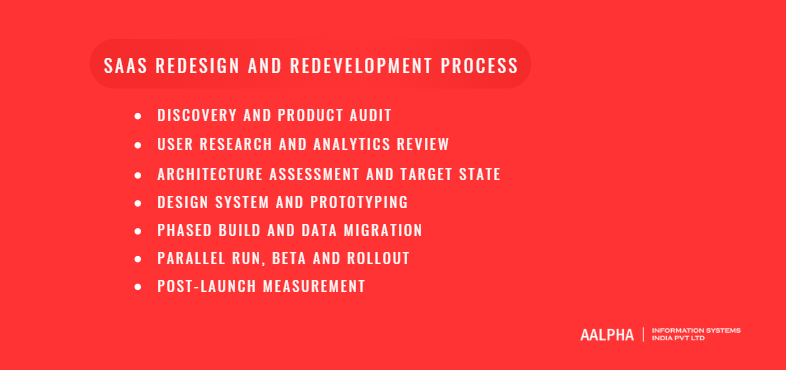
A SaaS redesign and redevelopment project usually runs through seven stages: discovery, user research, architecture assessment, design and prototyping, phased build with data migration, parallel run and rollout, and post-launch measurement. Discovery and assessment typically take 3 to 6 weeks and save far more time than they cost, because they decide what not to rebuild.
1. Discovery and product audit
Define the business goal first. Is the aim lower churn, enterprise readiness, lower hosting cost or faster releases? Each goal leads to a different scope. The audit then reviews the codebase, infrastructure, integrations, security posture and current analytics to find where the real constraints are.
2. User research and analytics review
Study how customers actually use the product. Combine product analytics, session recordings, support ticket themes and interviews with active, churned and power users. The output is a clear list of the workflows that matter most and where users get stuck.
3. Architecture assessment and target state
Decide what to keep, refactor, replace or retire. Map every module against business value and technical health. Define the target architecture, the tech stack and the order in which modules will move. This is also where you choose between incremental modernization and a full rebuild.
4. Design system and prototyping
Build the design system before the screens. A shared component library keeps the redesign consistent and makes future work faster. Clickable prototypes of the core workflows are then tested with real users before any production code is written.
5. Phased build and data migration
Ship in slices, not in one big release. Each phase delivers a working module with its APIs, tests and migrated data. Data migration scripts are written early, rehearsed against copies of production data and validated with record counts and checksums.
6. Parallel run, beta and rollout
Let real customers validate the new version before everyone moves. Run old and new modules side by side, invite a group of beta customers, and use feature toggles to move tenants across in batches. Keep a tested rollback path for every release.
7. Post-launch measurement
Compare results against the baseline you set in discovery. Track activation, churn, support volume, performance and deployment frequency for at least two to three months after rollout, then feed the findings into the next iteration.
How do you redesign a SaaS product without losing existing users?
You protect existing users by keeping every workflow they rely on, moving them gradually, and telling them what is changing before it changes. In practice that means a feature parity map, an opt-in beta, tenant-by-tenant rollout with feature flags, in-app guidance and a rollback plan. Surprise is the main cause of backlash after a SaaS redesign.
Build a feature parity map. List every feature, report, setting, export and integration in the current product, then mark each one as kept, improved, merged or retired. Power users often depend on small features the product team has forgotten about.
Offer an opt-in beta first. Let customers switch to the new experience voluntarily and switch back if needed. Their feedback catches gaps before the wider rollout.
Roll out by tenant, not all at once. Start with smaller or friendlier accounts, then move larger customers once the new version is stable. Agree timelines in advance with enterprise clients, who often need to retrain their staff.
Guide users inside the product. Short walkthroughs, tooltips and a “what’s new” panel reduce confusion far more than a long release note.
Communicate early and often. Announce the change, share screenshots, publish a help centre page and give account managers talking points. Keep APIs and webhooks backward compatible, or give integration partners a clear deprecation window.
Keep a rollback plan. Every release should have a tested way back. The downside of this cautious approach is that the full rollout takes longer, but the cost of losing a few key accounts is usually far higher.
Which technical decisions matter most in a SaaS rebuild?
The decisions that matter most are the tenancy model, the application architecture, the frontend and backend stack, API compatibility, security and compliance, and AI readiness. These choices are expensive to reverse, so they should be settled in the architecture assessment, before development starts. Getting them right matters more than choosing the trendiest framework.
Multi-tenancy model
Choose how customer data is separated. A shared database with a tenant ID on every row is the cheapest to run but needs strict access controls. A schema per tenant or a database per tenant gives stronger isolation, which some enterprise and healthcare buyers require, at a higher operating cost. Many products use a hybrid: shared by default, dedicated for premium plans.
Monolith, modular monolith or microservices
Start simpler than you think. Microservices help large teams deploy independently, but they add network, monitoring and data consistency overhead. For most SaaS products with fewer than 30 to 40 engineers, a well-structured modular monolith delivers most of the benefits with far less operational effort. Individual services can be split out later when a module genuinely needs to scale on its own.
Frontend and backend stack
Pick a stack with a large talent pool and long-term support. At Aalpha, our default for SaaS modernization is Next.js on the frontend and Node.js on the backend, with a custom admin and content layer rather than a third-party CMS. Next.js supports server rendering for fast, search-friendly public pages, while Node.js handles real-time features and high request volumes well. The trade-off is that teams coming from other ecosystems need time to adapt.
APIs and backward compatibility
Treat your API as a product. Customers and partners build integrations on it. Version the API, document changes clearly, and keep older versions running for an agreed deprecation period while new endpoints roll out.
Security and compliance
Design for the certifications your buyers ask for. Enterprise customers in the USA often request SOC 2 reports, European customers expect GDPR compliance, and healthcare products in the USA must meet HIPAA. A rebuild is the cheapest moment to add SSO, role-based access, audit logs, encryption at rest and regional data hosting.
AI readiness
Prepare the data before adding AI features. Clean, structured, well-labelled data and event tracking matter more than the choice of AI model. Design APIs that can feed context to AI services, and plan for usage-based costs, since AI calls can change your margin per customer.
How much does SaaS product redesign and redevelopment cost?
SaaS redesign and redevelopment typically costs between USD 8,000 and USD 300,000 or more. A UI refresh sits at the low end, a full UX redesign usually lands between USD 20,000 and USD 60,000, and a complete rebuild of a mature multi-tenant product can exceed USD 300,000. The biggest cost drivers are scope, data complexity, integrations, compliance and where your team is based.
Estimated cost by scope
Scope | Estimated cost (USD) | Typical team |
UI refresh | 8,000 to 20,000 | 1 to 2 designers, 1 to 2 frontend developers |
Full UX redesign | 20,000 to 60,000 | UX researcher, 2 designers, 2 to 3 frontend developers |
Partial modernization (selected modules) | 40,000 to 120,000 | 4 to 6 engineers, designer, QA |
Full rebuild | 80,000 to 300,000+ | 6 to 10 engineers, designers, QA, DevOps |
Assumptions behind these figures: a blended rate of USD 25 to 45 per hour for an experienced offshore team in India, a product with 20 to 60 core screens, up to 10 third-party integrations and standard SaaS security. Agencies in the USA or Western Europe commonly charge USD 100 to 200 per hour, which would put the same scope at roughly three to four times these numbers. Treat the ranges as planning estimates, not quotes.
What drives the cost up or down
Data migration complexity. Years of tenant data, inconsistent records and custom fields per customer add significant testing and validation time.
Number of integrations. Every payment gateway, CRM, accounting system or identity provider needs to be rebuilt, retested and often re-certified.
Compliance requirements. SOC 2, HIPAA or GDPR work adds documentation, logging, security testing and sometimes external audits.
Parallel running. Incremental modernization costs more per feature than a clean rebuild, because you maintain two systems for a while. The trade-off is much lower business risk.
Team location and model. A dedicated offshore team lowers the hourly rate, but needs strong product ownership on your side. The downside of the cheapest option is often slower decisions and more rework, so judge partners on delivery track record, not rate alone.
How long does a SaaS redesign or rebuild take?
A UI refresh takes 4 to 8 weeks, a full UX redesign 8 to 14 weeks, a partial modernization 3 to 6 months, and a full rebuild 6 to 12 months or more. Timelines depend on the number of modules, data migration effort and how quickly your team can review and approve work. Incremental approaches deliver visible improvements within the first two to three months.
UX redesign timeline. Discovery and audit take 2 to 3 weeks, followed by 4 to 6 weeks of research, design system work and prototyping. Frontend build takes another 2 to 4 weeks, and beta, rollout and stabilization add 1 to 2 weeks, for a total of 8 to 14 weeks.
Partial modernization timeline. Discovery and audit take 3 to 4 weeks, and research, design system and prototypes another 3 to 5 weeks. Build and data migration run 8 to 16 weeks, and rollout with stabilization takes 3 to 4 weeks, for a total of 3 to 6 months.
Full rebuild timeline. Discovery and audit take 4 to 6 weeks, and research, design system and prototypes 6 to 8 weeks. Build and data migration are the longest stage at 16 to 36 weeks, followed by 4 to 8 weeks of beta, rollout and stabilization, for a total of 6 to 12 months or more.
The most common cause of delay is not engineering. It is slow decisions, unclear ownership and scope added mid-project. Name one product owner with the authority to approve designs and priorities each week.
What are the biggest risks, and how do you avoid them?
The biggest risks in SaaS redesign and redevelopment are over-engineering the new system, uncontrolled scope, failed data migration, broken integrations, lost features and team fatigue. Nearly all of them are reduced by a clear scope, phased delivery, rehearsed migrations and a feature parity map agreed before development starts.
Over-engineering the replacement. Teams try to fix every past complaint in one go. Avoid it by setting a minimum scope for the first release and parking new ideas in a backlog.
Scope creep. New feature requests arrive during the rebuild. Freeze scope per phase and route new requests through a change process with cost and timeline impact stated up front.
Data migration failures. Missing or corrupted records destroy customer trust quickly. Rehearse migrations on production copies, validate counts and checksums, and keep the old data read-only until sign-off.
Broken integrations and SEO. Changed URLs, APIs or webhooks can break partner integrations and drop search traffic to public pages. Map every URL and endpoint, set up redirects, and keep old API versions alive for a deprecation period.
Feature regression. Small features power users depend on disappear quietly. The feature parity map and automated regression tests catch most of these.
Team fatigue. Long rebuilds with no visible results drain morale. Ship something real every few weeks so the team and the business can see progress.
How do you measure the success of a SaaS redesign?
Measure a SaaS redesign against the baseline captured during discovery, using a small set of product, business and engineering KPIs. The most useful are activation rate, time to value, feature adoption, churn, support ticket volume, deployment frequency and infrastructure cost per tenant. Track them for at least two to three months after full rollout.
Activation rate is the share of new users who reach their first meaningful result, and it should go up after a successful redesign. Time to value measures how quickly a new account gets that first result, and it should go down.
Feature adoption shows how many users actually use your key features, and it should rise as navigation and discoverability improve. Monthly churn, measured in customers or revenue lost, should fall if the redesign removed real friction.
Support tickets per 100 users reflect how clearly the product explains itself, so a drop here is a strong sign of better UX. On the engineering side, deployment frequency should increase while change failure rate, the share of releases that cause incidents, should decrease.
Infrastructure cost per tenant shows whether the new architecture is more efficient. If redevelopment was part of the project, this number should trend down as customer volume grows.
Look at trends, not single weeks. Metrics often dip briefly after a launch as users adjust. A short dip is normal, but a decline that lasts beyond four to six weeks needs investigation.
How do you choose a partner for SaaS redesign and redevelopment?
Choose a partner that has modernized live SaaS products before, not only built new ones. Look for proven experience with multi-tenant architecture, data migration and phased rollouts, plus design and engineering under one roof. Ask for case studies, a sample audit report and references from clients who stayed with the partner after launch.
Questions to ask a potential partner
- How do you decide whether to modernize incrementally or rebuild?
- How do you plan and rehearse data migration?
- How do you keep existing customers working during the transition?
- Who owns the code, designs and documentation at the end?
- What does post-launch support look like, and for how long?
Red flags
Recommending a full rewrite before an audit. A partner who proposes rebuilding everything without studying the product is selling hours, not outcomes.
No discovery phase. Fixed quotes for complex modernization without discovery usually lead to change requests later.
Design and engineering in separate silos. Redesigns break down when the designers never talk to the people building the APIs.
Working with Aalpha Information Systems
Aalpha Information Systems has helped SaaS companies, startups and independent software vendors modernize and rebuild their products since 2008. Clients rate the team 4.9 out of 5 across more than 215 reviews on Clutch. Our SaaS development services cover product audits, UX redesign, architecture modernization, cloud migration and phased rebuilds, and our custom software development team supports wider platform work around them.
Next step: If your SaaS product is showing the signs covered in this guide, start with a product and architecture audit. Talk to Aalpha’s team to scope it.
Frequently asked questions
What is the difference between SaaS redesign and SaaS redevelopment?
SaaS redesign changes the user experience and interface, such as workflows, navigation and visual design. SaaS redevelopment changes the code, architecture, database and infrastructure behind the product. Redesign fixes how the product feels to use, while redevelopment fixes how it performs, scales and evolves.
Can you redesign a SaaS product without rewriting the backend?
Yes. Many redesigns keep the existing backend and rebuild only the frontend on top of current APIs. This is faster and cheaper, but it works only if the APIs are reasonably clean. If they are slow or inconsistent, a thin API layer between the new frontend and the old backend is a common middle ground.
How do I know if my SaaS product needs a full rebuild?
A full rebuild is justified when the architecture cannot support your roadmap, the stack is obsolete or unsupported, or the data model no longer fits the business. If the main problems are usability or isolated slow modules, a redesign or incremental modernization is usually the better choice.
How much does it cost to redesign a SaaS product?
A UI refresh typically costs USD 8,000 to 20,000, and a full UX redesign USD 20,000 to 60,000, based on an experienced offshore team at USD 25 to 45 per hour. Partial modernization ranges from USD 40,000 to 120,000, and a full rebuild from USD 80,000 to over USD 300,000.
Will a SaaS redesign hurt my SEO?
It can if public page URLs, content or page speed change without planning. Map every existing URL, set up 301 redirects, keep valuable content, and test page speed before launch. The logged-in product itself is usually not indexed, so the main SEO risk sits on marketing pages, help centres and public listings.
How do you migrate tenant data safely during a rebuild?
Write migration scripts early, rehearse them on copies of production data, and validate results with record counts and checksums. Migrate tenants in batches, keep the old data read-only until each batch is signed off, and always have a tested rollback path.
Should we add AI features during a SaaS rebuild?
A rebuild is a good moment to prepare for AI, because you can clean the data model, add event tracking and design APIs that feed context to AI services. Ship AI features only where they solve a clear user problem, and model their usage costs, since they can reduce margin per customer.
How long does a SaaS product redesign take?
A UI refresh takes 4 to 8 weeks and a full UX redesign 8 to 14 weeks. Partial modernization usually runs 3 to 6 months, and a full rebuild 6 to 12 months or more, depending on scope, integrations and data migration.
Is incremental modernization better than a full rewrite?
For most live SaaS products, yes. Incremental modernization keeps the product running, delivers improvements every few weeks and limits the impact of mistakes. Its downside is temporary complexity from running two systems side by side. A full rewrite suits products with fundamentally broken architecture or very few active customers.