





TL;DR
AI copilot development is the process of building an AI assistant inside enterprise software that understands a user’s context, answers from company data, and completes tasks with the user’s approval. A production copilot combines a large language model, retrieval over approved data (RAG), tool integrations with systems such as ERP and CRM, permission-aware access, guardrails and monitoring. Most enterprises start with one high-volume workflow, such as support, sales or internal knowledge search, and prove value in 8 to 12 weeks. A focused pilot typically costs USD 25,000 to 60,000, while a multi-system production copilot runs USD 60,000 to 180,000 or more, plus monthly model and hosting costs. Buying an off-the-shelf copilot works for generic office tasks. Building a custom one makes sense when the work depends on your own data, workflows and compliance rules. Aalpha Information Systems builds custom enterprise copilots this way, starting with a fixed-scope pilot around one measurable workflow and treating security, evaluation and change management as part of the build.
Introduction
An enterprise AI copilot is an assistant built into business software that helps employees find information, make decisions and complete tasks inside the tools they already use. It reads company data the user is allowed to see, suggests the next step, and acts only with approval.
Copilots have moved from experiment to expectation. Gartner predicted in August 2025 that 40% of enterprise applications would include task-specific AI agents by the end of 2026, up from less than 5% in 2025. McKinsey’s 2025 State of AI survey found that 88% of organizations use AI in at least one business function, yet nearly two-thirds had not started scaling it across the enterprise. That gap is where most copilot projects live: the technology works in a demo, but it fails to reach daily use.
This guide explains how to close that gap. It covers what a copilot is, where it pays off, how the architecture works, how to build one step by step, and what it costs. It is written for CTOs, product leaders and founders of software companies who need a copilot that holds up under real enterprise conditions.
What is an AI copilot in enterprise software?
An AI copilot in enterprise software is an embedded assistant that works alongside a user inside an application. It uses a large language model to understand requests in plain language, pulls answers from approved company data, and can trigger actions in connected systems. The user stays in control and approves anything that changes data.
The word “copilot” describes the relationship. The human remains the pilot. The AI handles lookups, drafts, summaries and routine steps so the person can focus on judgment.
Context awareness. A copilot knows where the user is in the application. A copilot inside a CRM knows which account is open. One inside a claims system knows which claim is being reviewed. This context is what separates it from a general chat tool.
Grounded answers. A copilot answers from your documents, records and policies rather than from general training data alone. This is usually done with retrieval-augmented generation (RAG), which fetches relevant content before the model writes a response.
Actions with approval. A mature copilot can create a ticket, update a record, draft an email or run a report. It proposes the action, shows what will change, and waits for the user to confirm.
How is a copilot different from a chatbot or an AI agent?
A chatbot answers questions, a copilot assists a user inside a workflow, and an AI agent completes multi-step tasks with less supervision. The three sit on a spectrum of autonomy. Most enterprises start with a copilot because it delivers value while keeping a human in every decision that matters.
Rule-based chatbot. A chatbot usually sits on a website or in a help widget. It works from fixed scripts and FAQs, has no awareness of the task the user is doing, and rarely takes actions. The user simply asks questions. The risk is low, which makes chatbots a good fit for simple customer FAQs.
AI copilot. A copilot lives inside the business application and understands the context of the current task. It uses permission-aware retrieval to answer from company data and can take actions, but only after the user approves each change. The risk is moderate, and copilots are the best starting point for employee productivity in core workflows.
Autonomous AI agent. An agent works across systems, often in the background. It combines retrieval with tool use and acts on its own within set limits, while humans review outcomes and exceptions. The risk is higher and needs strong guardrails, so agents suit repetitive, well-defined back-office tasks.
The line between copilot and agent is blurring. Many copilots now run small agent steps, such as checking three systems before drafting a reply. The practical rule is simple: the more a system acts without a human checkpoint, the more testing, logging and permission control it needs.
Why are enterprises building AI copilots now?
Enterprises are building AI copilots because models are now accurate enough for real work, integration standards have matured, and software buyers expect AI inside the products they pay for. The pressure is commercial as much as technical. A business application without an assistant increasingly looks dated next to competitors that have one.
Buyer expectations have shifted. Gartner expected most enterprise applications to have embedded assistants by the end of 2025. For software vendors, a copilot is becoming a baseline feature in sales conversations and RFPs, not a differentiator.
Integration is easier than it was. The Model Context Protocol (MCP), an open standard released in November 2024, gives AI applications one consistent way to connect to tools and data. Teams no longer need to write a custom connector for every model and every system.
Individual productivity gains are real, but enterprise gains are harder. In McKinsey’s 2026 State of AI survey, 80% of respondents said AI improved their individual productivity. Only 37% attributed any EBIT impact to AI, roughly the same share as the year before. A copilot designed around a specific workflow, with clear metrics, is one of the most direct ways to turn personal time savings into business results.
Bolt-on AI carries risk. Gartner warned in April 2026 that software companies layering bolt-on AI over legacy applications, rather than redesigning for agentic execution, could face severe margin pressure by 2030. A copilot planned into the product’s workflows is more defensible than a chat window added to the side.
What are the best use cases for enterprise AI copilots?
The best use cases for enterprise AI copilots are high-volume tasks that depend on searching scattered information, drafting standard content or moving data between systems. Strong first candidates include customer support, sales, internal knowledge search, finance operations and software engineering. Each has a clear baseline you can measure before and after launch.
Customer support. A support copilot summarizes ticket history, drafts replies from the knowledge base and suggests the next action. It connects to the helpdesk, CRM and knowledge base. Track average handle time and first-contact resolution.
Sales. A sales copilot prepares account briefs, drafts follow-ups and updates CRM fields after calls. It typically connects to the CRM, email and call recording tools. Measure the time reps spend on admin and the quality of pipeline data.
Internal knowledge. A knowledge copilot answers policy and process questions with a link to the source document. It draws on document stores, intranets and wikis. Success shows up as less time spent searching and fewer repeat questions to HR or IT.
Finance operations. A finance copilot matches invoices, explains variances and drafts period-end commentary. It connects to the ERP, accounting system and spreadsheets. Track close cycle time and manual touches per invoice.
HR. An HR copilot answers benefits questions, drafts job descriptions and screens applications against agreed criteria. It works with the HRIS, ATS and policy documents. Ticket volume and time to fill are the metrics to watch.
Software engineering. A coding copilot explains code, drafts tests and reviews pull requests against team standards. It connects to the code repository, issue tracker and CI pipeline. Measure cycle time and review turnaround.
Field and operations. A field copilot guides technicians through procedures and logs work from voice notes. It integrates with asset management, ERP and mobile apps. Track time per job and data entry errors.
Healthcare and legal. A copilot for these sectors summarizes records or contracts, flags missing items and drafts structured reports. It connects to EHR, document management or case systems. Measure review time per file and the rework rate.
A practical selection rule. Pick the first use case where three things are true: the task happens hundreds of times a week, the data it needs already exists in a system you control, and a wrong answer can be caught by the user before it causes harm. This keeps the pilot measurable and the risk manageable.
One downside to plan for. Copilots for regulated work, such as clinical notes or legal advice, need stricter review loops and audit trails. They take longer to approve internally, so they rarely make the best first project even when the value is high.
For software engineering specifically, our guide to AI-assisted development covers coding copilots and secure development workflows in more depth.
How does an enterprise AI copilot work?
An enterprise AI copilot works in layers. The interface captures the user’s request and context. An orchestration layer decides what to do. A retrieval layer fetches approved data, a tool layer calls business systems, and the language model writes the response. Security, guardrails and monitoring wrap around every step.
The request path is the same for most copilots. The user asks a question inside the app. The orchestrator checks who the user is and what they can see. It retrieves relevant records and documents, calls any tools it needs, and sends a structured prompt to the model. The model’s answer passes through output checks before the user sees it, with sources attached. If the answer includes an action, the user approves it before anything changes.
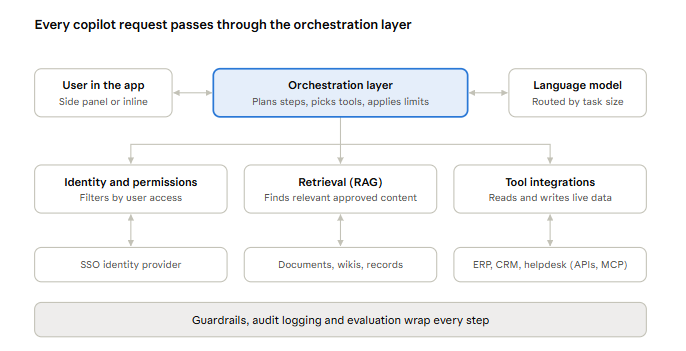
The orchestration layer sits at the centre: it checks permissions, gathers data and tool results, and sends a grounded prompt to the model before the answer returns to the user.
What are the core components of a copilot architecture?
A copilot architecture has seven core components: the user interface, the orchestration layer, the language model, the retrieval pipeline, tool integrations, identity and permissions, and evaluation with monitoring. Each one can be built, bought or swapped independently, which is why a modular design matters for long-term cost and vendor flexibility.
User interface. This is the side panel, inline suggestion or command bar inside your application. Good copilot interfaces show sources, let users edit drafts before sending, and make the approve or reject step obvious. Voice and mobile entry points matter for field teams.
Orchestration layer. This is the copilot’s control logic. It classifies the request, plans steps, chooses tools, manages conversation memory and enforces limits such as the maximum number of tool calls. Frameworks help, but most enterprise teams end up writing custom orchestration for their own workflows.
Language model. The model interprets requests and generates text. Enterprises usually choose between commercial APIs, hosted models in their own cloud tenancy, and open-weight models they run themselves. Many production copilots route simple tasks to a smaller, cheaper model and reserve a larger model for complex reasoning.
Retrieval pipeline (RAG). This pipeline ingests documents and records, splits them into chunks, converts them into embeddings, and stores them in a vector database or search index. At query time it finds the most relevant content and passes it to the model. Retrieval quality decides answer quality more than model choice in most enterprise projects.
Tool integrations. These are the connectors to ERP, CRM, ticketing, databases and internal APIs. They let the copilot read live data and perform actions. MCP servers are becoming a common way to expose these tools in a standard, reusable form.
Identity and permissions. The copilot must respect the same access rules as the rest of the business. If a user cannot open a document in the source system, the copilot must not quote it. This is usually enforced by passing the user’s identity through to retrieval and tool calls, not by trusting the model to filter.
Evaluation and monitoring. This layer logs prompts, retrieved sources, tool calls and outputs. It tracks accuracy against test sets, flags hallucinations, measures latency and cost, and records user feedback. Without it, nobody can prove the copilot is improving or catch a regression after a model update.
Should you build a custom AI copilot or buy one?
Buy an off-the-shelf copilot when the work is generic, such as email drafting, meeting notes or document summaries inside standard office tools. Build a custom copilot when the value depends on your own data, workflows, domain rules or product. Many enterprises do both: they license general assistants for staff and build custom copilots for core operations or customer-facing software.
Off-the-shelf copilot. A licensed copilot is ready in days to weeks, with a low upfront cost made up mostly of licences. Ongoing cost is a per-user subscription that rises with headcount. The fit is general, so your team adapts to the tool, and access to proprietary data is limited to the connectors the vendor supports. The vendor also decides the model and where data is processed. Because competitors can buy the same tool, it offers no product differentiation. The main downside is a shallow fit with your workflows and the risk of vendor lock-in.
Custom-built copilot. A custom copilot takes 8 to 12 weeks to reach a pilot and needs a higher upfront investment as a development project. Ongoing cost comes from model usage, hosting and maintenance rather than seat licences. It is designed around your process, can integrate with any system you can reach, and lets you choose the model, region and hosting. For software vendors in particular, it creates real product differentiation. The main downside is that it needs skilled engineering and clear ownership after launch.
A hybrid is often the right answer. You can start on a vendor platform’s assistant to learn what users ask for, then build a custom copilot for the two or three workflows that matter most. The downside is managing two sets of governance rules, so assign one owner for AI policy across both.
How do you build an enterprise AI copilot step by step?
You build an enterprise AI copilot in eight steps: define one workflow and its metric, audit the data, design the architecture, build a retrieval and integration prototype, add guardrails, evaluate against real test cases, pilot with a small user group, and then scale with monitoring. Skipping the evaluation step is the most common reason copilots stall after the demo.
- Define the workflow and success metric. Choose one task, one user group and one number to move, such as cutting support handle time by 20%. Record today’s baseline. Write down what the copilot must never do, for example approve refunds or give legal advice.
- Audit and prepare the data. List every source the copilot needs, who owns it, how fresh it is and who can access it. Clean duplicate and outdated documents. Poor source content is the root cause of most wrong answers, and no model fixes it.
- Design the architecture. Choose the model strategy, hosting region, vector store, integration method and identity flow. Decide early whether data can leave your cloud tenancy, because this shapes every later choice.
- Build the retrieval and integration prototype. Ingest a representative slice of data, connect one or two systems, and build the interface inside the real application. Test with the questions users actually ask, collected from tickets, chats or interviews.
- Add guardrails and permissions. Enforce user-level access on every retrieval and tool call. Add input checks against prompt injection, output checks for sensitive data, and approval steps for any action that writes data.
- Evaluate before launch. Build a test set of 100 to 300 real questions with expected answers. Score accuracy, groundedness, refusal behaviour and latency. Re-run this set after every prompt, model or data change.
- Pilot with a small group. Release to 20 to 50 users for four to six weeks. Collect thumbs-up and thumbs-down feedback, review failure cases weekly and compare the metric against baseline.
- Scale and operate. Roll out in waves, train users, and set up dashboards for usage, cost, accuracy and incidents. Plan a regular cycle for model upgrades, data refreshes and new skills.
What this process costs you in time. A disciplined team can reach a measured pilot in 8 to 12 weeks. The trade-off is that steps 1, 2 and 6 feel slow to stakeholders who expected a quick demo. They are also the steps that decide whether the copilot is still in use six months later.
How do you keep an enterprise copilot secure and compliant?
You keep an enterprise copilot secure by enforcing existing access rules on every data request, defending against prompt injection, controlling where data is processed, logging every action, and requiring human approval for changes. Compliance comes from mapping these controls to the frameworks your business already follows, such as GDPR, HIPAA or SOC 2.
Permission-aware retrieval. Pass the user’s identity to the search index and every tool. Filter results before they reach the model. Never rely on a prompt that tells the model to ignore restricted content.
Prompt injection defence. Documents, emails and web pages can contain hidden instructions. Treat all retrieved content as data, limit which tools can run after reading untrusted input, and require confirmation for sensitive actions.
Data residency and retention. Confirm where prompts and outputs are processed and stored, and whether the model provider retains or trains on them. For EU and UAE customers, regional hosting is often a contract requirement, not a preference.
Audit trails. Log who asked what, which sources were used, which tools ran and what the user approved. These logs support incident review, regulator questions and model debugging.
Governance framework. Assign an owner for each copilot, define acceptable use, and review risk before each new capability goes live. The NIST AI Risk Management Framework and, for European operations, the EU AI Act give structure to this work. The downside is overhead: a heavy review process can slow small improvements, so match the level of review to the risk of each feature.
How much does AI copilot development cost?
AI copilot development typically costs USD 25,000 to 60,000 for a focused pilot, USD 60,000 to 180,000 for a production copilot integrated with several systems, and USD 180,000 or more for an enterprise-wide agentic platform. Monthly running costs for model usage, hosting and monitoring sit on top and scale with usage.
These ranges are Aalpha Information Systems estimates based on a blended offshore team of product, AI, backend, frontend and QA engineers. They assume your data is reachable through existing APIs or databases and exclude licence fees for third-party platforms. Onshore teams in the US or Western Europe usually cost two to three times more for the same scope.
Copilot tier | Typical scope | Estimated build cost (USD) |
Pilot or MVP | One workflow, one user group, RAG over documents, one or two integrations, basic guardrails | 25,000 to 60,000 |
Production copilot | Several workflows, 3 to 6 system integrations, actions with approval, SSO, evaluation suite, admin dashboard | 60,000 to 180,000 |
Enterprise agentic platform | Multiple copilots or agents, shared tool layer, multi-tenant or multi-region, advanced governance and analytics | 180,000 to 400,000+ |
Running costs. Model tokens, vector database hosting, cloud compute and monitoring commonly run from about USD 1,000 per month for a small internal pilot to USD 25,000 or more per month for thousands of daily users. McKinsey’s 2026 survey found that about 20% of organizations said AI operating costs, including token costs, constrained their AI use. Model routing, caching and tight retrieval keep this in check.
What drives cost up. The biggest drivers are messy or fragmented data, the number of integrations, strict compliance or on-premise hosting, multilingual support, and how much autonomy the copilot has. Each extra level of autonomy adds testing and guardrail work.
What challenges should you expect, and how do you avoid them?
The most common copilot challenges are inaccurate answers, low user adoption, rising run costs, security gaps and pilots that never reach production. Most trace back to unclear goals, poor source data or missing evaluation. Each has a practical countermeasure that is cheaper to build in from the start than to add later.
Hallucinated or wrong answers. These come from weak retrieval, outdated documents and missing grounding checks. Clean the sources, cite every answer, and test against a fixed question set after every change.
Low adoption. Users ignore a copilot that sits outside the real workflow or saves too little time. Embed it where the work happens, start with a task users dislike, and train internal champions.
Pilots that never scale. This happens when there is no baseline metric, no owner and no budget for operations. Agree the metric and the production owner before the build starts.
Cost overruns. Using a large model for every call, sending long prompts and skipping caching all drive costs up. Route requests by task complexity, trim context and cache frequent answers.
Data leakage. Leaks happen when permissions are not enforced at retrieval time. Pass the user’s identity end to end and test with restricted accounts before launch.
Breakage after model updates. Prompts tuned to one model version can fail on the next. Version your prompts and re-run evaluations before every model switch.
McKinsey’s 2025 research found that AI high performers were nearly three times as likely as others to fundamentally redesign their workflows. The lesson for copilots is direct: the teams that see results change how the work is done, rather than adding AI to an unchanged process.
How do you choose an AI copilot development partner?
Choose an AI development partner that has shipped production AI features inside real business software, not just demos. Look for proven work in retrieval, integrations and security, a clear evaluation method, transparent pricing and a plan for support after launch. Ask to see how they measured accuracy on a past project.
Use these questions in your shortlist calls:
- How will you measure answer accuracy before and after launch?
- How do you enforce our existing user permissions inside the copilot?
- Which models would you recommend for our use case, and how easy is it to switch later?
- Where will our data be processed and stored?
- What happens when the copilot is unsure or the request is out of scope?
- What does post-launch support cover, and what does it cost per month?
A partner who answers these with specifics, such as test set sizes, permission flows and named hosting regions, is far less likely to deliver a copilot that stalls after the pilot.
How Aalpha Information Systems builds enterprise copilots
Aalpha Information Systems designs and builds custom AI copilots for software companies and enterprises across the USA, Europe and the Middle East. Our teams handle the full scope: use case discovery, data preparation, RAG pipelines, system integrations, permission-aware access, guardrails, evaluation and ongoing support. We hold a 4.9/5 rating from 215+ verified reviews on Clutch.
We typically start with a fixed-scope pilot around one measurable workflow. That gives your team real usage data before committing to a larger build.
Planning to build an enterprise AI copilot? Get in touch with Aalpha Information Systems to discuss your use case, integration requirements, and project scope. Our team can help define a suitable pilot, estimated cost, and development timeline.
Conclusion
AI copilot development for enterprise software succeeds when it starts small, stays grounded in your own data and earns trust through measurable results. Pick one high-volume workflow, prepare the data, enforce permissions from day one, and test every change against real questions. A copilot built this way becomes part of daily work instead of another abandoned pilot.
The next step is simple: list the three workflows where your team loses the most time to searching, copying and drafting, and pick the one with the cleanest data as your pilot.
Frequently asked questions
What is AI copilot development?
AI copilot development is the process of designing and building an AI assistant that works inside a software application. It combines a language model, retrieval over company data, integrations with business systems and guardrails, so users can get answers and complete tasks in plain language with human approval.
How long does it take to build an enterprise AI copilot?
A focused pilot takes 8 to 12 weeks. A production copilot with several integrations takes 3 to 6 months. An enterprise-wide platform with multiple copilots or agents can take 6 to 12 months. Data readiness and the number of integrations affect the timeline most.
How much does a custom AI copilot cost?
A pilot typically costs USD 25,000 to 60,000. A production copilot costs USD 60,000 to 180,000, and enterprise platforms start around USD 180,000. These are offshore team estimates. Monthly model, hosting and monitoring costs are extra and depend on usage volume.
What is the difference between an AI copilot and an AI agent?
An AI copilot assists a user inside a workflow and waits for approval before acting. An AI agent completes multi-step tasks with less supervision, within defined limits. Many enterprise copilots include small agent steps, but keep a human checkpoint for any action that changes data.
Do I need RAG for an enterprise copilot?
In most cases, yes. Retrieval-augmented generation lets the copilot answer from your current documents and records instead of general training data. It improves accuracy, allows source citations and avoids retraining the model every time your content changes.
Can an AI copilot work with our existing ERP or CRM?
Yes. Copilots connect to ERP, CRM, helpdesk and internal systems through APIs, database connectors or MCP servers. The copilot reads live data and can propose updates, while your existing access rules decide what each user can see and change.
Is it safe to use company data with an AI copilot?
It can be, if the copilot enforces user permissions at retrieval time, uses a model provider that does not train on your data, processes data in an approved region and logs every action. Prompt injection defences and human approval for changes are also essential.
Which industries benefit most from AI copilots?
SaaS, financial services, healthcare, logistics, legal, insurance and manufacturing see strong results. The common factor is high-volume knowledge work, such as reviewing documents, answering policy questions or moving data between systems, where small time savings multiply across many users.