





TL;DR : Restaurant App Development Cost
Building a restaurant app in 2026 typically costs $8,000-$25,000 for a basic single-restaurant app (menu, online ordering, payments, push notifications) and $40,000-$120,000+ for a multi-location or enterprise app with POS integration, loyalty programs, order tracking, and multi-vendor/delivery logistics. Development timelines run 8-14 weeks for a basic app and 5-9 months for an enterprise-grade platform. Ongoing maintenance typically runs 15-20% of the initial build cost per year. Restaurant owners looking for a multi-vertical, ready-built delivery and mobility platform rather than a from-scratch build can also evaluate white-label options like DeliveryStack instead of commissioning a custom app.
Why Restaurant Apps Matter More Than Ever
Mobile ordering, delivery aggregation, and loyalty-driven engagement have become baseline expectations for restaurant customers rather than differentiators. Restaurant owners who rely solely on third-party delivery marketplaces (Uber Eats, DoorDash, Zomato, Swiggy) give up 15-30% of order value in commissions and lose the direct customer relationship – no first-party data, no repeat-visit loyalty mechanics, no control over the ordering experience. An owned app changes that equation: direct payments, direct customer data, and a branded experience that supports repeat business.
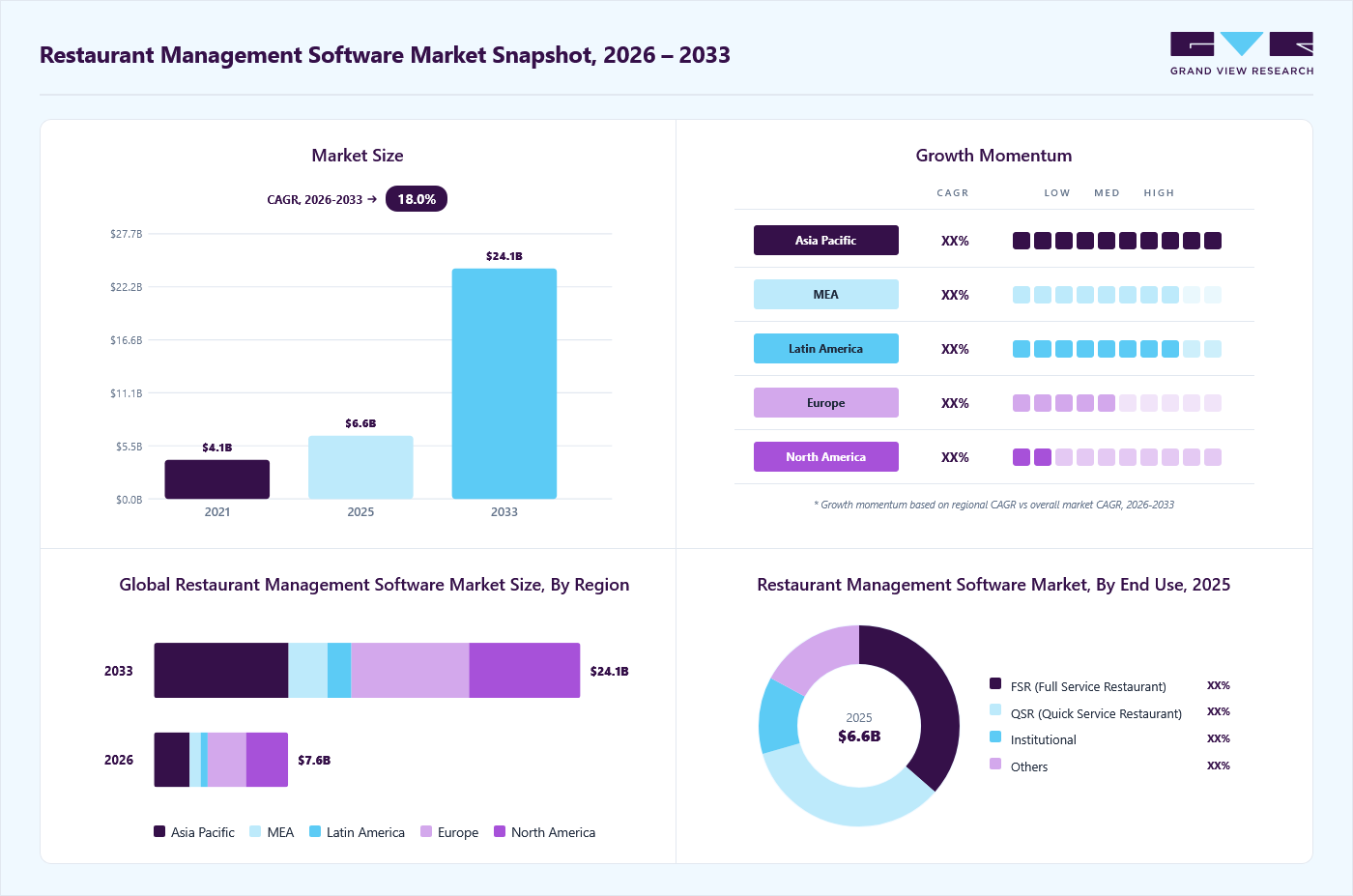
Did you know? The global restaurant management software market is projected to grow from USD 7.6 billion in 2026 to USD 24.1 billion by 2033, registering a CAGR of 18.0% during the forecast period (2026–2033).
Benefits of a Restaurant App
-
Stronger Brand Presence
A dedicated app gives a restaurant a permanent, branded touchpoint on the customer’s phone rather than a listing buried inside a third-party marketplace. Owners can showcase food photography, interior shots, and the restaurant’s story directly to customers, which builds the kind of recognition that turns an online order into an in-person visit.
-
Deeper Customer Engagement
An app opens a direct line to customers that a phone line or a marketplace listing can’t match. Order history, preferences, and behavior all flow back to the restaurant, making it possible to personalize offers and communicate in ways that keep customers coming back rather than defaulting to whichever delivery app is open.
-
Smoother, More Reliable Payments
Built-in payment processing removes the friction and error risk of taking orders over the phone. Customers pay through a method they already trust, and staff are freed from manually handling transactions, which reduces mistakes and speeds up service during busy hours.
-
More Bookings, Fewer No-Shows
Letting customers reserve a table or place an order in seconds, rather than waiting on hold, measurably increases how often they follow through. The convenience of a thirty-second checkout compared to a phone call is one of the biggest drivers of order volume for restaurants that make the switch.
-
Direct Feedback Loops
An app makes it easy to collect reviews and ratings right after an order or visit, giving owners real-time insight into what’s working and what isn’t — without waiting for a third-party review site to reflect it, and without losing that feedback to a platform the restaurant doesn’t control.
-
Built-In Customer Loyalty
Reward mechanics — points, free items, tiered perks — are far easier to run inside an owned app than across disconnected channels. Customers who see visible progress toward a reward have a concrete reason to keep ordering direct instead of drifting to a competitor or a marketplace app.
Core Features of a Restaurant App
-
Digital Menu
The menu is the heart of the app, so it needs to be simple to browse and easy to filter. Items are typically organized into categories and subcategories, with pricing, photos, and — increasingly expected by customers — calorie or allergen information, so people can find what they want without wading through a wall of text.
-
Online Ordering
Placing an order through an app takes a fraction of the time a phone call does, and it removes the back-and-forth of a rushed or misheard order. Customers should be able to choose delivery, pickup, or dine-in from the same flow, so the app fits however they want to eat that day.
-
Menu Customization
Dietary restrictions and food allergies are common enough that an app without customization options will frustrate a meaningful share of customers. Letting people add or remove ingredients, adjust portions, or filter by dietary need signals that the restaurant is paying attention to their specific needs, not just processing a generic order.
-
Payment Processing
Support for the payment methods customers already use — cards, digital wallets, online banking — makes checkout frictionless for the customer and reduces cash-handling risk for the restaurant. This is one of the few features where cutting corners shows up immediately in abandoned orders.
-
Table Reservations
For dine-in-focused restaurants, letting guests book a table in advance removes the uncertainty of walking in and waiting. It also gives the restaurant better visibility into expected covers for the evening, which helps with staffing and prep.
-
Geo-Location
For restaurant groups or chains, geo-location lets the app route each order to the nearest or most appropriate branch automatically, rather than forcing the customer to figure out which location to order from. It’s a small feature that has an outsized effect on order accuracy for multi-location operators.
-
Push Notifications
Notifications are the app’s main lever for bringing customers back without them having to think to check. Push notifications for deals, order status updates, and proximity-triggered alerts (such as a notification when a loyal customer is near the restaurant) all work here — used well, they turn an app that’s installed once into one that’s opened repeatedly.
-
Order Tracking
For delivery-focused restaurants, real-time status updates — order confirmed, in the kitchen, out for delivery, arrived — reduce the anxiety and support-ticket volume that comes with customers wondering where their food is. It also sets a clear expectation for delivery time, which reduces cancellations.
-
Waiter / Staff App
A companion app for waitstaff lets them check order progress, payment status, and table readiness at a glance, so they can act on what’s happening rather than walking back and forth to confirm it. This is most valuable for dine-in-heavy restaurants and larger floor teams.
Restaurant App Development Cost Breakdown by Complexity Tier
Tier | Core Features | Typical Cost Range | Timeline |
Basic (Single Restaurant) | Digital menu, online ordering (delivery/pickup/dine-in), online payments, push notifications, basic loyalty | $8,000 – $25,000 | 8–14 weeks |
Mid-Tier (Multi-Location / Advanced) | Everything in Basic + table reservations, menu customization, order tracking, geo-location for multi-branch routing, waiter/staff app, basic analytics dashboard | $25,000 – $60,000 | 3–5 months |
Enterprise (Chain / Multi-Vendor / Cloud Kitchen) | Everything in Mid-Tier + POS/kitchen display system integration, multi-vendor marketplace logic, delivery fleet management, advanced loyalty and CRM, multi-currency/multi-language support, admin and analytics suite | $60,000 – $120,000+ | 5–9 months |
Actual restaurant app development pricing depends heavily on platform choice (native vs. cross-platform), the number of user-facing apps required (customer, restaurant/staff, and delivery driver), and the depth of third-party integrations. A mobile app development company will also consider factors such as scalability, security requirements, and custom feature development when estimating the overall project cost.
Also Read: App development cost in india
Tech Stack Considerations
-
Native vs. Cross-Platform
Native iOS (Swift) and Android (Kotlin) apps offer the best performance and deepest access to device features, but require maintaining two codebases. Cross-platform frameworks — Flutter and React Native — are the more common choice for restaurant apps in 2026 because they cut development cost and time roughly 25-35% by sharing a single codebase across platforms, with minimal trade-off for a use case like food ordering.
-
Backend Architecture
Most restaurant apps are built on a Node.js, Django, or Laravel backend with a PostgreSQL or MySQL database, deployed on cloud infrastructure (AWS, GCP, or Azure) for scalability during peak ordering hours. Enterprise builds increasingly use microservices architecture to separate ordering, payments, delivery logistics, and kitchen operations into independently scalable services.
-
Common Third-Party Integrations
Payment gateways (Stripe, Razorpay, PayPal, Apple Pay/Google Pay), POS systems (Toast, Square, Lightspeed), delivery aggregator APIs, SMS and push notification services (Twilio, Firebase Cloud Messaging), and mapping/geo-location APIs (Google Maps, Mapbox) round out the typical integration list for a production-ready restaurant app.
Ongoing Costs Beyond the Initial Build
A restaurant app is not a one-time expense. Owners should budget for app maintenance and updates (15-20% of initial build cost annually for bug fixes, OS compatibility, and security patches), cloud hosting (typically $50-$500+/month depending on order volume), payment gateway fees (usually 1.5-3% per transaction), app store fees ($99/year for Apple, a one-time $25 for Google Play), and ongoing POS/KDS integration and third-party API costs that scale with usage.
Single-Restaurant vs. Multi-Vendor / Cloud Kitchen Apps
The calculus changes for restaurant groups, cloud kitchens, and food courts operating multiple brands or locations. Instead of building and maintaining a separate app per restaurant, many operators now consolidate under a single multi-vendor ordering and delivery platform — one customer-facing app, one delivery/driver app, and one restaurant/vendor dashboard, all sharing infrastructure.
Building this kind of multi-vendor logistics platform from scratch sits at the high end of the enterprise tier above, since it requires vendor onboarding flows, order-routing logic across multiple kitchens, and a dedicated delivery fleet management layer. Owners who want this capability without a full custom build can also evaluate DeliveryStack, a white-label mobility and delivery platform covering 25+ verticals (food, grocery, courier, and more) that can be deployed and branded for a restaurant group rather than engineered from zero — a faster and typically lower-cost path to the same outcome for operators who don’t need a fully bespoke system.
Aalpha’s Experience Building Ordering & Delivery Platforms
Aalpha has been building custom software for clients across the food-tech, delivery, and marketplace space as part of a broader portfolio of 5,500+ completed projects across 45+ countries, with a 4.9/5 rating from 215+ verified Clutch reviews and ISO 9001:2015 certification. That experience spans single-restaurant ordering apps, multi-vendor marketplace platforms, and delivery/logistics systems — giving restaurant owners a development partner who understands both the product and the operational realities of food ordering at scale.
Frequently Asked Questions
How much does it cost to build a restaurant app in 2026?
A basic single-restaurant app with ordering, payments, and notifications costs $8,000-$25,000. A multi-location or enterprise app with POS integration, loyalty programs, and multi-vendor logistics ranges from $40,000-$120,000+.
How long does it take to build a restaurant app?
A basic app takes 8-14 weeks. A mid-tier app with reservations and staff tools takes 3-5 months. An enterprise or multi-vendor platform typically takes 5-9 months.
What’s the cost difference between native and cross-platform development?
Cross-platform frameworks like Flutter or React Native typically cost 25-35% less than building separate native iOS and Android apps, since a single codebase serves both platforms with minimal performance trade-off for restaurant use cases.
Do I need separate apps for customers, delivery drivers, and restaurant staff?
For a single restaurant, one customer-facing app is usually sufficient. For multi-location chains or delivery-heavy operations, separate customer, driver, and staff/kitchen apps (or app modules) are standard, since each role needs a different interface and permission set.
What ongoing costs should I budget for after launch?
Plan for maintenance (15-20% of build cost annually), cloud hosting, payment gateway fees (1.5-3% per transaction), app store fees, and any POS or third-party API costs.
Should I build a custom app or use a white-label platform?
A custom app makes sense for a single restaurant or brand with specific workflow needs. For multi-vendor, multi-location, or cloud kitchen operations, a white-label platform like DeliveryStack can deliver the same core capability faster and at lower upfront cost than a fully bespoke build.
Ready to Build Your Restaurant App?
Whether you’re launching a single-location ordering app or a multi-vendor delivery platform, Aalpha’s team can help you scope the right approach and budget. Contact Aalpha for a free consultation on your restaurant app project.
Also check: Cost to build an app like Airbnb | MVP development cost