





TL;DR
B2B SaaS development is the process of building subscription software that businesses buy for their teams, with one account holding many users, roles, and permissions. It differs from consumer SaaS because a buyer, an administrator, and daily users all judge the product, and each wants something different. A focused MVP with organization accounts, role-based access, one or two core workflows, billing, and basic reporting typically costs USD 40,000 to 120,000 and takes three to six months with an offshore team, while enterprise-ready products with SSO, audit logs, integrations, and compliance work run higher. Before hiring a team, decide five things: the exact customer and problem, the pricing model, the tenancy model, the first integrations, and the security standard your first large customer will ask for. Getting these right early saves more money than any hourly rate negotiation. Aalpha Information Systems builds custom B2B SaaS products from discovery to post-launch support, with multi-tenant architecture, subscription billing, and enterprise integrations as standard parts of its delivery.
- B2B SaaS serves organizations, so accounts, roles, and permissions shape the whole architecture.
- Validate with buyers and daily users before writing code, and test willingness to pay.
- Pricing model decisions (per seat, usage, tiers) change what the backend must track.
- Multi-tenant architecture suits most products; single tenant suits regulated or very large customers.
- Security, SSO, and audit logs become sales requirements once you sell to mid-market and enterprise buyers.
- Plan for integrations from the first sprint rather than bolting them on later.
- Aalpha Information Systems has built SaaS platforms since 2008, with 5,500+ projects delivered in 55+ countries, a 4.9/5 rating from 215+ Clutch reviews, and ISO 9001:2015 certification.
1. What is B2B SaaS development?
B2B SaaS development is building cloud software that a business subscribes to and its employees use through a browser or app. The vendor hosts, updates, and secures the product. The customer pays per user, per tier, or per unit of usage, and the product must support many organizations, each with its own users, data, and settings.
Definition of B2B SaaS
Software as a service is a delivery model where the vendor runs the application and customers access it over the internet, rather than installing it on their own servers. Wikipedia’s entry on software as a service covers the general model. The B2B part means the customer is a company, not an individual. A single contract might cover 5 seats or 5,000, and the person who signs the contract is rarely the person who logs in every morning.
How B2B SaaS differs from B2C SaaS and custom enterprise software
The differences show up in the data model, the sales process, and what “done” means for a feature.
B2B SaaS sells to an organization with many users, so the account model is built on workspaces, roles, and permissions. Its sales cycle runs from weeks to months and often includes demos and security reviews. Pricing is usually per seat, tiered, or usage based, with annual contracts for larger customers, and every customer runs on one shared cloud platform that is updated for everyone. Customization happens through configuration, within limits.
B2C SaaS sells to an individual with a single user profile. People sign up in minutes through self-serve flows, pay a monthly subscription or use a freemium plan, and get almost no customization. The platform is also shared, but there are no roles or approval chains to design for.
Custom enterprise software is built for one organization and shaped around that company’s structure. It is usually bought through a tender or RFP over several months, paid for as a fixed project fee plus maintenance, and often hosted by or for the client. Everything is built to order.
The downside of B2B SaaS compared with custom software is that you cannot say yes to every customer request. A shared product has to serve all tenants, so some requests must be declined or turned into configuration options.
Common examples and use cases
B2B SaaS covers CRM, HR and payroll, project management, accounting, field service management, procurement, learning management, customer support desks, compliance tracking, and vertical tools for industries such as logistics, construction, clinics, and legal practices. Vertical products tend to win on workflow fit. Horizontal products win on integrations and brand.
Who uses, buys, and approves B2B software
Three groups decide whether a B2B product succeeds. The economic buyer approves the budget and cares about return on investment. The administrator sets up the account, manages users, and cares about control and security. Daily users care about speed and whether the tool removes work from their day. In larger companies, IT and security teams also approve the purchase, and procurement handles contract terms. A product that delights users but fails a security questionnaire will not close. A product that passes every review but frustrates users will churn at renewal.
2. How do you validate a B2B SaaS idea?
You validate a B2B SaaS idea by confirming that a specific type of business has a costly problem, that current tools handle it poorly, and that a buyer will commit money or a signed pilot before the product exists. Interviews with buyers, administrators, and users, combined with a paid pilot or letter of intent, give the clearest signal.
-
Identify a specific business problem and target customer
“Small businesses” is not a target customer. “Independent physiotherapy clinics with 3 to 15 staff in the UK that still schedule on paper or spreadsheets” is. A narrow definition tells you who to interview, which integrations matter, and what price the market will bear. You can widen the market later. Starting wide usually produces a product that fits nobody well.
-
Interview buyers, administrators, and daily users
Run 15 to 30 structured interviews before committing to a build. Ask about the last time the problem occurred, what it cost, who fixed it, and what tools they tried. Avoid asking whether they would use your product, because people are polite. Ask what they currently pay, in money or staff hours, to work around the problem. Speak to at least one person from each role. Buyers will describe the outcome they want, administrators will describe setup pain, and users will tell you which screens they would avoid.
-
Study existing solutions and gaps
List the direct competitors, the adjacent tools that partly solve the problem, and the spreadsheets or email threads people use instead. Read public reviews on software review sites to see what customers complain about. Common gaps in B2B markets include poor integrations, pricing that punishes growth, weak permissions, and products built for a different company size. A gap is only useful if customers care about it enough to switch, and switching B2B software is expensive for them.
-
Test willingness to pay
The strongest validation is a customer paying before the product is finished. Options include a paid discovery workshop, a discounted annual pre-sale, a paid pilot, or a signed letter of intent with a stated price. Three to five committed design partners is a good threshold for a first build. If nobody will commit anything, the problem may be real but not urgent.
-
Define a clear value proposition and success criteria
Write one sentence that names the customer, the problem, and the measurable result, for example “cut invoice approval time for mid-size distributors from five days to one.” Then set success criteria for the MVP: number of active organizations, weekly active users per account, time to first value, and conversion from pilot to paid. These numbers guide scope decisions later, when every feature request sounds important.
3. Which business model should a B2B SaaS product use?
Most B2B SaaS products use tiered subscription pricing, charged per user or per organization, with annual contracts for larger customers. Usage-based pricing suits products where value grows with volume, such as API calls or transactions. The model you choose affects the product itself, because billing, limits, and plan features must be built into the backend.
-
Subscription pricing options
Each model rewards a different kind of customer behavior and carries a different engineering cost.
Per-user pricing charges for each active user per month and suits collaboration and workflow tools. Its weakness is that customers limit seats to save money, which reduces adoption inside the account. Tiered pricing offers Basic, Pro, and Enterprise plans with different features and fits most B2B products, although packaging mistakes can push customers into the wrong tier.
Usage-based pricing charges per transaction, API call, record, or gigabyte. It works well for infrastructure, messaging, and data tools, but revenue is harder to forecast and bills can surprise customers. Flat-rate pricing sets one price for the whole product. It is simple for tools with a single buyer type, and it leaves money on the table with large customers.
Hybrid pricing combines a base platform fee with seats or usage. Growing products with varied customers often end up here, at the cost of more billing logic to build and explain.
Aalpha’s guide on how to build a SaaS product from scratch compares these models with examples from HubSpot, Snowflake, and Twilio.
-
Free trials, demos, pilots, and proof of concept projects
Self-serve free trials work when a user can reach value alone in under an hour. Products that need data imports, integrations, or team setup usually sell better through a guided demo followed by a pilot of 30 to 90 days. Enterprise buyers may ask for a proof of concept against their own data. Pilots take engineering time, so charge for them where you can, or cap their length and scope in writing.
-
Contract terms and enterprise pricing
Enterprise deals often involve annual or multi-year terms, invoiced billing instead of card payments, custom data processing agreements, service level commitments, and negotiated discounts. Your billing system should handle both card-based self-serve plans and manually invoiced contracts. Many early products lose weeks because they built only one of these.
-
Expansion revenue, renewals, and churn
In B2B SaaS, a large share of growth comes from existing customers adding seats, upgrading tiers, or buying add-ons. Design for expansion by making it easy to invite colleagues, showing usage against plan limits, and offering add-ons that match real needs. Track gross churn and net revenue retention from the first paying customer.
How pricing affects product architecture
Per-seat pricing needs accurate counts of active users and rules for what counts as active. Usage pricing needs metering, which means recording every billable event reliably and reconciling it with the billing provider. Tiered pricing needs feature flags or entitlements so the product can switch features on and off by plan. Deciding the model late means rebuilding these parts under pressure.
4. How do you plan the product and define the MVP?
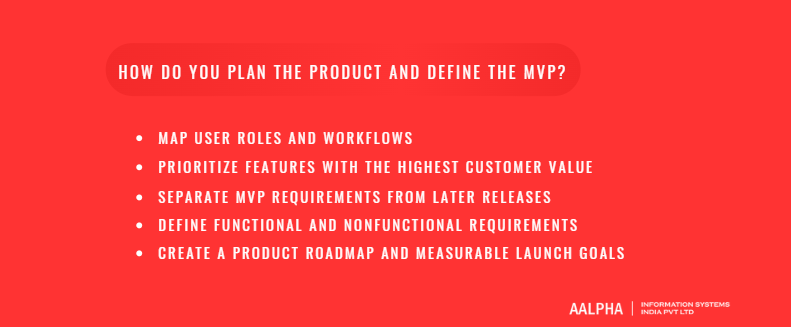
Plan a B2B SaaS product by mapping each user role and the workflows they perform, then choosing the smallest set of features that delivers the core outcome to one customer type. The MVP should be usable by a real organization end to end, including account setup, permissions, and billing, even if many features wait for later releases.
-
Map user roles and workflows
List every role that touches the product: account owner, administrator, manager, standard user, read-only viewer, and possibly external guests such as clients or vendors. For each role, write the three to five tasks they perform most often and the order in which they perform them. This map shows where roles hand work to each other, which is where most B2B products create or remove friction.
-
Prioritize features with the highest customer value
Score each candidate feature on how many design partners need it, how often they would use it, and how much it contributes to the value proposition you wrote during validation. Features that serve one loud customer score low even if that customer is large. The MoSCoW method (must have, should have, could have, won’t have) works well for this conversation because it forces a “won’t have” list.
-
Separate MVP requirements from later releases
A B2B MVP still needs some foundations that consumer MVPs can skip. Organization accounts, invitations, basic roles, secure login, and a way to take payment are hard to add later without data migrations. Advanced reporting, custom roles, SSO, a public API, and mobile apps can usually wait, unless your first customers are enterprises that require SSO on day one.
-
Define functional and nonfunctional requirements
Functional requirements describe what the product does, such as “a manager can approve or reject an expense claim.” Nonfunctional requirements describe how well it must do it: page load times, uptime targets, data retention, supported browsers, accessibility level, and the security controls required. B2B buyers check nonfunctional requirements during procurement, so write them down early and test against them.
-
Create a product roadmap and measurable launch goals
Break the roadmap into releases of six to ten weeks, each with a clear customer outcome. Attach measurable goals to the MVP launch, such as five paying organizations, 60 percent of invited users active weekly, and time to first value under one day. A roadmap without goals becomes a feature list, and feature lists grow until the budget runs out.
5. What features does a B2B SaaS product need?
A B2B SaaS product needs organization accounts, user invitations, role-based permissions, the core workflow screens, dashboards and exports, notifications, audit logs, subscription billing, and admin tools for both the customer and your own support team. These features let one company manage many users safely, which is what separates B2B software from a single-user app.
-
Organization accounts and workspaces
Every record in the system belongs to an organization, sometimes called a tenant, account, or workspace. Some products also let one organization hold several workspaces, for example one per department or client. Decide early whether a user can belong to more than one organization. Agencies, accountants, and consultants often need this, and adding it later means changing how login and data access work.
-
User invitations, roles, and permissions
Administrators invite users by email, assign roles, and remove access when people leave. Start with a small set of fixed roles such as owner, admin, member, and viewer. Custom roles and permission sets are a common enterprise request, but they multiply testing effort, so add them when paying customers ask. Permissions must be checked on the server for every request, never only hidden in the interface.
-
Dashboards, reporting, and exports
Managers buy B2B software partly to see what their team is doing. A useful first dashboard shows the three or four numbers the buyer named during validation. Add filters by date, team, and status, and allow CSV or Excel export, because business users will take data into spreadsheets regardless of how good your reports are. Scheduled email reports are a cheap feature that keeps busy buyers engaged.
-
Workflow automation and notifications
Rules such as “when an invoice over USD 5,000 arrives, route it to the finance manager” save time and justify higher tiers. Notifications should go to email, in-app alerts, and often Slack or Microsoft Teams. Give users control over which alerts they receive. Too many notifications is one of the fastest ways to make people ignore a product.
-
Search, audit logs, and activity history
Search should cover the records users work with daily and respect permissions, so a user never sees results they cannot open. Audit logs record who did what and when: logins, permission changes, exports, deletions, and settings changes. Security reviewers ask for audit logs, and customer support uses them to answer “who changed this?” without guesswork. Keep them tamper resistant and retain them for a stated period.
-
Subscription management and billing
Customers need to choose a plan, add payment details, upgrade, downgrade, add seats, download invoices, and update billing contacts. Providers such as Stripe Billing or Chargebee handle card payments, tax calculation, invoices, and dunning, which saves months compared with building billing yourself. You still need to connect plan entitlements to the product and handle manual invoices for enterprise contracts.
-
Admin controls and customer support tools
Customer administrators need settings for security policies, user management, branding, data retention, and integrations. Your internal team needs a separate back office to look up accounts, view subscription status, extend trials, and, with consent and logging, view the product as a customer sees it. Teams that skip the internal admin panel end up running database queries to answer support tickets, which is slow and risky.
6. How should you design UX and UI for business users?
Design B2B SaaS around the tasks users repeat every day, with navigation that changes by role and screens built for scanning dense information. Business users value speed, predictable layouts, keyboard shortcuts, and clear tables over visual novelty. Good onboarding matters as much as good screens, because a confused administrator stalls the whole account.
-
Design around frequent tasks and complex workflows
Identify the top five tasks by frequency and make each one reachable in two clicks or fewer. Multi-step processes such as approvals, onboarding a client, or closing a month should show progress, allow saving drafts, and let users return without losing work. Test designs with real users performing real tasks, and time them. A screen that looks clean but adds 30 seconds to a task done 40 times a day costs a team hours each week.
-
Create clear navigation for different roles
An administrator, a manager, and a field user need different starting points. Show each role the menu items it uses and hide the rest, rather than showing everything and disabling half of it. Keep settings and billing in a consistent place, usually behind the account menu, so administrators can find them without training.
-
Build effective tables, forms, and dashboards
Tables are the main interface of most B2B products. They need sorting, filtering, saved views, column selection, bulk actions, and pagination that handles thousands of rows. Forms need inline validation, sensible defaults, and clear error messages that say how to fix the problem. Dashboards should answer a question, such as “which projects are over budget?”, rather than displaying every available metric.
-
Support onboarding and self-service setup
The first session decides whether an account activates. Use a short setup checklist for administrators: invite teammates, connect an integration, import data, configure one workflow. Provide sample data so users can see a working product before their own data arrives. Empty states should explain what the screen is for and offer the next action. Self-service setup reduces the support load, which matters once you have more customers than your team can personally onboard.
-
Design for accessibility and mobile use where relevant
Many enterprise and public sector buyers require conformance with the Web Content Accessibility Guidelines, usually WCAG 2.1 or 2.2 at level AA. Build with semantic HTML, keyboard navigation, sufficient color contrast, and screen reader labels from the start, since retrofitting is slower. Mobile support depends on the users. Field workers, sales teams, and approvers need a mobile experience. Analysts working in dense reports mostly do not, and a responsive web app is often enough before investing in native apps.
7. What architecture and technology stack suit B2B SaaS?
Most B2B SaaS products start well as a modular monolith with a relational database, a web frontend, background job processing, and a cloud host such as AWS, Azure, or Google Cloud, using a multi-tenant model with a tenant ID on every record. Teams move parts to separate services when scale or team size justifies the added operational cost.
-
Frontend, backend, database, and cloud infrastructure
A typical stack uses React, Angular, or Vue with a framework such as Next.js on the frontend. The backend is commonly Node.js, Python with Django or FastAPI, PHP with Laravel, Java with Spring, or .NET. PostgreSQL is a strong default database for B2B products because business data is relational and reporting queries depend on joins. Redis handles caching and queues. The cloud layer covers compute, managed databases, object storage, email delivery, monitoring, and backups. Aalpha’s article on SaaS architecture types explains how these layers fit together.
-
Monolith versus microservices
A modular monolith keeps one codebase and one deployment, with clear internal boundaries between modules such as billing, users, and workflows. It is faster to build, test, and debug with a team of under 15 engineers. Microservices split the system into independently deployed services, which helps large teams release separately and scale hot spots. The cost is operational: service discovery, distributed tracing, network failures, and data consistency across services. Our recommendation for most first products is a modular monolith. The downside is that poorly enforced module boundaries can make a later split painful, so treat those boundaries seriously from the start. For teams already committed to services, Aalpha’s piece on multi-tenant architecture in microservices covers the trade-offs.
-
Multi-tenant versus single-tenant architecture
In a multi-tenant system, customers share the application and infrastructure while their data stays separated. In a single-tenant system, each customer gets its own application instance and database.Multitenancy is the standard pattern for SaaS because upgrades, monitoring, and infrastructure costs are shared.
The simplest model is a shared database with a shared schema, where every table carries a tenant ID column. It has the lowest cost, the simplest operations, and easy upgrades, which is why most SMB and mid-market products use it. The risk is that every query must filter by tenant, so one bug can expose another customer’s data.
A shared database with a schema per tenant gives each customer its own schema. Separation is stronger and per-tenant backups are easier, but migrations have to run for every schema, and the approach gets harder to manage beyond a few thousand tenants. It suits products with moderate tenant counts.
A database per tenant gives strong isolation and makes per-customer data residency possible. Costs and operational complexity are higher, so it fits regulated industries and large enterprise tenants. The fully single-tenant, or silo, model runs a separate application and database for each customer. It offers full isolation and custom release timing, at the highest cost, and every upgrade has to be rolled out across many copies. Only very large or highly regulated customers usually justify it.
Many mature products run a hybrid: pooled tenancy for most customers and dedicated databases or instances for enterprise accounts that pay for them. The AWS SaaS Lens describes these pooled, siloed, and bridge models in detail.
-
Data isolation and tenant configuration
Isolation must be enforced in more than the main queries. Background jobs, search indexes, file storage paths, caches, analytics events, and logs all need tenant context. PostgreSQL row-level security adds a database-level safety net on top of application checks. Tenant configuration covers plan entitlements, feature flags, branding, time zones, locale, and custom fields. Store configuration as data rather than code branches, so onboarding a new customer never requires a deployment.
-
APIs, event processing, and background jobs
Design the internal API so the frontend and any future public API use the same endpoints and permission checks. Heavy work such as imports, report generation, email batches, and integration syncs belongs in background jobs with retries and failure alerts. An event log or message queue lets modules react to changes, for example sending a webhook when an invoice is approved, without tightly coupling code.
-
Criteria for choosing a technology stack
Pick a stack your team, or the team you hire, already knows well. Then check it against hiring availability in your market, library support for your integrations, hosting cost, and long-term maintenance. Fashion is a poor reason to choose a framework. The downside of choosing only for familiarity is that some stacks handle specific needs, such as real-time collaboration or heavy data processing, better than others, so test risky requirements with a small prototype first.
8. How do you handle security, privacy, and compliance?
Handle B2B SaaS security by building tenant isolation, strong authentication, least-privilege authorization, encryption, audit logs, backups, and a tested incident process into the first release. Compliance frameworks such as SOC 2, ISO 27001, GDPR, and HIPAA then document and verify those controls. Enterprise buyers will ask for evidence before they sign, so plan for it.
-
Authentication, single sign-on, and multifactor authentication
Offer email and password login with secure hashing, rate limiting, and account lockout rules, plus multifactor authentication through authenticator apps. Mid-market and enterprise customers will ask for single sign-on through SAML 2.0 or OpenID Connect so their IT team controls access from Okta, Microsoft Entra ID, or Google Workspace. Identity providers such as Auth0, WorkOS, or AWS Cognito shorten this work considerably. The downside is ongoing per-user cost and some dependency on the vendor, which is usually acceptable for an early product.
-
Authorization and least-privilege access
Every request should check who the user is, which tenant they belong to, and whether their role permits the action on that specific record. Centralize these checks in one layer instead of scattering them through the code. Apply the same principle internally. Your own staff should have access only to the systems and customer data their job requires, with access logged and reviewed.
-
Encryption, secrets, and secure development practices
Encrypt data in transit with TLS and at rest using your cloud provider’s managed keys. Store API keys and credentials in a secrets manager, never in code repositories. Follow the OWASP Top 10 as a baseline for web application risks, run dependency scanning in the build pipeline, and require code review for every change. Schedule an external penetration test before your first enterprise deal, since buyers commonly ask for a recent report.
-
Backups, disaster recovery, and incident response
Set a recovery point objective (how much data you can afford to lose) and a recovery time objective (how long you can be down), then design backups to meet them. Automated daily backups with point-in-time recovery are a reasonable start. Test restores on a schedule. A backup that has never been restored is an assumption, not a control. Write an incident response plan that names who decides, who communicates with customers, and how quickly you notify them.
-
Data residency, retention, and deletion
Customers in the EU, the Gulf, India, and elsewhere may require data to stay in a specific region. Choose cloud regions deliberately and document where each type of data lives, including backups and third-party processors. Provide retention settings and a clear process to export and delete a customer’s data when a contract ends. Deletion has to reach backups, search indexes, and analytics copies within a stated period.
How to evaluate applicable regulations and customer requirements
Start with your customers’ location, industry, and data types. Processing personal data of people in the EU brings the GDPR into scope. US health data brings HIPAA. Payment card data brings PCI DSS, which most products avoid by using a payment provider’s hosted fields. US mid-market buyers often ask for a SOC 2 Type II report, one of the System and Organization Controls reports defined by the AICPA, while European and Asian buyers frequently ask for ISO 27001. A SOC 2 Type II audit covers a period of operation, typically 3 to 12 months, so start collecting evidence well before the deal that needs it. For a sector example, Aalpha’s guide to SaaS development for healthcare covers HIPAA and interoperability requirements.
9. How do you build integrations and enterprise readiness?
Build integrations by first connecting to the two or three systems your target customers already run their work on, such as a CRM, accounting package, or identity provider, and by exposing a documented API with webhooks. Enterprise readiness adds SSO, automated user provisioning, data import tools, and the paperwork that procurement and security teams require.
-
Integrations with CRM, ERP, accounting, and communication tools
Ask design partners which systems hold the data your product needs and where your product’s output should go. Common B2B targets include Salesforce, HubSpot, Microsoft Dynamics, SAP, NetSuite, QuickBooks, Xero, Zoho, Slack, Microsoft Teams, and Google Workspace. Each integration needs authentication handling, field mapping, error reporting, rate limit management, and a sync strategy. Integration platforms such as Merge or unified APIs can speed up breadth, but native integrations usually give better depth for the one or two systems that matter most.
-
API design, webhooks, and developer documentation
A public REST or GraphQL API lets customers and partners build on your product. Version it from the start, authenticate with API keys or OAuth 2.0, apply per-tenant rate limits, and return consistent error formats. Webhooks notify other systems when events occur, so customers do not need to poll. Publish documentation with an OpenAPI specification, example requests, and a sandbox. Good documentation reduces support tickets and helps win technical evaluators.
-
Identity provisioning and enterprise sign-on
Beyond SSO, large customers want users created, updated, and removed automatically from their directory. The SCIM standard handles this. When an employee leaves and IT disables them in Okta or Entra ID, SCIM removes their access to your product without manual work. Enterprise buyers treat this as a security requirement, not a convenience.
-
Importing customer data from existing systems
Most customers are replacing something, even if it is a spreadsheet. Provide CSV and Excel import with column mapping, validation, a preview step, and clear error reports that show which rows failed and why. For larger customers, plan assisted migrations through scripts or integration connectors. A slow, error-prone import delays activation and can sink a pilot that was otherwise going well.
-
Procurement, security reviews, and service agreements
Enterprise deals come with security questionnaires such as SIG or CAIQ, vendor risk assessments, data processing agreements, and negotiation over service level agreements. Prepare a security overview document, a list of subprocessors, uptime history, and standard contract templates before you need them. A trust page on your website that answers common questions shortens every review. Expect procurement to add four to twelve weeks to a first enterprise deal.
10. What does the B2B SaaS development process look like?
The B2B SaaS development process runs through discovery, prototyping and technical planning, iterative development in two-week sprints, quality assurance and security testing, deployment, and handover with documentation. Design partners review working software at the end of every sprint, so the product is shaped by real use rather than assumptions made at the start.
-
Discovery and requirements
Discovery usually takes two to four weeks. The team reviews validation findings, maps roles and workflows, lists integrations, sets nonfunctional requirements, and identifies the riskiest assumptions. The output is a prioritized backlog, a release plan, and a cost estimate with stated assumptions. Paying for discovery separately is sensible even if you later change vendors, because the documents belong to you and make any estimate more accurate.
-
Prototyping and technical planning
Designers produce wireframes and then a clickable prototype of the core workflows, which design partners test before any production code exists. Changing a prototype costs hours. Changing a built feature costs days. In parallel, architects decide the tenancy model, data model, authentication approach, hosting, and CI/CD pipeline, and they build small proofs of concept for risky parts such as a difficult integration or a heavy calculation.
-
Iterative development
Development runs in sprints of one to two weeks. Each sprint ends with a demo of working features on a staging environment. Build the account foundations first: organizations, users, roles, login, and the tenant data model. Then build the core workflow end to end, even in a simple form, before widening features. This order gets a usable product into partners’ hands early and exposes design problems while they are cheap to fix.
-
Quality assurance and security testing
Automated tests cover business logic, permissions, and tenant isolation. A specific test suite should try to access one tenant’s data while logged in as another, since this is the most damaging class of bug in B2B SaaS. Manual QA covers usability and edge cases across browsers. Security testing includes static code analysis, dependency scanning, and, before launch, an external penetration test. Performance testing checks that reports and imports hold up under realistic data volumes.
-
Deployment and release management
Use infrastructure as code (for example Terraform) so environments are reproducible. Automate deployments through a CI/CD pipeline with separate development, staging, and production environments. Feature flags let you release code without exposing unfinished features, and let you turn features on for one tenant at a time. Schedule database migrations so they do not lock tables during business hours in your customers’ time zones.
-
Documentation, training, and handover
Deliverables should include architecture documentation, API documentation, deployment runbooks, environment access, and an admin guide. If an external team builds the product, confirm that code lives in your own repository, cloud accounts are in your company’s name, and your staff or a successor team can deploy without the original vendor. Aalpha’s article on the SaaS product lifecycle follows these stages from idea to scale.
11. How much does B2B SaaS development cost?
B2B SaaS development typically costs USD 40,000 to 120,000 for an MVP, USD 75,000 to 225,000 for a market-ready product, and USD 125,000 to 400,000 or more for an enterprise-ready platform, assuming an offshore team at USD 25 to 45 per hour. The main cost drivers are the number of workflows, roles and permissions, integrations, compliance requirements, and platforms such as mobile apps.
Main cost drivers: scope, complexity, integrations, and compliance
Scope is the number of workflows and screens. Complexity comes from business rules, calculations, custom permissions, and real-time features. Each integration adds roughly 80 to 300 hours depending on the target system’s API quality and sync logic. Compliance adds both development work (audit logs, encryption, data retention) and external costs (penetration tests, audits). Aalpha’s article on backend development cost notes that in SaaS platforms the backend can take the majority of the technical budget, because tenancy, billing, and permissions all live there.
MVP versus full product budgets
The table below uses Aalpha’s typical offshore blended rate range. The assumptions are stated because estimates without assumptions are not useful.
Product stage | Typical scope | Estimated hours | Cost at USD 25 to 45 per hour | Typical timeline |
Focused MVP | Web app, organization accounts, 3 to 4 roles, 1 or 2 core workflows, Stripe billing, basic dashboard, 1 integration | 1,600 to 2,700 | USD 40,000 to 120,000 | 3 to 6 months |
Market-ready product | MVP plus automation rules, reporting, audit logs, 3 to 5 integrations, public API, onboarding flows | 3,000 to 5,000 | USD 75,000 to 225,000 | 6 to 10 months |
Enterprise-ready platform | Above plus SSO, SCIM, custom roles, data residency options, mobile apps, SOC 2 readiness work | 5,000 to 9,000+ | USD 125,000 to 400,000+ | 9 to 15 months |
These figures exclude third-party subscriptions, audits, and marketing. Onshore teams in the US or Western Europe commonly charge two to four times these rates. For background on rates, see Aalpha’s breakdown of SaaS developer hourly rates and the wider guide on the cost to build a SaaS product.
Team composition and engagement models
A typical MVP team includes a product manager or business analyst, a UI/UX designer, two to four full-stack or backend developers, a frontend developer, a QA engineer, and part-time DevOps and architecture support. Engagement models include fixed price, time and materials, and a dedicated team billed monthly.
Fixed price works best when scope is well defined after discovery. Its downside is that every change needs a formal change request, and vendors add a risk margin to the quote. Time and materials suits a scope that will evolve with design partner feedback, but the budget needs active management and regular reviews. A dedicated team fits long-term product development after launch, and it depends on your own product leadership to direct the work.
A common pattern is a fixed-price discovery phase, followed by time and materials or a dedicated team for the build.
Ongoing costs: hosting, support, maintenance, and third-party services
Budget 15 to 25 percent of the initial build cost per year for maintenance, security updates, and minor improvements. Cloud hosting for an early B2B product often runs USD 300 to 2,000 per month and grows with customers and data. Third-party services add up: identity providers, email delivery, error monitoring, logging, billing platforms (which often take a percentage of revenue), and support desk software. Annual penetration tests and compliance audits are separate line items.
Ways to control costs without weakening core requirements
Use managed services for authentication, billing, email, and search instead of building them. Keep the MVP to one platform, usually web. Limit the first release to integrations that design partners actually use. Choose a modular monolith over microservices. Do not cut tenant isolation tests, backups, or basic security controls to save money, because a single data exposure can end a B2B company’s sales pipeline.
12. How long does it take to build a B2B SaaS product?
Building a B2B SaaS MVP usually takes three to six months, including discovery, design, development, and testing. A market-ready product takes six to ten months, and an enterprise-ready platform with SSO, compliance work, and several integrations often takes nine to fifteen months. External dependencies, not coding speed, cause most delays.
Typical phases and what affects their duration
A realistic plan for a focused MVP starts with two to four weeks of discovery and requirements, which runs longer when stakeholders are unavailable or the target customer is unclear. UX design and prototype testing take three to six weeks, and more when the product has many roles, complex workflows, or repeated rounds of partner feedback. Architecture and setup take one to two weeks and overlap with design, though compliance requirements or unusual hosting constraints can extend them.
Development sprints usually run for 8 to 16 weeks, and scope changes and integration surprises are the most common reasons they overrun. QA, security testing, and fixes take two to four weeks and partly overlap with development. Late penetration test findings are what usually stretch this phase. A beta with design partners then runs for three to six weeks, and slow data imports or customer approval cycles can lengthen it.
Why integrations and customer approvals can extend timelines
Third-party APIs are often poorly documented, rate limited, or require partner program approval that takes weeks. Sandbox access for ERP systems can take a month to arrange. On the customer side, pilots need IT approval, security questionnaires, and data exports from old systems. Start these requests in the first sprint, not when the integration work is scheduled.
How to set realistic milestones
Tie milestones to working outcomes that a customer could verify, such as “an admin can invite users and assign roles on staging” rather than “authentication module complete.” Add a buffer of 15 to 20 percent for unknowns. Review progress against milestones every two weeks and cut scope, not quality, when the schedule slips.
When to launch an MVP and when to expand it
Launch when design partners can complete the core workflow without your team’s help and security basics are in place. Expand when data shows consistent weekly use, paying conversions, and repeated requests for the same next features. If usage is low, adding features rarely fixes it. Go back to customer interviews first.
13. How do you launch and drive customer adoption?
Launch a B2B SaaS product through a closed beta with selected customers, then a staged rollout with assisted data migration, structured onboarding for administrators and users, clear documentation, and responsive support. Measure activation and time to value for every new account, because early adoption inside each organization predicts renewal more reliably than signups.
-
Beta testing with selected customers
Run the beta with three to ten design partners who match your target customer. Agree on goals, duration, pricing after the beta, and the feedback you expect from them. Hold a short weekly call with each partner and watch real sessions where possible. Beta partners find the workflow gaps that internal testing misses, particularly around permissions and edge cases in their data.
-
Migrating data and configuring accounts
For each beta and early customer, plan the move from their existing system: export, clean, map, import, verify. Offer a configuration session in which your team sets up roles, workflows, and integrations with their administrator. This hands-on setup is expensive and does not scale, but in the first year it teaches you exactly which parts of setup to automate.
-
Onboarding administrators and end users
Administrators need a setup checklist, security settings guidance, and a short live or recorded walkthrough. End users need in-product guidance for their first tasks, not a long manual. Role-specific onboarding works better than generic tours, since a manager and a field user have different first tasks.
-
Product documentation and support channels
Publish a help center with setup guides, feature articles, integration instructions, and troubleshooting steps. Offer email and in-app chat support, and define response times by plan tier. Enterprise customers may expect a named account contact and a support SLA. Tag every support ticket by topic, since recurring questions point to design problems worth fixing.
-
Measuring activation and time to value
Define activation as the action that shows an account has received value, such as “first invoice approved through the workflow” or “five users active in week one.” Track the time from signup or contract signature to that point. If time to value is measured in weeks, look for steps to remove, templates to provide, or imports to automate.
14. How do you measure and improve the product after launch?
After launch, measure product usage and adoption per account, revenue retention and churn, system reliability, and customer feedback, then use these signals to decide what to build next. B2B products are judged at renewal, so track health at the organization level, not only by total users.
-
Product usage and adoption metrics
Track daily and weekly active users per organization, the percentage of licensed seats in use, feature adoption for key workflows, and the depth of use by role. Product analytics tools such as PostHog, Mixpanel, or Amplitude support account-level analysis. Low seat utilization is an early warning. Customers who pay for 50 seats and use 12 will ask for a smaller contract at renewal.
-
Retention, churn, and expansion metrics
Measure logo churn (customers lost), gross revenue retention, and net revenue retention, which includes upgrades and seat growth. Track expansion revenue separately from new business. Build a simple customer health score from usage, support tickets, and payment status, and review at-risk accounts every month with the people who own customer relationships.
-
Reliability and performance monitoring
Monitor uptime, error rates, response times for key pages and API endpoints, background job failures, and database performance. Tools such as Datadog, Grafana, or Sentry alert the team before customers notice. Publish a status page. Watch per-tenant performance too, because one large customer’s heavy reports can slow the product for everyone, which is the noisy neighbor problem in multi-tenant systems.
-
Collecting and prioritizing customer feedback
Collect feedback from support tickets, customer calls, in-app surveys, sales notes about lost deals, and churn interviews. Log requests against the organization that made them, with its plan and revenue, so you can see which requests come from your target customers. Prioritize by frequency across accounts and fit with the product direction, not by the volume of any single customer’s voice.
-
Managing the roadmap as customer needs grow
Reserve capacity in each quarter for three kinds of work: new features, improvements to existing features, and technical health such as performance, security, and debt reduction. A split of about 50, 30, and 20 percent is a reasonable starting point. Share a high-level roadmap with customers, but avoid committing dates for features that are not yet designed.
15. What challenges come up in B2B SaaS development?
The most common B2B SaaS development challenges are building too much before validation, underestimating permissions and tenant isolation, leaving integrations until late, letting individual customer requests fragment the product, accumulating technical debt during growth, and discovering security requirements only when a large deal depends on them. Each is avoidable with early decisions.
-
Building too many features before validation
Teams often spend a year building a broad product and then find that customers only needed two workflows done well. Every unvalidated feature adds testing, documentation, and maintenance cost forever. The fix is the discipline described earlier: design partners, a written “won’t have” list, and launch goals tied to real usage.
-
Underestimating permissions and tenant isolation
Permissions look simple until customers ask for department-level visibility, approval hierarchies, guest users, and record-level sharing. Tenant isolation looks simple until a background job, cache key, or export file ignores tenant context. Design the permission model with room to grow, centralize access checks, and keep automated cross-tenant access tests in every build.
-
Treating integrations as an afterthought
Integrations added late tend to be fragile because the data model was not designed for external IDs, sync status, or conflict resolution. Store external identifiers from the start, log every sync, and show customers clear integration errors they can act on. A silent sync failure that corrupts customer data damages trust more than a missing feature.
-
Balancing customer-specific requests with a shared product
Large customers ask for custom features, and early revenue makes it tempting to say yes. Code branches for individual customers make every release harder. Convert requests into configurable options that other customers could use, charge for genuinely custom work as a separate service, or decline. The downside of strict discipline is losing some early deals, which is usually the right trade.
-
Handling technical debt while scaling
Shortcuts taken to meet a launch date are normal. Problems come when nobody tracks them. Keep a visible debt register, reserve sprint capacity for it, and fix debt in areas you are already changing. Watch database performance in particular, since queries that were fast with ten tenants can slow badly with a thousand.
-
Addressing security requirements late in development
Adding SSO, audit logs, encryption changes, and data retention controls after launch touches most of the codebase. A prospect’s security questionnaire can stall a deal for months while the team catches up. Build the basics in the MVP and plan the enterprise controls on the roadmap before sales starts approaching larger accounts.
16. How do you choose a B2B SaaS development partner?
Choose a B2B SaaS development partner by checking for shipped multi-tenant products, a structured discovery process, clear security practices, a stable team with direct communication, and contract terms that give you full ownership of code, data, and documentation. Speak to their past clients and review how they handled scope changes, not only finished screenshots.
-
Relevant product and industry experience
Ask for examples of SaaS products the team built that are live, with paying customers and multiple tenants. Websites and single-company internal tools do not demonstrate the same skills. Industry experience helps where regulations or domain workflows are complex, such as healthcare, fintech, or logistics, but strong SaaS engineering experience matters more for most products.
-
Approach to discovery, architecture, and security
A good partner asks about your customers, pricing model, and security expectations before estimating. They should explain their preferred tenancy model for your case and why, how they test tenant isolation, and how they handle secrets, backups, and access. Vague answers here predict problems later.
-
Team structure and communication
Find out who will work on your product, their experience, and how much of their time is allocated. Confirm a named project manager or delivery lead, the sprint cadence, the tools used for tracking and communication, and overlap hours with your time zone. Ask how the team handles developer turnover, since it happens on long projects.
-
Ownership of code, data, and documentation
The contract should assign intellectual property to you on payment, keep code in repositories you control, host infrastructure in accounts registered to your company, and include documentation and handover obligations. Avoid arrangements where the vendor holds the only production credentials.
-
Questions to ask and warning signs to watch for
Useful questions include: Which SaaS products have you built, and can I speak to those clients? How would you structure tenancy for my product? How do you test that one customer cannot see another’s data? What happens if we want to take development in-house? Warning signs include a fixed price quoted before discovery, reluctance to share references, no mention of testing or security, and a sales contact who cannot connect you with the technical lead. Independent reviews help as well. Platforms such as Clutch publish verified client interviews that describe how vendors handle problems, not only successes.
17. Why choose Aalpha for B2B SaaS development?
Aalpha Information Systems builds custom B2B SaaS products from discovery through architecture, design, development, launch, and long-term maintenance. The team has delivered SaaS platforms for HR technology, fintech, and real-time collaboration, and works with startups validating a first product as well as established companies moving existing software to a subscription model.
-
Custom SaaS product development capabilities
Aalpha’s SaaS development services cover multi-tenant architecture, subscription billing, role-based access, APIs, and cloud deployment on AWS, Azure, and Google Cloud. Past work includes a microservices-based HR SaaS platform for AgileHRO built with Laravel and Angular, and MoneyWellth, a US financial wellness platform that employers buy for their staff, which is a clear example of the B2B buyer and user split described earlier in this guide.
-
Support across product planning, design, development, and maintenance
Engagements usually start with a paid discovery phase that produces the backlog, architecture plan, and estimate you own. The same team then designs, builds, tests, and supports the product after launch, so knowledge is not lost between phases. Aalpha has worked this way since 2008, across more than 5,500 projects.
-
Experience with integrations, cloud platforms, and scalable applications
The team regularly integrates SaaS products with CRMs, ERPs, accounting systems, payment gateways, and identity providers, and builds the backend systems that handle tenancy, background processing, and scale. Delivery follows ISO 9001:2015 certified quality processes.
-
Engagement options for startups and established businesses
Startups often choose fixed-price discovery followed by an MVP build. Established companies more often choose a dedicated team that works as an extension of their product organization. Clients in 55+ countries have used both models, and Aalpha holds a 4.9 out of 5 rating from more than 215 verified reviews on Clutch.
-
Discuss your product requirements
If you are planning a B2B SaaS product, get in touch with Aalpha to discuss your target customer, pricing model, and first-release scope. Our team can help you assess architecture options, cost range, and timeline for your specific requirements.
18. Frequently asked questions
What is the difference between B2B SaaS and enterprise software?
B2B SaaS is one shared product sold on subscription to many businesses and hosted by the vendor. Enterprise software is usually built or heavily customized for one large organization and may run on its own infrastructure. B2B SaaS changes through configuration and shared releases, while enterprise software changes through custom development for that one client.
How much does it cost to build a B2B SaaS product?
A focused B2B SaaS MVP typically costs USD 40,000 to 120,000 with an offshore team charging USD 25 to 45 per hour. A market-ready product costs about USD 75,000 to 225,000, and an enterprise-ready platform with SSO, compliance work, and several integrations often costs USD 125,000 to 400,000 or more.
How long does B2B SaaS development take?
A B2B SaaS MVP usually takes three to six months from discovery to beta launch. A market-ready product takes six to ten months, and an enterprise-ready platform takes nine to fifteen months. Third-party integrations, security reviews, and customer approval cycles cause more delays than development work itself.
What should a B2B SaaS MVP include?
A B2B SaaS MVP should include organization accounts, user invitations, a few fixed roles, secure login, one or two complete core workflows, a basic dashboard, subscription billing, and an internal admin panel. It should also include tenant isolation tests and backups. SSO, custom roles, a public API, and mobile apps can usually follow later.
Is multi-tenant architecture always necessary?
Multi-tenant architecture is the right default for most B2B SaaS products because it lowers hosting cost and lets you update every customer at once. It is not always necessary. Products for a few large or heavily regulated customers may use a database per tenant or fully separate instances, and many mature products mix both models.
How do you secure customer data in B2B SaaS?
Secure customer data with tenant isolation enforced in code and the database, strong authentication with MFA and SSO, role-based permissions checked on every request, encryption in transit and at rest, secrets management, audit logs, tested backups, and regular penetration tests. SOC 2 or ISO 27001 audits then verify these controls for customers.
Can a B2B SaaS product integrate with existing business systems?
Yes. B2B SaaS products commonly integrate with CRMs, ERPs, accounting software, identity providers, and messaging tools through their APIs. A product should also offer its own documented API and webhooks. Plan the first two or three integrations during discovery, because they shape the data model and often decide whether customers buy.
When should a company hire an external development team?
Hire an external development team when you need to launch faster than in-house hiring allows, lack SaaS architecture experience, or want predictable costs for an MVP. Keep product ownership internal. The best results come when your team owns customer decisions and the partner owns engineering delivery, with code and cloud accounts held in your name.