





TL;DR: A white label app for hotels and restaurants is a ready-built booking, ordering and guest-service platform that a business launches under its own name, logo and colours. Hotels use it for direct bookings, digital check-in, service requests and upsells. Restaurants use it for direct ordering, table reservations, QR dine-in and loyalty. Costs usually combine a setup fee, a recurring subscription and integration work, and the total depends mostly on how many locations you run and which PMS, POS or delivery systems need to connect. Aalpha Information Systems helps hospitality businesses choose, customise and integrate these apps. For restaurants and cloud kitchens that run their own riders, Aalpha’s DeliveryStack platform provides a branded on-demand delivery solution.
Introduction to white label apps for hotels and restaurants
Hotels and restaurants invest in branded apps to own more of the customer relationship. Every booking made through an online travel agency and every order placed through a delivery marketplace carries a commission, and the platform usually keeps the guest’s contact details and purchase history.
A white label app gives a property or restaurant its own direct channel without building software from scratch. A hotel can take bookings, run digital check-in, handle housekeeping requests and sell spa slots or airport transfers. A restaurant can take delivery and pickup orders, manage reservations, accept QR table orders and run a loyalty programme. The vendor supplies the core product. The business supplies its brand, content, prices and policies.
This guide is written for four groups. Independent hotels and restaurant owners want a direct channel at a manageable cost. Chains and hospitality groups need one platform across many properties or outlets. Agencies and resellers want a product they can rebrand for their own clients. Operators already paying high marketplace commissions want to know whether a branded app will actually move revenue.
The sections below cover the features hotels and restaurants need, the integrations that decide whether the app works in daily operations, the benefits you can measure, and the risks that catch buyers out. The longest section deals with cost: pricing models, illustrative budgets and the questions to ask before you sign. It closes with a vendor checklist, a launch roadmap and a simple ROI method.
What is a white label hospitality app?
A white label hospitality app is software built once by a vendor and licensed to many hotels or restaurants, each of which publishes it under its own brand. Guests see the property’s name, logo and colours. The vendor maintains the code, hosting and updates, while the business configures content, prices and workflows.
Definition and how white label apps work
The vendor owns a core product: a booking engine, an ordering system, a staff dashboard and the customer-facing apps. Each client gets its own configured instance. The vendor sets up the branding, connects the client’s payment gateway and back-office systems, loads menus or room types, and publishes the app. After launch, the client runs daily operations from an admin panel and the vendor ships product updates to every client at once.
This is the key difference from a template you buy and host yourself. You are paying for a running service, not a one-time code purchase.
What can be branded and customised?
Most vendors let you change the app name and icon, logo, colour palette, fonts within limits, custom domain, app store listing, email and SMS templates, and push notification copy. Content is fully yours: room categories, rate plans, menus, photos, policies and local guides.
Workflows are configurable inside the boundaries the vendor has built. You can usually set delivery zones, minimum order values, tax rules, cancellation windows and check-in times. You usually cannot change how the booking engine calculates availability or add a screen the product does not already have without paying for custom development.
White label apps vs marketplace listings
A listing on an online travel agency or a food delivery marketplace puts your property inside someone else’s app. The marketplace brings traffic, but it sets the commission, controls the customer relationship and often limits what guest data you see. A white label app is your own direct channel. You get the customer’s details and order history, but you also have to bring the customers yourself.
Most businesses run both. The marketplace finds new customers, and the branded app is where repeat customers book or order without a commission.
White label apps vs custom-built apps
A custom app is built for one client and that client usually owns the source code. It can do anything the budget allows, but it takes months to build and the owner pays for every update. A white label app launches in weeks because the product already exists. The trade-off is less flexibility and a long-term dependence on the vendor’s roadmap and pricing.
Common delivery models
Vendors deliver white label hospitality apps in four main forms:
- Native iOS and Android apps published under the business’s own developer accounts
- Progressive web apps that install from the browser without an app store
- Web-based guest portals reached through a link or QR code, with no install at all
- Shared multi-brand platforms where each client gets a branded interface on common infrastructure
Hotels increasingly favour web portals for check-in and service requests, because many guests will not install an app for a two-night stay. Restaurants with frequent repeat customers get more value from native apps and push notifications.
Who should invest in a white label app?
A white label app makes sense when a business has enough repeat customers to justify a direct channel and enough transaction volume to cover a monthly fee. Independent hotels, busy restaurants, chains and resellers are the usual buyers. A low-volume business with mostly one-time visitors may get more from a good mobile website.
-
Independent hotels, boutique properties and resorts
Independent hotels pay OTA commissions on a large share of bookings and have no chain loyalty programme to pull guests back. A branded app or guest portal gives them a direct booking path, digital check-in and a place to sell upgrades. Resorts benefit most, because guests stay longer and buy more on-property services such as spa sessions, dining and excursions.
-
Individual restaurants, cafés and cloud kitchens
A restaurant with regulars who order every week is the strongest case. Each order moved from a marketplace to the restaurant’s own app saves the commission on that order. Cloud kitchens, which rely almost entirely on delivery, gain the most if they can also run their own riders.
-
Hotel chains and multi-location restaurant groups
Groups need one platform with central control and per-location settings. Prices, menus and room inventory differ by site, but branding, loyalty and reporting should be shared. White label products built for multi-property use handle this well. Single-site products often do not.
-
Hospitality agencies and technology resellers
Agencies that serve many hotels or restaurants can license a white label platform and resell it under their own brand. They earn recurring revenue without maintaining the core product. The risk is that they carry the client relationship while depending on the vendor’s support and roadmap.
-
When a mobile-friendly website or guest portal may be enough
A native app is not always the right first step. A business with low repeat visits, a small menu or a short average stay may see few downloads. A fast mobile booking or ordering site, a web check-in portal and QR menus can deliver most of the value at a lower cost. Start there, and add a native app when repeat volume justifies it.
Essential features of white label apps for hotels
A hotel app needs direct booking, reservation management, digital check-in and check-out, in-stay service requests and a staff dashboard. Digital keys, upselling, loyalty and multilingual content add value once the basics work. Every feature depends on a clean connection to the property management system, so check integrations before comparing feature lists.
-
Room search and direct booking
Guests pick dates and occupancy, see live availability by room type, compare rate plans such as flexible, non-refundable and breakfast-included, and apply promo codes. The booking engine must pull rates and inventory from the hotel’s PMS or channel manager, not from a separate copy. Confirmation should arrive by email and inside the app within seconds. For a deeper look at how booking engines work, see Aalpha’s guide to hotel booking app development.
-
Reservation management
Guests should be able to view stay details, change dates within policy, add guests or extras, and request cancellation without calling the front desk. Pre-arrival screens can collect arrival time, special requests and transport needs. Each change must update the PMS, or staff end up working from two versions of the same booking.
-
Digital check-in and check-out
Online check-in collects guest details, arrival time and, where local law requires it, identity documents. It can also authorise a card for incidentals. Check-out lets the guest review the folio, pay any balance and leave without queuing. Document handling must follow local registration rules and data protection law, so confirm how the vendor stores and deletes ID images.
-
Digital room keys
Mobile keys let a guest open the room with a phone over Bluetooth or NFC. They only work when the hotel’s door locks support them and the vendor has an integration with that lock system. Many older properties cannot offer mobile keys without replacing locks, which is a hardware project, not an app setting.
-
In-room dining and service requests
Guests can order room service from a digital menu, ask for housekeeping, report a maintenance issue or request extra towels. Each request goes to the right department with a timestamp, and the guest can see its status. This replaces phone calls and handwritten slips, and it gives managers response-time data.
-
Digital concierge and guest communication
The app can hold property information such as Wi-Fi details, opening hours and pool rules, along with local recommendations. Chat lets guests message the front desk, with messages escalated to a staff member when needed. Automated replies help at night, but a guest with a problem should always reach a person quickly.
-
Upselling and ancillary bookings
Upgrades, late check-out, airport transfers, spa appointments and tours can be offered before arrival and during the stay. Timing matters. A room upgrade offered three days before arrival converts better than the same offer at the front desk, and it does not slow the check-in queue.
-
Loyalty programmes and guest profiles
Guest profiles store stay history, preferences and member benefits. Personalisation, such as remembering a pillow preference or offering a returning guest their usual room type, should rely on data the guest agreed to share. Keep the programme simple. Points rules that guests cannot explain in one sentence rarely drive repeat stays.
-
Multilingual content and accessibility
International properties need the app in their guests’ main languages, with correct currency and date formats. Accessibility support, including screen reader labels, adequate contrast and scalable text, should be part of the vendor’s base product, not an add-on.
-
Staff dashboard and guest-service analytics
Staff need one screen showing arrivals, check-in status, open requests and orders by department. Managers need reports on direct booking share, upsell revenue, request volumes and response times. If the dashboard is slow or confusing, staff go back to the phone and the app stops working in practice.
Essential features of white label apps for restaurants
A restaurant app needs a live digital menu, item customisation, direct ordering for delivery and pickup, payments and order status. Reservations, QR dine-in ordering, loyalty and multi-outlet reporting come next, depending on the format. The POS connection decides whether the app reduces work or creates a second order queue for staff to manage by hand.
-
Digital menus and item availability
The menu should show categories, descriptions, photos, prices, allergen and dietary labels, and calorie counts where regulations require them. Staff must be able to mark an item sold out in one tap, from the POS or the admin panel. Nothing loses a customer faster than a confirmed order for a dish the kitchen ran out of an hour ago.
-
Item customisation and add-ons
Customers choose portion size, spice level, toppings, sides and preparation notes. Modifiers carry their own prices and must map correctly to POS item codes, so the kitchen ticket matches what the customer paid for. Combo meals and meal deals need the same mapping.
-
Direct ordering for delivery and pickup
Customers order for now or a scheduled time, see whether their address falls in a delivery zone, and meet any minimum order value. Pickup orders show a ready time and collection instructions. Zones, fees and minimums should be editable by the restaurant without a vendor ticket.
Delivery itself is where many restaurant apps stop. Taking the order is one job. Getting it to the door is another, and it needs a rider app, dispatch logic and a way to assign orders by distance and kitchen prep time. Restaurants and cloud kitchens that run their own riders can use a white label delivery platform such as Aalpha’s DeliveryStack, which adds a branded customer app, a driver app, a restaurant panel and an admin console with dispatch on a single system.
-
Table reservations and waitlist management
Guests pick a date, time and party size, add notes such as a birthday or high chair, and receive confirmation and reminders. Walk-ins can join a digital waitlist and get a text when their table is ready. Deposits or card guarantees for peak slots reduce no-shows.
-
QR-based dine-in ordering
Each table has a QR code that identifies it. Guests scan, browse the menu, order, add more items during the meal and request the bill. Orders go straight to the kitchen tagged with the table number. This works well in busy casual venues, though some fine-dining guests still prefer a server taking the order.
-
Payments, tips, refunds and receipts
The app should accept cards, wallets and local payment methods, support tips, split bills at the table and send digital receipts. Staff need a simple way to issue full or partial refunds that also update the POS and the accounting records.
-
Order status and delivery tracking
There are two different things here. Kitchen status updates such as received, preparing and ready come from the POS or kitchen display. Live map tracking of a rider needs a delivery system that knows where the rider is. A restaurant using marketplace couriers gets tracking from that courier’s API. A restaurant running its own fleet needs a rider app with GPS, which DeliveryStack provides alongside prep-time-aware dispatch, so the rider arrives when the food is ready rather than ten minutes early.
-
Loyalty, offers and referral programmes
Points, stamp cards, birthday rewards, first-order discounts and referral credits bring customers back to the direct channel. Measure them by repeat order rate and margin, not by sign-ups.
-
Customer support, feedback and service recovery
Customers should be able to report a missing item or a late order from the order screen. Staff can then refund, re-send or issue a credit quickly. Post-order ratings show which dishes and which locations cause complaints.
-
Multi-outlet administration and sales reporting
Groups need per-outlet menus, prices, hours and delivery zones under one brand, with central reporting on sales, average order value, popular items and channel mix. Head office should be able to push a menu change to all outlets, or to one.
Integrations and technical requirements
A hospitality app is only as reliable as the systems it connects to. Hotels need links to the PMS, booking engine and channel manager. Restaurants need the POS, kitchen display and delivery systems. Both need payment gateways and messaging tools. Ask each vendor which systems they already support, and how they handle a failed sync.
-
Hotel PMS, CRS, booking engine and channel manager integrations
The property management system (PMS) holds the live record of rooms, guests and folios. A central reservation system (CRS) manages inventory across properties in a group. The booking engine sells rooms on direct channels, and the channel manager pushes rates and availability to OTAs. The app has to read availability from the right source and write bookings back to the PMS straight away. If it does not, the hotel risks selling a room that was booked on an OTA a minute earlier.
-
Restaurant POS, kitchen display and inventory integrations
App orders should arrive in the POS as native orders with correct item and modifier codes, and print or display in the kitchen like any other ticket. Prices and menu changes should flow from the POS to the app, so a price change made at the counter appears in the app the same day. Inventory links allow automatic sold-out flags when stock runs low.
-
Payment gateways and financial systems
The vendor should support the gateways common in your market and let you use your own merchant account, so funds settle directly to you. Card data must be handled by a PCI DSS compliant gateway, never stored by the app. Daily settlement reports should export to your accounting system without manual re-entry.
-
Delivery partners and dispatch platforms
Restaurants have two delivery approaches. The first sends app orders to third-party courier fleets through an API. This is quick to set up, but the restaurant pays per delivery and has little control over timing. The second runs an in-house fleet on a white label delivery platform. DeliveryStack, built by Aalpha, is an example: it gives the restaurant its own branded rider app, automatic dispatch by distance and load, delivery zones with distance-based pricing, and payouts to riders. The restaurant controls delivery fees, rider assignment and customer data. It also takes on rider recruitment and management, which suits businesses with steady delivery volume in a defined area.
-
CRM, loyalty, messaging and marketing tools
Guest and customer profiles should sync with your CRM or email platform, with marketing consent recorded for each person. SMS, WhatsApp and push notifications need approved templates and opt-out handling. Loyalty data should live in one place, not split between the app and the POS.
-
APIs, webhooks, synchronisation and failure handling
Good vendors publish API documentation and use webhooks to push events, such as a new booking or a changed order status, in real time. Ask what happens when the PMS or POS is offline. The app should queue the transaction, retry it, alert staff, and never confirm a booking or order it could not record.
-
Performance, availability and multi-location scalability
Ask for the vendor’s uptime commitment and how it is measured, peak-load figures such as orders per minute at Friday dinner, and how the platform handles 20 outlets versus one. Multi-location groups should confirm that each location can have its own integrations, payment accounts and settings under one brand.
Business benefits and how to measure them
The main benefits are lower commission costs on repeat business, direct access to customer data, extra revenue from upsells and less manual work for staff. None of them is automatic. Each depends on how many customers actually use the app, so set measurable targets before launch and review them every month.
-
More control over the branded customer experience
On a marketplace, your property or restaurant is one listing among hundreds, shown next to competitors. In your own app, you decide the photos, the order of items, the offers and the tone of every message.
-
Greater access to direct customer relationships
Every direct booking or order gives you a name, contact details, purchase history and, with consent, permission to market. That data lets you invite a guest back for an anniversary or tell regulars about a new menu. Marketplaces rarely pass this on in full.
-
Opportunities to increase direct bookings and orders
A direct channel only pays off if customers use it. Hotels can promote it at check-in, in confirmation emails and with member-only rates. Restaurants can use packaging inserts, receipts and a small direct-order discount that still costs less than the marketplace commission.
-
Better support for repeat visits and loyalty
Push notifications, saved preferences and one-tap reordering make a second purchase easier than the first. Loyalty rewards work better in an app the customer already has than on a plastic card.
-
Additional revenue through relevant upsells
Hotels can sell upgrades, late check-out, transfers and spa slots at the moment a guest is planning the trip. Restaurants can suggest sides, drinks and desserts at checkout. Relevance matters more than volume. One well-timed offer outperforms five pop-ups.
-
Less manual work across connected systems
Orders that flow straight into the POS remove re-keying errors. Service requests routed to the right team cut phone calls. Online check-in shortens the front desk queue. These savings are real only when integrations work, which is why integrations deserve as much scrutiny as the feature list.
-
Faster launch using an existing product foundation
Because the product is already built and tested, launch is a matter of configuration, branding, data loading and app store approval. Custom development of the same scope usually takes months.
Metrics that show whether the app is delivering value
Track six metrics from day one.
Direct-channel share shows what percentage of bookings or orders come through your app and website rather than marketplaces. Conversion rate shows how many app sessions end in a booking or order. Repeat purchase rate tracks how many customers book or order again within 30, 60 or 90 days.
Average booking or order value tells you whether upsells and add-ons are working. Service response time measures the minutes between a guest request and staff completing it. Contribution margin per order is the most important of the six: revenue minus food or room cost, commission, payment fees and discounts.
Results vary widely between businesses. A restaurant with strong regulars and good in-store promotion may move a large share of orders direct, while a city hotel with mostly one-time business travellers may see modest adoption.
Limitations, risks and common mistakes
The biggest risks are limited customisation, dependence on one vendor, weak integrations and low app adoption. Contract terms cause the rest: hidden fees, long lock-ins and unclear data rights. Most of these can be managed if you read the contract carefully, test the product properly and plan how customers will find the app.
-
Limited customisation and shared product roadmaps
You get the product the vendor built. If you need a workflow it does not support, you wait for the roadmap or pay for custom work, and the vendor may decline features that only one client wants.
-
Vendor dependence and data portability
If the vendor raises prices, gets acquired or shuts down, your app goes with it. Confirm in writing that you can export customer, booking and order data in a standard format at any time, including at exit.
-
Integration gaps and inconsistent data
A vendor that says it integrates with your PMS or POS may support only part of the data, such as orders but not modifiers, or bookings but not folio charges. Test the exact flows you need before signing.
-
Low downloads and weak repeat usage
An app nobody installs costs money and delivers nothing. Budget time and some spend for promotion, and consider a web version for customers who will not download anything.
-
Hidden fees and restrictive contracts
Watch for per-transaction fees on top of the subscription, charges for each new integration, paid support tiers and automatic renewals with long notice periods.
-
App store submission and maintenance responsibilities
Apple and Google reject apps that look like generic templates or lack enough unique content. Agree who handles submission, rejections, annual developer account renewals and updates when operating systems change.
-
Launching without staff training or customer support
Staff who do not trust the dashboard will keep taking orders by phone. Train every shift, name an owner for the app on site, and decide who answers customer complaints about app orders.
How much do white label apps for hotels and restaurants cost?
A white label hospitality app usually costs a one-time setup fee plus a monthly subscription, with integration work and transaction fees on top. In the illustrative budgets below, a single restaurant spends roughly USD 1,700 to 10,300 in year one, and a multi-outlet group or resort spends USD 20,000 to 63,000. Locations and integrations drive most of the difference.
Common pricing models
Vendors combine five models. A monthly or annual subscription is the most common, often with a discount for paying yearly. A setup fee covers onboarding, branding and app store submission. Per-property or per-outlet pricing scales the subscription with the number of locations. Transaction fees charge a percentage or fixed amount per booking or order. Enterprise licensing bundles everything into a negotiated annual contract for chains.
A low subscription with a high transaction fee can cost more than a higher flat fee once volume grows. Model both at your expected volume.
Initial setup and branding costs
Setup covers configuring the product, applying your logo and colours, loading rooms or menus, setting taxes and policies, and preparing app store listings. Some vendors include it in the first year’s subscription. Others charge separately, especially for multi-location setups.
Feature configuration and custom development costs
Configuration inside the product’s settings is usually included. Anything the product cannot do, such as a custom loyalty rule or a new report, is billed as custom development, often at an hourly or daily rate. Ask whether custom work stays maintained in future product updates, or breaks when the core changes.
Third-party integration costs
Integrations with a PMS, POS, channel manager or delivery platform the vendor already supports are often included or carry a modest fee. A system the vendor has never connected to may need a new connector, which can cost more than the setup itself. The PMS or POS provider may also charge its own API access fee.
Recurring operating costs
Beyond the subscription, budget for hosting if not included, support tiers, SMS and WhatsApp messages, map and geolocation API calls, email sending, Apple and Google developer accounts, and paid add-ons released later.
Payment processing and transaction charges
Keep two fee types separate. The app vendor may charge a platform fee per order or booking. The payment gateway charges its own processing fee, which depends on the provider, card type and country. Using your own merchant account usually gives you clearer rates and faster settlement than a vendor-managed account.
What changes the final price?
The main price drivers are the number of locations, the number and depth of integrations, order or booking volume, platforms required (iOS, Android, web), the support level and response times, and how much custom development you need.
Illustrative budgets for different business types
The figures below are illustrative estimates to help with planning, not quotes. They assume USD pricing, a vendor with existing integrations for your PMS or POS, native iOS and Android apps plus a web version, and standard business-hours support. They exclude payment gateway fees, marketing spend, hardware such as tablets or smart locks, and staff time.
An independent hotel with 60 rooms, direct booking, web check-in, service requests and one PMS link might pay USD 2,000 to 6,000 for setup, USD 1,500 to 5,000 for integration and USD 300 to 800 a month in subscription. That puts year one at roughly USD 7,100 to 20,600.
A resort with 150 rooms and multiple guest services needs more. Booking, check-in, F&B ordering, and spa and activity bookings, connected to the PMS, an F&B POS and a spa system, might cost USD 5,000 to 12,000 for setup, USD 6,000 to 15,000 for integrations and USD 800 to 2,000 a month. Year one comes to roughly USD 20,600 to 51,000.
A single-location restaurant with delivery and pickup ordering, loyalty, one POS link and third-party couriers sits at the low end. Setup might run USD 500 to 3,000, integration USD 0 to 2,500 and the subscription USD 100 to 400 a month, for a year one total of roughly USD 1,700 to 10,300.
A multi-outlet restaurant group with 10 outlets, ordering, reservations, QR dine-in, loyalty and a POS link per outlet might pay USD 5,000 to 15,000 for setup, USD 5,000 to 12,000 for integrations and USD 1,000 to 3,000 a month. Year one lands at roughly USD 22,000 to 63,000.
A restaurant group that wants to run its own riders instead of paying per-delivery courier fees should add an own-fleet delivery module. Aalpha’s DeliveryStack starts at USD 1,000 per month, with the final price depending on cities, order volume and custom features. It covers the rider app, dispatch and admin console, and launches in 2 to 4 weeks.
First-year cost vs three-year total cost of ownership
Year one carries the setup and integration costs, so it looks expensive. Years two and three are mostly subscription. Take the mid-range independent hotel above: setup 4,000, integrations 3,000 and a subscription of 550 a month gives 13,600 in year one and 26,800 over three years, before any price increases. Compare vendors on the three-year figure, and ask for the renewal price in writing.
Questions to ask before accepting a quote
- What exactly does the setup fee include, and what is billed separately?
- Is there a per-order or per-booking fee, and does it change with volume?
- Which integrations are included, and what does a new one cost?
- What support hours, response times and channels come with each tier?
- How much can the price rise at renewal, and with how much notice?
- What does it cost to leave, and what data do we receive at exit?
White label vs custom development vs third-party platforms
White label suits businesses that want their own branded channel quickly and at a predictable monthly cost. Custom development suits groups with unusual workflows and the budget to own the software. Third-party marketplaces suit customer acquisition but charge commission and keep the customer relationship. Many businesses combine a branded app with marketplace listings.
On cost, a white label app needs a low to moderate setup fee and then a monthly subscription, sometimes with a per-order fee. Custom development needs a large upfront build, and you then fund hosting, maintenance and updates yourself. A marketplace needs little or no upfront spend but takes a commission on every booking or order.
On speed, a marketplace listing goes live in days, a white label app in weeks, and a custom app in several months. On branding, both owned options carry your brand throughout, while a marketplace shows its own brand with your listing inside it.
On flexibility, custom development can do anything you can fund, a white label app can do what the vendor’s product supports, and a marketplace offers no feature control at all. Integrations follow the same pattern: whatever you build, whatever the vendor supports, or only the marketplace’s own tools.
On customer data, custom software gives you full ownership, white label gives you ownership subject to the contract, and marketplaces keep most of it. Marketplaces are the only option with customer acquisition built in. The owned options rely on your own marketing. On exit, you can delist from a marketplace at any time, a custom build leaves you owning the code, and leaving a white label vendor means exporting your data and rebuilding elsewhere.
Comparison of investment and launch effort
White label spreads cost over time and launches fastest of the owned options. Custom development front-loads cost and time. Marketplaces need almost no investment but take a share of every sale.
Branding, features and integration flexibility
Custom development wins on flexibility. White label wins when your needs match the product closely. A marketplace gives you no control over features.
Customer acquisition and access to customer data
Marketplaces are strong at finding new customers. Owned channels are strong at keeping them, because you hold the contact details and history.
Ownership, maintenance and exit options
With custom software you own the code and carry all maintenance. With white label you own your data and brand but rent the software. Check what leaving a white label vendor costs before you join.
Which approach fits which business?
A single restaurant or small hotel should usually start with white label and keep marketplace listings for discovery. A chain with distinctive processes may outgrow white label and move to custom software later. A cloud kitchen running its own fleet can pair a white label ordering and delivery platform with selective marketplace presence, using the marketplace for first orders and its own app for repeat ones.
How to choose a white label app provider
Choose a provider by testing your real workflows, not by reading feature lists. Confirm that it integrates with your exact PMS or POS, try both the customer app and the staff dashboard, and read the contract terms on data, app store accounts and exit before you sign. Support quality matters as much as the product.
-
Match the product to your actual workflows
Write down how a booking, an order, a refund and a service request move through your business today. Then ask the vendor to show each flow in the product. Gaps found in a demo cost nothing. Gaps found after launch cost money and goodwill.
-
Verify integrations with your existing systems
Ask for the name of a live client using the same PMS or POS version you run. Ask which data fields sync in each direction and how often. A logo on an integrations page is not proof.
-
Test the customer app and staff dashboard
Place real test orders and bookings on both iOS and Android. Then have a front desk agent or shift manager use the dashboard during a mock busy hour. Their verdict matters more than the sales demo.
-
Review security, permissions and data handling
Confirm PCI DSS compliance for payments, role-based staff permissions, encryption of personal data, and compliance with the data protection laws in your markets, such as GDPR in Europe.
-
Confirm support coverage and service commitments
Check support hours against your trading hours. A restaurant busy on Saturday nights needs to know who answers when orders stop flowing at 9 pm. Get response times in the contract.
-
Clarify app accounts, data rights and source-code terms
The app should be published under your own Apple and Google developer accounts where possible. You should own your customer data. Most white label contracts do not include source code, so if you need it, negotiate an escrow arrangement.
-
Review renewal, cancellation, migration and exit clauses
Look for automatic renewal terms, notice periods, price increase caps and the format and timing of data export at exit.
Use this checklist during demos:
- Shows our booking, ordering, refund and service-request flows end to end
- Has a live client on our PMS or POS
- Lets us publish under our own developer accounts
- Confirms in writing that we own customer data and can export it
- Lists every fee, including per-transaction and integration charges
- Commits to support hours and response times that match our trading hours
- States the renewal price cap and exit process
Implementation and launch: a practical roadmap
Implementation runs in seven steps: set goals and scope, prepare content, configure integrations and payments, test every workflow, train staff and pilot, launch, then measure and improve. A single restaurant on a well-integrated product can go live in a few weeks. A hotel group with several systems should plan for longer, because integrations and app store reviews set the pace.
-
Define business goals and minimum launch scope
Pick two or three measurable goals, such as raising direct orders to a target share or cutting check-in time. Launch with the features that serve those goals and add the rest later. A smaller first release goes live sooner and is easier for staff to learn.
-
Prepare branding, menus, room information and policies
Gather logos, colour codes, photos, room descriptions, menus with modifiers and prices, allergen data, cancellation and refund policies, and privacy terms. Missing content is the most common cause of delay, and it sits entirely on the client side.
-
Configure integrations, payments and user permissions
Connect the PMS or POS, set up your merchant account with the gateway, and create staff roles with the right permissions. Gateway approval and PMS vendor sign-off can each take time you do not control, so start them on day one.
-
Test complete booking, ordering and refund workflows
Run end-to-end tests: book a room and check that it appears in the PMS, place an order with modifiers and check the kitchen ticket, issue a refund and check the accounting entry. Test failure cases too, such as a declined card or the POS going offline.
-
Train staff and run a limited pilot
Train each shift on the dashboard. Launch first to a small group, such as loyalty members or one outlet, for a week or two. Fix what the pilot exposes before going wide.
-
Launch across relevant customer touchpoints
Promote the app where customers already are: booking confirmations, in-room cards, receipts, table QR codes, packaging inserts, your website and social channels.
-
Measure adoption and improve the experience
Review the metrics from the benefits section every month. Read customer feedback, watch where users abandon a booking or order, and adjust menus, offers and flows.
How to calculate ROI and grow app adoption
Calculate ROI by comparing the contribution margin your app adds with what it costs. Count orders shifted from marketplaces separately from genuinely new orders, because a shifted order only saves the commission difference, while a new order adds its full margin. Downloads alone tell you nothing about profit.
-
Establish a baseline before launch
Record monthly bookings or orders by channel, average value, commission paid, repeat rate and service response times for at least two months before launch.
-
Calculate incremental contribution and operating savings
Here is a worked example for one restaurant. All figures are assumptions for illustration, in USD.
- Average order value: 25
- Food and packaging cost: 30%, so 7.50 per order
- Marketplace commission: 25%, so 6.25 per order
- App orders carry a 5% direct-order discount (1.25) and 3% payment processing on the discounted total (0.71)
- App orders are pickup, or delivery fees cover delivery cost
- Six months after launch, the app takes 300 orders a month: 220 moved from the marketplace and 80 that are new
A marketplace order contributes 25 minus 7.50 minus 6.25, which is 11.25. An app order contributes 23.75 minus 7.50 minus 0.71, which is 15.54.
The 220 orders moved from the marketplace each gain 4.29 (15.54 minus 11.25), which adds 943.80 a month. The 80 genuinely new orders each add their full 15.54, which is 1,243.20 a month. Together, the 300 app orders add 2,187.00 a month before app costs.
Subtract a 300 monthly subscription and the app adds about 1,887 a month. If all 300 orders had simply moved from the marketplace, the gain would be 1,287 before subscription, so the split matters.
-
Account for app costs, discounts and acquisition spending
Include every recurring fee, promotional discounts, loyalty rewards redeemed and money spent promoting the app. Amortise setup and integration costs over 12 or 36 months.
-
Promote the app through existing guest and customer journeys
The cheapest growth comes from customers you already serve. Mention the app at check-in and on receipts, add QR codes to tables and packaging, and offer a first-order or first-stay benefit.
-
Review retention and profitability alongside downloads
A thousand downloads with no second order is a failed launch. Watch 30, 60 and 90-day repeat rates and contribution per customer, and cut offers that drive orders without margin.
How Aalpha can support your hospitality app project
Aalpha Information Systems, a mobile app development company, helps hotels and restaurants choose, configure, integrate and extend branded apps, and builds custom software where a white-label product falls short. For restaurants and cloud kitchens that run their own delivery, Aalpha offers DeliveryStack, its own white-label delivery platform. Aalpha has delivered more than 5,500 projects since 2008.
-
Requirements assessment and solution selection
Aalpha starts by mapping your booking, ordering and service workflows against the systems you already run. The output is a clear recommendation: a white label product, custom development, or a mix of the two, with an itemised estimate for each.
-
Branding, customisation and system integration
The team configures branding and content, connects your PMS, POS, payment gateway and messaging tools, and builds connectors where none exist. Integration is usually where hospitality projects slip, so it gets tested first.
-
DeliveryStack: white label delivery for restaurants and cloud kitchens
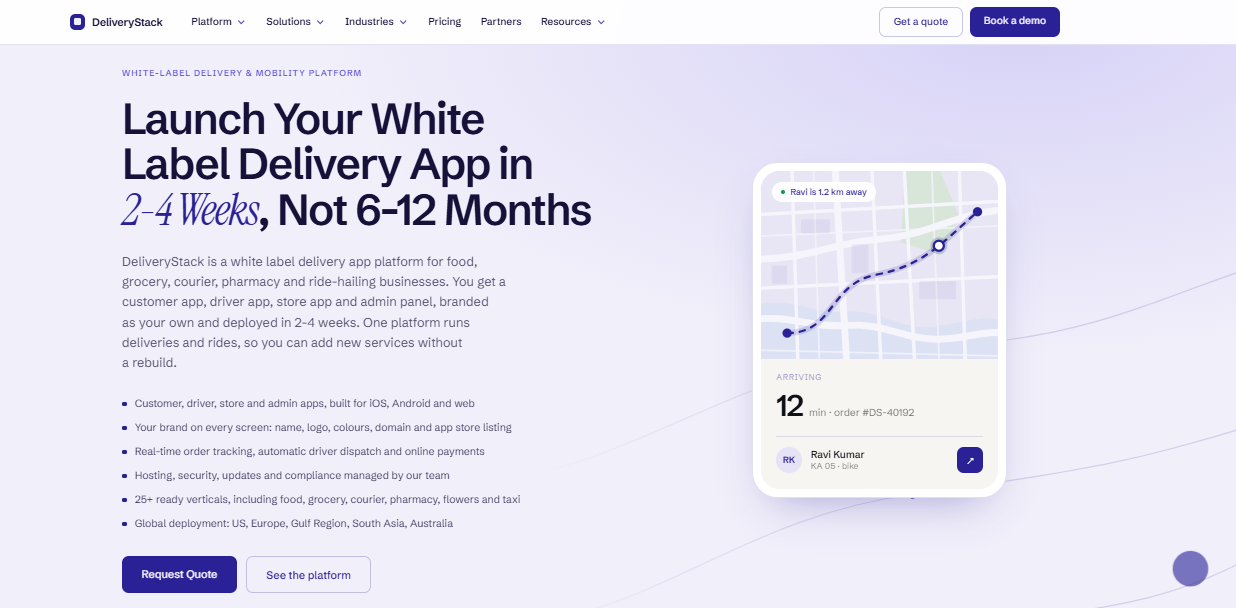
DeliveryStack is Aalpha’s white label on-demand delivery platform. It gives a restaurant its own branded customer app and website, a driver app with navigation and earnings, a restaurant panel for menus and orders, and an admin console for dispatch, zones and payouts. Dispatch takes kitchen prep time into account. The apps are published under the client’s own developer accounts, the client owns its customer and order data, and a typical deployment takes 2 to 4 weeks. It suits single restaurants with their own riders, multi-location brands with per-outlet zones, and operators moving orders off third-party aggregators.
-
Custom development for requirements beyond the base platform
When a product cannot support a workflow, such as a group-wide loyalty scheme across hotels and restaurants, Aalpha builds it as custom software that works alongside the platform.
-
Testing, launch support and ongoing maintenance
Aalpha tests complete booking, ordering and refund flows before launch, handles app store submission, and provides maintenance and support within agreed business hours. Its delivery record is reflected in a 4.9/5 rating from more than 215 reviews on Clutch.
To get an itemised estimate for your hotel or restaurant app, contact Aalpha with your locations, current systems and the features you need at launch.
Frequently asked questions
What is a white label app for hotels and restaurants?
It is a ready-built booking, ordering and guest-service app that a vendor licenses to a hotel or restaurant, which publishes it under its own name and branding. The vendor maintains the software, and the business manages content, prices and daily operations.
How much does a white label hospitality app cost?
Most vendors charge a setup fee plus a monthly subscription, with integration and transaction fees on top. As an illustrative range, a single restaurant may spend about USD 1,700 to 10,300 in year one, and a resort or restaurant group about USD 20,000 to 63,000.
How long does implementation take?
A single restaurant on a product that already supports its POS can launch in a few weeks. Hotels and groups with several systems take longer. Content preparation, payment gateway approval, PMS sign-off and app store review usually set the timeline.
Can the app use my business name and branding?
Yes. Your name, logo, colours, domain and app store listing appear throughout. Customers should not see the vendor’s brand anywhere in the app.
Can it connect to my existing PMS or POS?
Only if the vendor supports your specific system and version. Ask for a live client reference on the same system and confirm which data syncs in each direction before you sign.
Who owns the customer data and app store accounts?
That depends on the contract. Insist that you own customer, booking and order data with the right to export it, and that the app is published under your own Apple and Google developer accounts where possible.
Does white labelling include source-code ownership?
Usually not. You license the software rather than own it. If source code matters to you, negotiate an escrow arrangement or consider custom development.
Can one app support multiple properties or outlets?
Many products can, with per-location menus, rooms, prices, hours and payment settings under one brand and central reporting. Confirm this before signing, because some products are built for single sites only.
Do customers need to download an app?
Not always. Many vendors offer web portals or progressive web apps for guests who will not install anything, which suits hotel check-in and QR dine-in ordering. Native apps work best for frequent repeat customers.
Can a branded app replace booking or food-delivery marketplaces?
Rarely in full. Marketplaces bring new customers, and your own app keeps repeat ones without commission. Most businesses use both and steer repeat customers to the direct channel over time.
Can a restaurant run its own delivery fleet through a white label app?
Yes, with a white label delivery platform that adds a rider app, dispatch and live tracking. Aalpha’s DeliveryStack provides branded customer, driver, restaurant and admin apps and typically launches in 2 to 4 weeks.
What happens if I change providers?
You export your data, build or license a new app, and ask customers to move to it. Check exit clauses, data export formats and app store account ownership early, because these decide how painful the switch will be.
When is custom development a better choice?
When your workflows differ sharply from what products support, when you need to own the software outright, or when you operate at a scale where licence fees exceed the cost of building and maintaining your own platform.
Conclusion
A white label app pays off when it fits how your hotel or restaurant already works, connects cleanly to your PMS or POS, and gets used by repeat customers. Judge vendors on those three points and on three-year cost, not on demo polish or the lowest monthly fee.
Before requesting quotes, write down your must-have workflows, list every system the app must connect to, and estimate your monthly bookings or orders. Then ask each vendor for an itemised proposal covering setup, integrations, subscription, transaction fees and exit terms, so you can compare them line by line.
If you run your own delivery, include a delivery platform such as DeliveryStack in that comparison. To discuss your requirements and get an itemised estimate, talk to Aalpha.