



Migrating from React to Next.js means moving from a client-side rendered JavaScript application to a framework that supports server-side rendering, static generation, hybrid rendering strategies, and production-grade performance optimizations out of the box. For many growing products, this transition is not simply a technical upgrade; it is an architectural shift that directly impacts SEO visibility, performance metrics, infrastructure costs, and long-term scalability.
Organizations typically begin asking whether they should migrate when they encounter slow first-page loads, weak organic search performance, complex deployment pipelines, or the need for better rendering control. If your React application is evolving from a simple SPA into a content-rich SaaS platform, marketplace, or customer-facing product where discoverability and performance matter, Next.js becomes a serious consideration. However, migration is not universally required. The decision depends on product goals, user behavior, and revenue models.
What Is React and What Is Next.js?
React is a JavaScript library developed by Meta for building user interfaces using reusable components. It focuses purely on the view layer and provides tools such as hooks, state management patterns, and virtual DOM rendering. React does not prescribe routing, data fetching, rendering strategy, or backend integration. Developers assemble those pieces independently, often using libraries such as React Router and external APIs.
Next.js, created by Vercel, is a full-stack React framework. It builds on React and adds file-based routing, server-side rendering, static site generation, API routes, image optimization, and edge deployment support. The architectural difference is significant. React applications are typically client-side rendered by default, meaning content is generated in the browser. Next.js allows rendering on the server, at build time, or dynamically at the edge. This changes how pages are delivered, indexed, and optimized for performance.
The Business Case for Migration
The most common driver behind migration is search engine visibility. Traditional React single-page applications render content in the browser after JavaScript loads. Although search engines such as Google have improved JavaScript crawling capabilities, client-side rendering can still lead to delayed indexing, incomplete metadata rendering, and weaker performance in competitive search environments. For content-heavy platforms, this directly impacts traffic acquisition and customer growth.
Performance is another decisive factor. In a React SPA, users often download a large JavaScript bundle before seeing meaningful content. This increases Time to First Byte and Largest Contentful Paint, both of which influence Core Web Vitals. Next.js addresses this by pre-rendering pages on the server or at build time, reducing the amount of JavaScript required during the initial load. Faster load times translate into improved user engagement and conversion rates.
Scaling complexity also increases over time in pure React applications. As teams add custom routing logic, performance optimizations, server integrations, and SEO workarounds, the architecture becomes fragmented. Next.js consolidates these capabilities into a structured framework. This standardization reduces technical debt and simplifies long-term scaling, particularly for SaaS platforms and marketplaces where content and user interactions grow rapidly.
When Migration Makes Sense
Migration makes sense when SEO, performance, and scalability are central to business growth. SaaS platforms that depend on organic search for customer acquisition benefit from server-rendered landing pages and documentation portals. eCommerce businesses require fast product page loading, structured metadata, and dynamic pricing updates that Next.js handles efficiently through hybrid rendering strategies.
Marketing websites and content-driven brands gain measurable advantages from static generation and incremental regeneration, enabling rapid updates without sacrificing performance. Multi-tenant applications, such as platforms serving multiple brands or user-specific portals, also benefit from flexible routing and server-side logic embedded within the framework.
If your product roadmap includes global expansion, content localization, or performance-critical user journeys, migrating from React to Next.js becomes a strategic move rather than a cosmetic upgrade.
When You Should NOT Migrate
Migration is unnecessary for every React application. Internal dashboards, admin panels, and tools used behind authentication rarely depend on search engine visibility. In such cases, client-side rendering is sufficient and often simpler to maintain.
Small single-page applications with limited public exposure and minimal content do not typically benefit enough from server-side rendering to justify migration effort. If your application functions efficiently, does not rely on SEO, and serves a controlled user base, remaining on React may be the more pragmatic choice.
The decision to migrate should be guided by measurable business objectives rather than architectural trends.
React vs Next.js: Architectural Differences Explained
Understanding the architectural differences between React and Next.js is essential before planning migration. React is a UI library focused on component rendering. Next.js is a full-stack React framework that defines how rendering, routing, APIs, and deployment are structured. For CTOs and engineering leaders, the distinction is not cosmetic. It directly impacts performance budgets, DevOps complexity, SEO readiness, and long-term maintainability.
At a high level, React gives flexibility but requires assembling multiple tools. Next.js provides an opinionated architecture that standardizes production patterns. The differences become clear when comparing rendering models, routing systems, API handling, performance optimizations, and infrastructure strategy.
Client-Side Rendering vs Server-Side Rendering
In a traditional React application created using tools like Create React App, rendering happens entirely in the browser. This is known as Client-Side Rendering. When a user visits a page, the server sends a minimal HTML file and a large JavaScript bundle. The browser then downloads the JavaScript, executes it, fetches data, and renders the UI dynamically. While this model allows rich interactivity, it delays meaningful content rendering until JavaScript execution completes.
Next.js supports Server-Side Rendering, where HTML is generated on the server before being sent to the browser. Instead of delivering an empty shell, the server sends fully rendered HTML. The browser then hydrates the page, attaching JavaScript functionality afterward. This significantly improves initial content visibility.
From an SEO perspective, server-rendered content is immediately crawlable. Search engines such as Google can index complete metadata and structured content without waiting for JavaScript execution. For content-driven platforms, this difference directly affects discoverability and ranking consistency.
Static Site Generation vs Dynamic Rendering
Static Site Generation is another major architectural shift. In pure React applications, pages are rendered dynamically in the browser on each request. There is no built-in mechanism for pre-generating static HTML at build time.
Next.js allows pages to be pre-rendered during the build process. With SSG, HTML files are generated ahead of time and served instantly via a CDN. This approach is ideal for blogs, marketing pages, documentation portals, and product catalogs where content updates periodically but does not require per-request personalization.
Dynamic rendering in Next.js allows selective server-side computation when necessary. For example, user dashboards can render per request, while marketing pages remain static. This hybrid approach gives developers granular control over rendering strategy. Engineering teams no longer have to choose between fully static or fully dynamic applications. Instead, they can combine static generation, server rendering, and client-side interactivity within the same project.
This architectural flexibility reduces infrastructure strain while maintaining real-time capabilities where needed.
Routing Systems: React Router vs File-Based Routing
React itself does not include routing. Developers typically integrate libraries such as React Router to manage navigation and route definitions. Routes are manually configured in JavaScript files, often resulting in complex nested structures that require ongoing maintenance as applications scale.
Next.js introduces file-based routing. Every file inside the pages or app directory automatically becomes a route. Nested folders define nested routes. Dynamic routes are created using bracket syntax. This approach reduces configuration overhead and enforces predictable structure.
For large teams, file-based routing improves onboarding efficiency. Developers can understand application structure simply by examining the folder hierarchy. It also reduces the likelihood of routing misconfigurations that commonly occur in manually maintained route definitions.
API Handling: Separate Backend vs Built-In API Routes
In traditional React architecture, frontend and backend systems are separated. React communicates with APIs hosted elsewhere, often built using Node.js, Django, Laravel, or other frameworks. This separation increases deployment complexity and infrastructure coordination.
Next.js includes built-in API routes that allow developers to define server-side functions within the same project. These API routes run as serverless functions when deployed on platforms such as Vercel. This enables lightweight backend logic, authentication handlers, or proxy endpoints without maintaining a separate server.
However, enterprise-scale systems may still require dedicated backend services. Next.js API routes are not a replacement for complex microservices architectures but are highly effective for mid-scale SaaS platforms and frontend-focused applications.
This integrated model reduces DevOps overhead and accelerates development cycles.
Performance Optimization Features
Next.js includes several performance optimizations by default that React projects typically implement manually.
Automatic code splitting ensures that each page loads only the JavaScript required for that route. In many React SPAs, large bundles are loaded regardless of page usage, increasing initial load times. Next.js enforces per-page bundles automatically.
Image optimization is another built-in feature. The Next.js Image component automatically resizes, compresses, and serves images in modern formats based on device characteristics. In traditional React applications, image optimization requires manual configuration or third-party services.
Edge rendering enables pages to execute server logic closer to users geographically, reducing latency. This capability is particularly valuable for global SaaS platforms serving distributed audiences.
Streaming and React Server Components allow partial page rendering. Instead of waiting for all data to load before sending HTML, content can stream incrementally to the browser. This improves perceived performance and user experience in data-heavy applications.
These built-in features reduce reliance on external performance tooling and enforce best practices by default.
Deployment and Infrastructure Differences
React applications are typically deployed as static bundles on hosting platforms or CDNs. Backend APIs are deployed separately, requiring additional configuration for environment variables, scaling, and routing.
Next.js introduces a unified deployment model. Applications can be deployed as serverless functions, edge functions, or static assets depending on rendering strategy. Platforms such as Vercel provide optimized hosting specifically for Next.js applications.
This alignment between framework and infrastructure simplifies CI/CD pipelines, reduces operational friction, and supports hybrid rendering without manual server configuration.
Architecturally, the difference between React and Next.js is not about replacing a library. It is about adopting a production-ready framework that defines rendering strategies, routing conventions, performance standards, and deployment workflows in a cohesive system.
Benefits of Migrating from React to Next.js
Migrating from React to Next.js is not simply a framework upgrade. It fundamentally changes how applications are rendered, delivered, indexed, and scaled. For engineering teams building SaaS platforms, marketplaces, content-driven products, or customer-facing enterprise systems, the move to Next.js often results in measurable gains in organic traffic, performance metrics, development velocity, and infrastructure efficiency.
While React remains an excellent UI library, it requires assembling routing, rendering, performance optimization, and backend integration manually. Next.js consolidates these capabilities into a production-oriented framework. The benefits are most visible in SEO performance, load speed, developer workflow, and long-term scalability.
-
Improved SEO and Discoverability
One of the strongest reasons to migrate from React to Next.js is search engine optimization. Traditional React single-page applications rely on client-side rendering. When a user or crawler visits a page, the browser downloads JavaScript and generates the content dynamically. Although search engines such as Google can execute JavaScript, client-side rendering still introduces indexing delays and inconsistent metadata interpretation.
Next.js enables server-side rendering and static site generation, ensuring that fully rendered HTML is delivered immediately. This allows search engines to crawl structured content, headings, metadata, and schema markup without waiting for JavaScript execution. As a result, content-heavy platforms such as SaaS documentation portals, marketing sites, eCommerce catalogs, and multi-location service websites benefit from improved crawl efficiency and stronger search visibility.
For businesses that depend on inbound traffic, discoverability is directly tied to revenue. Migrating to Next.js ensures that landing pages, blog posts, product listings, and feature pages are indexable, performant, and optimized for modern search requirements.
-
Faster Initial Page Load
Performance plays a critical role in user retention and conversion rates. In standard React applications, users often download large JavaScript bundles before meaningful content appears. This increases metrics such as Time to Interactive and Largest Contentful Paint, both of which influence user experience and search rankings.
Next.js reduces initial load times by pre-rendering pages either at build time or on the server. Instead of delivering a blank HTML shell, it sends fully constructed markup. Users see content immediately, even before JavaScript hydration completes. This dramatically improves perceived speed.
Additionally, Next.js implements automatic code splitting at the page level. Only the JavaScript required for the current route is loaded, reducing bundle size. For mobile users and regions with slower networks, this optimization has measurable impact.
Faster initial rendering leads to lower bounce rates, longer session durations, and improved conversion performance. For eCommerce platforms, subscription services, and marketing funnels, even minor improvements in load speed can translate into significant revenue gains.
-
Built-in Performance Optimization
Next.js includes performance optimizations that React projects often implement manually. The framework automatically splits code, optimizes images, and supports edge deployment. Developers no longer need to integrate multiple third-party tools to achieve baseline performance standards.
The built-in Image component automatically resizes and compresses images based on device characteristics. This reduces bandwidth usage and improves Core Web Vitals. Streaming capabilities and React Server Components enable incremental rendering, allowing parts of the page to load as data becomes available rather than waiting for complete data resolution.
By standardizing these optimizations within the framework, Next.js reduces performance inconsistencies across large codebases and ensures that best practices are applied by default.
-
Better Developer Experience
Developer productivity improves significantly with Next.js due to its opinionated structure. File-based routing eliminates manual route configuration. API routes allow backend logic to reside within the same repository. Environment configuration is simplified through structured conventions.
The framework reduces architectural decision fatigue. Instead of deciding how to implement routing, rendering, bundling, and performance strategies from scratch, teams follow established patterns. This accelerates onboarding for new developers and improves maintainability across growing engineering teams.
Hot reloading, optimized builds, and structured folder conventions provide clarity. For CTOs managing scaling teams, predictable architecture reduces knowledge silos and simplifies collaboration.
-
Scalability and Enterprise Readiness
Next.js is designed for production-grade systems. It supports hybrid rendering strategies, edge deployment, serverless functions, and global CDN integration. This makes it suitable for enterprise SaaS platforms, multi-tenant applications, and global eCommerce systems.
As products expand across regions and user segments, rendering flexibility becomes essential. Next.js provides the architectural foundation needed to scale efficiently without continuously restructuring the application.
Migrating from React to Next.js therefore aligns frontend architecture with long-term growth objectives rather than short-term feature delivery.
Migration Readiness Checklist
Before migrating from React to Next.js, engineering teams should pause and conduct a structured technical assessment. Migration is not simply copying components into a new framework. It involves rethinking rendering strategies, routing architecture, API boundaries, and deployment models. A readiness checklist helps determine scope, effort, and potential risks before implementation begins.
This phase should include performance benchmarking, architectural documentation, and stakeholder alignment. The goal is to identify what must change, what can remain intact, and what may break during transition. CTOs and senior developers should treat this as an architectural audit rather than a framework upgrade.
-
Application Size and Complexity
The first step is evaluating how large and interconnected your React application has become. Small SPAs with fewer than 20 routes and limited shared state are generally easier to migrate. Enterprise systems with hundreds of components, nested layouts, shared hooks, and cross-module dependencies require phased planning.
Assess the total number of routes, reusable components, shared utilities, and global providers. Document how many pages rely on dynamic data versus static content. Applications that already separate presentation and logic cleanly will transition more smoothly.
Complexity also includes user roles and conditional rendering logic. If your application contains extensive permission-based UI rendering or feature flags, you must evaluate how these behaviors will translate into server-side or hybrid rendering in Next.js.
A migration timeline should correlate directly with codebase complexity, not simply the number of pages.
-
Routing Complexity
Routing architecture significantly influences migration difficulty. React applications often rely on React Router with deeply nested route definitions. These routes may include dynamic parameters, lazy-loaded modules, protected routes, and conditional redirects.
Map all existing routes and categorize them as static, dynamic, or authenticated. Identify nested structures and layout dependencies. Since Next.js uses file-based routing, your current routing hierarchy must be restructured into folders and layout files.
Special attention should be given to dynamic routes and URL parameter handling. Understanding routing depth and redirect logic in advance prevents structural rework during implementation.
-
State Management Review
Evaluate how your application handles global and local state. Are you using Redux, Zustand, Context API, MobX, or a custom pattern? Identify which parts of the state are client-only and which rely on server-fetched data.
In Next.js, some data fetching may shift to the server layer. This can reduce the need for complex client-side state management in certain areas. However, user-interactive features such as forms, modals, and real-time updates still require client-side state.
Document all global stores, reducers, and shared contexts. Determine whether they depend on browser-only APIs such as localStorage or window objects, as these may require adaptation during server-side rendering.
-
API Architecture Evaluation
React applications typically consume APIs from separate backend services. Before migrating, document all API endpoints, authentication flows, and environment configurations. Identify which endpoints are publicly accessible and which require authorization tokens.
Decide whether certain lightweight endpoints can move into Next.js API routes or remain on an external backend. If your backend architecture involves microservices, gateways, or third-party integrations, migration should not disrupt these systems.
Authentication mechanisms require careful review. If you use JWT tokens stored in localStorage, you must consider how server-side rendering will handle authentication state. Session-based authentication or secure cookies may be more compatible with server-rendered applications.
Understanding API boundaries ensures that backend contracts remain stable during frontend migration.
-
Third-Party Dependencies Audit
Review all installed libraries and identify browser-dependent packages. Some third-party components assume client-only execution and may fail during server-side rendering. Libraries that directly access window, document, or navigator must be wrapped in dynamic imports or client-only components in Next.js.
Audit analytics tools, payment integrations, maps, UI libraries, and animation packages. Confirm compatibility with server-rendered environments.
Removing unused dependencies before migration simplifies the process. A leaner dependency tree reduces potential hydration errors and build conflicts.
A structured readiness checklist minimizes unexpected failures during migration. By assessing architecture, routing, state, APIs, and dependencies upfront, teams can create a phased migration roadmap that aligns with technical and business priorities rather than reacting to runtime issues after deployment.
Step-by-Step Process to Migrate from React to Next.js
Migrating from React to Next.js should be treated as an architectural transition, not a simple framework swap. The goal is to improve rendering performance, SEO readiness, and long-term scalability without breaking existing functionality. This section provides a structured, production-ready execution roadmap suitable for engineering teams, tech leads, and CTOs planning real-world migrations. When working with an experienced Next.js development company, this transition becomes more predictable, measurable, and aligned with long-term product strategy rather than experimental refactoring.
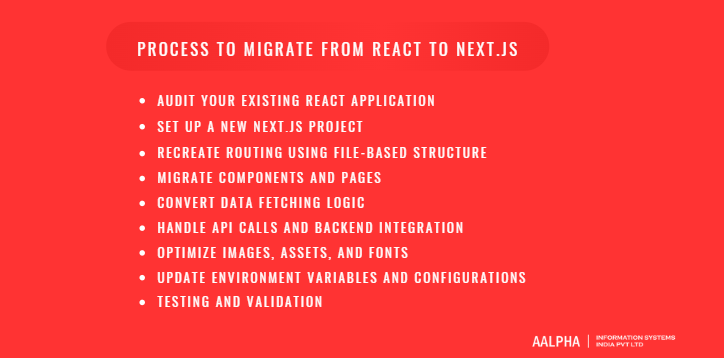
Step 1: Audit Your Existing React Application
Before creating a new Next.js project, conduct a complete architectural audit of your current React application. Skipping this step leads to duplicated mistakes and migration delays.
Component Structure
Start by mapping your component hierarchy. Identify reusable UI components, layout wrappers, shared utilities, and page-level components. Separate purely presentational components from logic-heavy components. Applications with clean separation between UI and data logic migrate more smoothly.
Document which components depend on browser-only APIs such as window, document, or localStorage. These may require modification for server-side rendering compatibility.
Routing System
List all routes currently defined in React Router. Categorize them into:
- Static routes
- Dynamic routes with parameters
- Protected routes requiring authentication
- Nested routes with layout wrappers
This map will become the foundation for rebuilding routing in Next.js using file-based conventions.
Global State
Inventory your global state solution. Are you using Redux, Zustand, Context API, or a custom store? Determine which state is essential for client interactivity versus data that can be server-rendered. Overreliance on client-side fetching often complicates performance.
SEO Limitations
Evaluate current SEO weaknesses. Check whether metadata is dynamically rendered. Inspect page source rather than browser-rendered DOM to see what crawlers receive. If content appears empty without JavaScript, this confirms a rendering limitation.
Performance Baseline Metrics
Measure Core Web Vitals, bundle size, Time to First Byte, and Largest Contentful Paint. These benchmarks will later validate migration success.
Migration decisions should be data-driven, not assumption-driven.
Step 2: Set Up a New Next.js Project
After completing the audit, create a clean Next.js environment rather than modifying the existing React setup.
Installation
Initialize a new Next.js project using the official CLI:
npx create-next-app@latest
Choose TypeScript if your current React project uses it. Maintain consistent linting and formatting configurations to reduce onboarding friction.
Folder Structure Overview
Next.js introduces structured directories:
- app/ or pages/ for routing
- components/ for reusable UI
- lib/ for utilities
- public/ for static assets
This enforced structure reduces architectural ambiguity common in large React codebases.
App Router vs Pages Router Decision
Modern Next.js applications use the App Router, which supports Server Components, nested layouts, and streaming. The Pages Router is legacy but still supported.
For new migrations, choose the App Router unless you require legacy compatibility. It provides better long-term scalability and more granular rendering control.
Starting clean ensures you migrate intentionally rather than replicating legacy constraints.
Step 3: Recreate Routing Using File-Based Structure
Routing transformation is the most visible architectural shift.
Convert React Router Routes
In React, routes are declared in configuration files. In Next.js, each file becomes a route automatically.
For example:
React Router:
<Route path=”/dashboard” element={<Dashboard />} />
Next.js:
app/dashboard/page.tsx
Each folder defines a route segment.
Nested Routes
Nested routing in React often uses layout components wrapping child routes. In Next.js App Router, nested layouts are handled using layout.tsx files within folders.
Example:
app/dashboard/layout.tsx
app/dashboard/settings/page.tsx
The layout automatically wraps all nested routes.
Dynamic Routes
Dynamic parameters in React Router such as /product/:id translate to bracket syntax in Next.js:
app/product/[id]/page.tsx
For static generation of dynamic routes, you can define parameter lists using generateStaticParams.
Layout Restructuring
React projects often have a single global layout. Next.js allows multiple nested layouts, improving modularity. Reorganize layouts according to route hierarchy rather than centralizing everything in App.js.
This restructuring improves maintainability in large applications.
Step 4: Migrate Components and Pages
Once routing is structured, begin migrating UI components.
Reusable Components
Move shared components into the components/ directory. Ensure they do not rely on browser-only APIs unless explicitly marked as client components using “use client”.
By default, components in the App Router are Server Components. Add “use client” at the top of files that require state, effects, or browser APIs.
Page-Level Conversion
Each page in React becomes a page.tsx file in the appropriate route folder. Remove React Router logic and instead rely on Next.js navigation using the Link component.
Replace:
import { Link } from ‘react-router-dom’
With:
import Link from ‘next/link’
Layout.tsx Handling
Instead of wrapping routes in a global layout component, use layout.tsx files at appropriate directory levels. This provides scoped layout control.
Shared UI Migration
Elements such as navigation bars, sidebars, and footers should move into shared layout files. Avoid duplicating UI across page components.
Component migration should be incremental. Validate each page before proceeding to the next.
Step 5: Convert Data Fetching Logic
Data fetching is the most critical conceptual shift.
useEffect to Server-Side Data Fetching
In React SPAs, data is often fetched inside useEffect. This delays content rendering until after the page loads.
In Next.js, data can be fetched directly inside Server Components:
async function Page() {
const data = await fetch(‘https://api.example.com/data’)
return <div>{data.title}</div>
}
This ensures content is rendered before reaching the browser.
getServerSideProps (Legacy)
If using the Pages Router, getServerSideProps enables server-side rendering per request. While still supported, the App Router encourages direct async data fetching within components.
generateStaticParams
For dynamic routes that can be pre-rendered at build time, use generateStaticParams to define all possible route values. This enables static site generation for dynamic content.
Server Components
Server Components reduce JavaScript sent to the client. Logic-heavy components can remain on the server while interactive components are explicitly marked as client-side.
This separation reduces bundle size significantly.
Edge Rendering
For global applications, specify edge runtime to execute logic closer to users geographically. This reduces latency for international traffic.
Migrating data logic often improves performance more than UI restructuring.
Step 6: Handle API Calls and Backend Integration
Moving API Logic to Next API Routes
If your React application relies on lightweight backend logic, consider moving it into Next.js API routes inside:
app/api/
These run as serverless functions when deployed.
This simplifies deployment pipelines for authentication handlers, contact forms, or proxy endpoints.
When to Keep External Backend
Complex systems using microservices or enterprise backends should retain their existing architecture. Next.js works well as a frontend layer consuming external APIs.
Do not migrate backend systems unnecessarily.
Authentication Considerations
Authentication must be adapted for server rendering. Avoid storing tokens exclusively in localStorage. Instead, use HTTP-only cookies to support server-side authentication validation.
Libraries such as Auth0 or custom session strategies integrate effectively with Next.js server-side logic.
Authentication architecture must be reviewed before deployment.
Step 7: Optimize Images, Assets, and Fonts
Replace standard <img> tags with the Next.js Image component. This enables automatic resizing, compression, and lazy loading.
Move static assets into the public/ directory. Use the built-in font optimization system for loading web fonts efficiently.
Remove redundant image optimization libraries previously used in React projects. Next.js handles these automatically.
Optimizing assets during migration improves Core Web Vitals immediately.
Step 8: Update Environment Variables and Configurations
Next.js uses a structured environment variable system. Variables must be prefixed with NEXT_PUBLIC_ to be accessible on the client side.
Move sensitive environment variables to server-only configuration files. Avoid exposing API keys unnecessarily.
Update build scripts, CI/CD pipelines, and deployment configuration to align with Next.js requirements. If deploying on Vercel, configuration is streamlined. For custom servers, ensure Node runtime compatibility.
Environment misconfiguration is a common migration pitfall.
Step 9: Testing and Validation
After migration, validate functionality comprehensively.
Test:
- Route transitions
- Authentication flows
- API integrations
- Dynamic pages
- SEO metadata rendering
- Performance benchmarks
Inspect page source to confirm server-rendered content. Run Lighthouse audits and compare against baseline metrics collected in Step 1.
Monitor hydration warnings in development mode. Address any mismatches between server and client rendering.
Only after functional, performance, and SEO validation should the Next.js application replace the production React deployment.
This structured migration approach minimizes downtime, reduces risk, and ensures measurable improvement in performance, SEO, and maintainability rather than simply changing frameworks.
Common Migration Challenges and How to Solve Them
Migrating from React to Next.js introduces a hybrid runtime model where part of the application executes on the server and part runs in the browser. Most migration issues occur because the original React application was designed under the assumption that everything runs client-side. When server-side rendering is introduced, hidden architectural assumptions surface. The most common challenges fall into four categories: hydration mismatches, browser-only logic failures, third-party incompatibilities, and incomplete SEO configuration. Each has a clear technical cause and a repeatable solution.
-
Hydration Errors
Hydration errors occur when the HTML generated on the server does not match what React attempts to render in the browser during hydration. This mismatch triggers warnings and, in severe cases, broken UI behavior.
Common causes include rendering time-dependent values such as current timestamps, generating random IDs during render, or conditionally displaying content based on browser state. For example, if a component checks screen size during rendering and outputs different markup depending on viewport width, the server and client will produce inconsistent HTML.
The solution is to ensure that server-rendered output is deterministic. Any logic that depends on browser APIs, user-specific local storage, time-sensitive values, or randomization should execute after hydration, not during the initial render. In practice, this means separating purely visual server-rendered content from interactive client-side enhancements.
Another common cause is inconsistent data fetching. If data changes between server render and client hydration, markup may differ. Stabilizing data inputs and ensuring consistent serialization between server and client prevents these mismatches.
Hydration errors are not random. They are signals that server and client rendering responsibilities have not been clearly separated.
-
Dynamic Imports and Window Object Issues
React applications often assume access to browser-specific objects such as window, document, navigator, and localStorage. In a server-rendered environment, these objects do not exist because rendering initially occurs in a Node.js runtime.
When such assumptions remain in migrated components, runtime errors appear. This is especially common in analytics tools, charting libraries, map integrations, WYSIWYG editors, and customer engagement widgets.
The solution is architectural isolation. Browser-dependent logic should be confined to client-designated components. Instead of attempting to “fix” server errors reactively, identify modules that require browser APIs and explicitly mark them for client-only execution.
Another best practice is guarding browser access with runtime checks so that code referencing window or document executes only when those objects are available. However, overusing client-only execution defeats the purpose of server-side rendering. The goal is to isolate only what must run in the browser while keeping the rest server-rendered.
A successful migration balances server efficiency with necessary client interactivity.
-
Third-Party Library Compatibility
Not all third-party libraries are designed for server-side rendering. Some libraries access the DOM immediately when imported. Others assume persistent browser state or inject styles in ways that differ between server and client.
Incompatibility typically surfaces as hydration warnings, style flickering, runtime crashes, or inconsistent layout rendering.
The first step is auditing dependencies before migration. Identify which packages depend directly on browser APIs. If a library is not SSR-compatible, isolate it within a client-only boundary. For UI frameworks or CSS-in-JS solutions, ensure they are configured to generate identical markup and styles on both server and client.
In some cases, replacing a problematic dependency is more efficient than patching it. Particularly for foundational components such as rich text editors or data visualization tools, SSR compatibility should be treated as a selection criterion.
Migration is an opportunity to remove outdated or unused dependencies that increase bundle size and technical debt.
-
SEO Misconfiguration
Many teams assume that adopting server-side rendering automatically resolves SEO limitations. In reality, misconfiguration during migration can create new indexing issues.
Common problems include missing metadata definitions, duplicate titles across dynamic pages, broken canonical tags, and lost URL structures. If the migration changes route paths without proper redirects, search rankings may decline due to broken backlinks.
Another frequent issue is relying on client-side metadata updates. In Next.js, metadata should be defined in a way that ensures it is present in the initial server-rendered HTML. Verifying page source rather than inspecting the browser-rendered DOM is critical during testing.
Teams should also review robots directives, sitemap generation, structured data markup, and locale configurations before production release. Server-side rendering improves crawlability, but only when metadata and indexing rules are implemented correctly.
SEO must be validated as part of migration testing, not treated as a post-launch adjustment.
Most migration challenges arise from implicit assumptions carried over from a client-only architecture. By identifying hydration risks, isolating browser-dependent logic, auditing dependencies, and validating SEO configuration, teams can prevent the most common post-migration failures and ensure that the transition to Next.js delivers measurable technical and business improvements.
Cost of Migrating from React to Next.js
The cost of migrating from React to Next.js depends on application complexity, architectural maturity, rendering strategy changes, and organizational structure. This is not a simple framework upgrade. It involves restructuring routing, adjusting data fetching logic, validating server-side compatibility, and reconfiguring deployment pipelines. The true cost includes engineering time, QA cycles, DevOps updates, and potential temporary productivity slowdown during transition.
Migration costs typically fall into three tiers: small applications, medium-scale SaaS platforms, and enterprise-grade systems. The primary cost drivers include the number of routes, complexity of state management, authentication logic, third-party integrations, and performance optimization requirements.
The following breakdown provides a realistic estimate framework for planning purposes.
-
Small Applications
Small React applications with fewer than 20 routes and limited global state are relatively inexpensive to migrate. These projects often include marketing websites, basic dashboards, or early-stage MVPs.
Typical migration work includes:
- Rebuilding routing using file-based structure
- Converting client-side data fetching
- Adjusting metadata handling
- Updating deployment configuration
Because architectural complexity is low, migration can often be completed within a few weeks by a small engineering team. Costs remain manageable as long as third-party dependencies are minimal and authentication logic is straightforward. For startups, this tier represents a strategic upgrade rather than a major operational shift.
-
Medium-Scale SaaS
Medium-scale SaaS platforms involve more substantial migration planning. These systems typically include authenticated dashboards, role-based access, API integrations, subscription flows, and dynamic content rendering.
Cost drivers in this tier include:
- Converting complex routing hierarchies
- Refactoring useEffect-based data fetching into server-rendered patterns
- Reconfiguring authentication for server-side compatibility
- Validating SEO improvements across dynamic pages
- Ensuring performance metrics improve rather than regress
Engineering effort may span multiple months depending on feature density. QA cycles are more extensive because user workflows must be tested across rendering contexts. However, the long-term return is significant: improved organic traffic, better performance metrics, and cleaner architectural standards.
For SaaS businesses dependent on inbound growth or high-performance user journeys, this migration often pays for itself within a year through improved conversion rates and operational efficiency.
-
Enterprise Systems
Enterprise React applications introduce the highest migration complexity. These systems often include hundreds of routes, microservices integration, multi-tenant architecture, advanced permission layers, analytics systems, and global deployment infrastructure.
Costs escalate due to:
- Large codebase refactoring
- Dependency compatibility audits
- Session and authentication redesign
- Infrastructure realignment for hybrid rendering
- Incremental rollout strategies to avoid downtime
Enterprises rarely perform full rewrites. Instead, they adopt incremental migration approaches, running React and Next.js side-by-side. This phased strategy reduces operational risk but increases coordination overhead.
Although migration investment is significant, enterprise systems gain architectural clarity, performance standardization, and long-term maintainability. For organizations planning global expansion, content scaling, or modernization initiatives, the migration cost represents a strategic technology investment rather than a maintenance expense.
Should You Migrate?
Migrating from React to Next.js should not be driven by trend adoption or framework popularity. It should be a structured decision based on technical architecture, business growth goals, and long-term scalability requirements. For some teams, migration unlocks measurable performance and SEO advantages. For others, it introduces unnecessary complexity.
This framework helps engineering leaders and product stakeholders evaluate whether migration aligns with their product strategy.
-
Technical Decision Factors
Start with architecture and performance.
If your React application suffers from slow first-page loads, large JavaScript bundles, hydration-heavy rendering, or SEO indexing inconsistencies, these are strong technical indicators for migration. Applications that rely heavily on client-side data fetching for content pages may benefit significantly from server-side rendering or static generation.
Evaluate whether your routing structure has become difficult to maintain. If routing logic is scattered across configuration files and layout handling is inconsistent, Next.js file-based routing can simplify architecture.
Also consider your data-fetching strategy. If most pages use useEffect to load core content, this is a structural inefficiency in content-driven applications. Moving to server-rendered or statically generated pages reduces client workload.
However, if your application is an internal dashboard, highly interactive tool, or browser-only workflow without SEO requirements, technical justification for migration may be weak.
-
Business Decision Factors
Technical benefits must align with business objectives.
If organic search traffic is a key growth channel, improving crawlability and metadata reliability through server rendering directly impacts revenue. eCommerce platforms, SaaS marketing funnels, and documentation portals often see measurable gains in discoverability after migration.
Performance also influences conversion rates. Faster load times reduce bounce rates and increase engagement. If analytics show user drop-off during initial loading, migration may offer competitive advantage.
Another factor is developer productivity. If teams spend excessive time managing custom routing, performance tuning, and deployment workarounds, standardizing on Next.js can reduce operational friction.
On the other hand, if your product generates revenue through authenticated user workflows, referrals, or paid acquisition rather than search visibility, the business incentive for migration may be limited.
Migration should support growth strategy, not distract from it.
-
Long-Term Scalability Considerations
Think beyond current requirements.
If your roadmap includes global expansion, localization, multi-tenant architecture, content scaling, or hybrid static-dynamic rendering, Next.js provides a structured foundation for those needs. It supports serverless deployment, edge rendering, and incremental static regeneration without significant architectural overhaul.
However, if your product scope is stable and unlikely to evolve toward content-heavy or SEO-dependent surfaces, maintaining your current React architecture may be sufficient.
The decision ultimately depends on whether you are optimizing for short-term simplicity or long-term scalability.
Why Choose Aalpha for a React to Next.js Migration
Aalpha approaches React to Next.js migration as a structured modernization initiative rather than a framework swap. As an experienced web development company, the team begins with a technical audit covering routing architecture, data-fetching patterns, authentication flows, dependency compatibility, and performance baselines. From there, Aalpha designs a phased migration roadmap that prioritizes high-impact routes such as SEO-sensitive pages or performance-critical user journeys. This ensures measurable improvements in server-rendered output, page speed, and bundle optimization without interrupting ongoing feature development. Instead of rewriting entire systems, Aalpha implements controlled, incremental transitions that reduce operational risk and maintain stability throughout deployment.
Beyond technical execution, Aalpha focuses on production readiness and long-term maintainability. That includes restructuring components for server compatibility, optimizing metadata for crawlability, refining state management to reduce client-side overhead, and aligning deployment pipelines with hybrid rendering strategies. The objective is not just to move to Next.js, but to build a scalable architecture that supports growth, global expansion, and sustained performance gains. For SaaS platforms, marketplaces, and content-driven applications, Aalpha delivers migration outcomes that align directly with business performance metrics rather than superficial architectural changes, reinforcing its position as a reliable web development company for complex frontend modernization projects.
Final Thoughts
Migrating from React to Next.js is a strategic architectural decision that can significantly improve performance, SEO visibility, and long-term scalability when executed correctly. The key is not simply adopting a new framework, but restructuring rendering logic, routing patterns, and deployment workflows in a way that aligns with business growth objectives. With a clear migration roadmap, careful validation, and incremental rollout, organizations can modernize their frontend stack without disrupting ongoing operations.
If you are evaluating a React to Next.js migration and want a structured, low-risk execution plan, Aalpha can help. As an experienced web and enterprise development partner, Aalpha delivers end-to-end migration services tailored to SaaS platforms, marketplaces, and scalable digital products. Contact Aalpha to discuss your architecture, assess feasibility, and build a migration strategy that drives measurable technical and business outcomes.