





TL;DR: How do you scale a healthcare SaaS platform?
Scaling a healthcare SaaS platform means growing infrastructure, data capacity, and integrations to support more users and organizations – without hurting performance, security, or patient safety. This requires: a modular or API-first architecture, auto-scaling cloud infrastructure, strict multi-tenant data isolation, standardized FHIR/HL7 integrations, high-availability design with tested disaster recovery, and mature DevOps with full observability. Readiness depends on proven retention and stable revenue, not just sign-up growth. The most common mistake is scaling infrastructure while ignoring compliance, support, and tenant security – since in healthcare, failures can affect patient care, not just user experience.
Healthcare companies building or scaling a SaaS platform can work with Aalpha Information Systems for architecture planning, cloud deployment, healthcare integrations, and security-focused development support.
Scaling a healthcare SaaS platform means expanding its capacity to support more users, patients, healthcare providers, facilities, transactions, integrations, and clinical data without reducing performance, reliability, security, or usability. A platform that works well for a few clinics may struggle when adopted by hospital networks, diagnostic centres, insurers, pharmacies, or healthcare organisations operating across multiple locations. Scaling therefore involves more than adding servers. It requires coordinated improvements across application architecture, databases, cloud infrastructure, security controls, compliance processes, customer onboarding, integrations, monitoring, and internal operations.
Healthcare SaaS platforms are more difficult to scale than general SaaS products because they manage highly sensitive information and often support workflows that directly affect patient care. A temporary slowdown in a conventional business application may cause inconvenience. In a healthcare platform, the same issue could delay access to medical records, appointment information, laboratory results, prescriptions, or clinical alerts. Healthcare systems must therefore maintain high availability, accurate data processing, strict access controls, traceable user activity, and dependable recovery mechanisms.
Compliance adds another layer of complexity. Platforms may need to meet requirements related to HIPAA, GDPR, data residency, consent management, audit logging, encryption, retention, and breach notification. These obligations can vary by country, customer type, and data-processing arrangement.
Healthcare SaaS products must also communicate with external systems such as electronic health records, laboratory platforms, pharmacies, payment services, insurance systems, medical devices, and telehealth tools. Many of these systems use different standards, data formats, and authentication methods. As adoption increases, integration failures, data duplication, delayed updates, and inconsistent records become harder to control.
A successful scaling strategy must therefore balance technical growth with clinical reliability. Performance, security, interoperability, compliance, cost control, and user experience must improve together. Scaling one area while neglecting the others can create operational risk, weaken customer trust, and limit long-term expansion.
Did you know? The global healthcare cloud computing market was valued at approximately USD 63.11 billion in 2025 and is projected to reach USD 169.34 billion by 2031, representing an estimated compound annual growth rate of 18%.
When Is a Healthcare SaaS Platform Ready to Scale?
A healthcare SaaS platform is ready to scale when demand, product performance, customer retention, infrastructure, and internal operations show that growth can be supported without creating serious technical or clinical risks. Increasing sales alone does not prove readiness. The platform must demonstrate that customers receive consistent value, users continue using it, the system can handle higher workloads, and the business has the people and processes needed to support expansion.
-
Signs of Product-Market Fit
Product-market fit is one of the clearest signs that a healthcare SaaS platform may be ready to scale. It exists when the product solves a meaningful problem for a defined group of healthcare users and customers are willing to adopt, renew, and recommend it.
Relevant indicators may include growing inbound interest, shorter sales cycles, strong customer references, repeated feature usage, high onboarding completion rates, and demand from similar healthcare organizations. For example, if several clinics use the platform daily for appointment management, patient communication, billing, or clinical documentation, and new clinics request the same core capabilities, the product may have found a repeatable market need.
The platform should also solve a problem that is important enough for customers to allocate budget and resources. Interest without paid adoption is not sufficient evidence of product-market fit.
-
Stable User Retention and Recurring Revenue
Retention is more important than early sign-up growth. A platform that adds customers quickly but loses them after a few months is not ready for large-scale expansion. Strong retention shows that the product has become part of the customer’s regular operations.
Healthcare SaaS companies should review customer renewal rates, churn, monthly recurring revenue, annual recurring revenue, usage frequency, and account expansion. Stable recurring revenue provides the financial base needed to invest in cloud infrastructure, support teams, compliance, security, and product development.
It is also useful to examine retention by customer type. Small clinics, hospitals, laboratories, and insurers may have different usage patterns and support requirements. Scaling should focus first on the segment with the strongest adoption and renewal behaviour.
-
Increasing Patient, Provider, and Organizational Usage
A platform may be ready to scale when usage is rising across multiple levels. This may include more patients completing digital forms, more providers accessing records, more administrators managing workflows, and more healthcare organizations adding locations or departments.
Usage growth should be consistent rather than dependent on a few large customers. The platform should also show that its core workflows continue to function well as transaction volumes increase. Metrics such as active users, API requests, appointment volumes, messages, prescriptions, uploaded files, and concurrent sessions can reveal whether adoption is broad and repeatable.
-
Infrastructure, Support, and Operational Readiness
Technical and operational readiness must be assessed before expansion. The application should have reliable monitoring, backups, access controls, audit logs, incident procedures, tested recovery processes, and clear performance benchmarks.
The customer support team should be able to handle more onboarding requests, integration issues, training needs, and compliance questions. Internal documentation, release processes, escalation paths, and service-level expectations should also be established.
A platform may perform well with ten customers because the founders manually resolve every issue. That model often fails with one hundred customers. Scaling requires repeatable systems rather than constant manual intervention.
-
Risks of Scaling Too Early
Scaling too early can magnify product weaknesses, technical debt, security gaps, and support problems. A poorly tested platform may experience outages, slow response times, data inconsistencies, integration failures, or customer dissatisfaction as usage increases.
Premature expansion can also increase cloud costs, sales expenses, and implementation commitments before recurring revenue is stable. In healthcare, the consequences can be more serious because failures may affect access to patient information or important clinical workflows.
The safer approach is to scale after the platform has proven customer value, retention, operational stability, and technical resilience. Growth should follow evidence, not pressure to expand quickly.
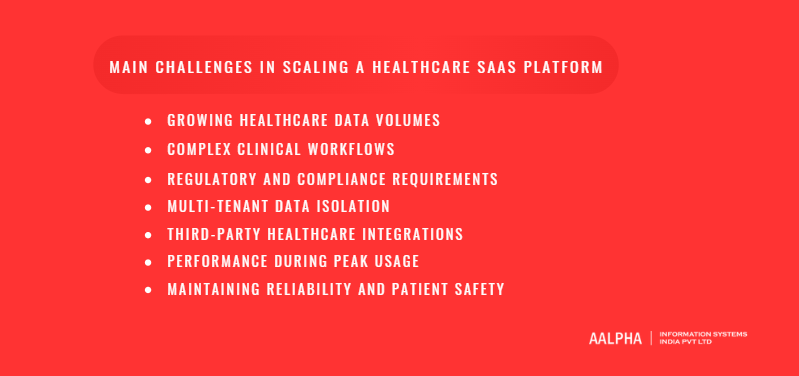
Main Challenges in Scaling a Healthcare SaaS Platform
Scaling a healthcare SaaS platform introduces technical, operational, regulatory, and clinical challenges that become more difficult as the number of users, facilities, transactions, and integrations increases. Issues that appear manageable during an early pilot can become serious when the platform is used across multiple hospitals, clinics, laboratories, pharmacies, or regions. A successful scaling strategy must account for these risks before they affect service quality or patient care.
-
Growing Healthcare Data Volumes
Healthcare SaaS platforms generate and process large amounts of structured and unstructured data. This may include patient profiles, clinical notes, prescriptions, appointment records, billing information, laboratory results, scanned documents, medical images, device readings, audit logs, and communication records.
As data volumes grow, database queries may become slower, backups may take longer, storage costs may increase, and reporting workloads may affect application performance. The platform may need database indexing, partitioning, archiving policies, read replicas, object storage, and separate analytics infrastructure. Data retention rules must also be considered because some healthcare records may need to remain accessible for several years.
-
Complex Clinical Workflows
Healthcare workflows are rarely simple or identical across organizations. A clinic may need appointment scheduling, digital intake, consultation notes, prescriptions, and follow-up reminders. A hospital may require referrals, departmental approvals, laboratory orders, pharmacy workflows, insurance verification, and discharge processes.
Scaling becomes difficult when every customer requests a different workflow. Excessive customization can create separate product versions that are expensive to maintain and test. The platform should support configurable rules, role-based workflows, reusable modules, and tenant-level settings without changing the core codebase for every organization.
-
Regulatory and Compliance Requirements
Healthcare SaaS companies may need to comply with HIPAA, GDPR, national health data laws, data residency requirements, consent rules, breach notification obligations, and contractual security standards. Requirements can vary based on where the patient lives, where the customer operates, and where the data is stored.
Compliance becomes harder as the platform enters new countries or serves larger healthcare organizations. The company must maintain access controls, encryption, audit trails, risk assessments, vendor agreements, retention policies, and incident response procedures. Compliance cannot be treated as a one-time certification exercise. Controls must be reviewed continuously as the platform, infrastructure, and customer base change.
-
Multi-Tenant Data Isolation
A multi-tenant SaaS platform allows several healthcare organizations to use the same application and infrastructure. This model can reduce cost, but it creates serious data isolation responsibilities. One hospital must never be able to access another hospital’s patient records, reports, configuration, or user activity.
Tenant separation must be applied across databases, APIs, file storage, caches, logs, background jobs, and reporting systems. Weak authorization logic or incorrect tenant identifiers can cause cross-tenant data exposure. Large enterprise customers may also demand dedicated databases, separate encryption keys, private network connections, or isolated infrastructure.
-
Third-Party Healthcare Integrations
Healthcare SaaS platforms often depend on EHR systems, laboratories, pharmacies, insurers, payment gateways, medical devices, identity providers, and telehealth services. These integrations may use FHIR, HL7, custom APIs, file transfers, or older proprietary formats.
External systems may be slow, unavailable, poorly documented, or inconsistent in how they represent data. At scale, even a small integration failure rate can affect thousands of records. The platform therefore needs retry mechanisms, message queues, duplicate detection, error tracking, reconciliation tools, and clear fallback processes.
-
Performance During Peak Usage
Healthcare platforms often experience predictable and unpredictable usage peaks. Appointment systems may receive heavy traffic in the morning, patient portals may see sudden demand after test results are released, and telehealth platforms may experience high concurrent usage during public health events.
Without proper capacity planning, peak loads can cause slow dashboards, failed form submissions, delayed notifications, or timeouts. Load balancing, auto-scaling, caching, efficient database queries, asynchronous processing, and realistic performance testing are essential for handling higher concurrency.
-
Maintaining Reliability and Patient Safety
Reliability is a clinical concern, not only a technical metric. A delayed medication alert, missing laboratory result, duplicated patient record, or unavailable clinical note can affect care decisions.
Healthcare SaaS platforms need strong validation, monitoring, failover systems, backups, disaster recovery plans, and incident escalation procedures. Critical workflows should degrade safely when a dependency fails. For example, a temporary messaging outage should not block a clinician from viewing a patient record.
The main challenge is to scale capacity without reducing trust. Growth must preserve data accuracy, system availability, clinical continuity, and clear accountability across every part of the platform.
Build a Scalable Healthcare SaaS Architecture
A scalable healthcare SaaS architecture must support growing numbers of patients, providers, healthcare organizations, transactions, integrations, and data records without weakening performance, security, or reliability. The architecture should also make it possible to add new features, meet customer-specific requirements, and comply with healthcare regulations without forcing the development team to rebuild the platform repeatedly.
The right architecture is not necessarily the most complex one. It is the one that matches the platform’s current scale, expected growth, clinical workflows, engineering capacity, and compliance obligations.
-
Modular Monolith Versus Microservices
A modular monolith is often the most practical starting point for an early-stage healthcare SaaS platform. In this model, the application is deployed as one system, but its internal components are divided into clear modules such as patient management, appointments, billing, prescriptions, notifications, reporting, and administration.
This approach is easier to develop, test, deploy, and monitor than a distributed microservices system. It also reduces infrastructure overhead and allows a smaller engineering team to move faster. A well-designed modular monolith can support substantial growth when modules have clear responsibilities and limited dependencies.
Microservices divide the platform into independently deployable services. A healthcare SaaS product may have separate services for identity, patient records, scheduling, payments, communications, clinical documentation, and integrations. This model can improve independent scaling and release flexibility, but it also introduces service discovery, network failures, distributed logging, data synchronization, version management, and operational complexity.
Healthcare SaaS companies should move toward microservices only when there is a clear operational need. Common reasons include different modules having very different scaling requirements, large engineering teams needing independent deployments, or critical services requiring stronger isolation.
-
API-First Architecture
An API-first architecture treats APIs as primary product components rather than additions created after the application is built. Every major capability should be designed so that it can be securely accessed by web applications, mobile apps, internal services, customer systems, and approved third parties.
This is particularly important in healthcare because platforms often connect with EHRs, laboratories, pharmacies, insurance systems, medical devices, payment providers, and telehealth services. A consistent API layer reduces duplicate integration work and makes new partnerships easier to support.
APIs should use clear resource models, consistent authentication, predictable error responses, rate limits, versioning, and detailed documentation. Healthcare APIs must also apply tenant validation, patient-level authorization, consent rules, and audit logging. A technically valid API request should still be rejected when the requester lacks the correct clinical or organizational permissions.
-
Service Separation and Domain Boundaries
The platform should be divided according to business domains rather than technical functions alone. For example, appointment scheduling, patient identity, billing, clinical documentation, prescriptions, and notifications should have clear boundaries.
Each domain should own its core rules and data responsibilities. The scheduling domain should manage appointment availability, booking rules, cancellations, and rescheduling. The billing domain should manage invoices, payment status, and payer information. Mixing these responsibilities across the application creates tight dependencies and makes changes harder to test.
Clear boundaries also help when parts of the system later need to become independent services. A well-separated module can be extracted more safely than code that shares database tables and logic across the entire application.
-
Stateless Application Design
Stateless application design allows any application server to process a user request without depending on information stored locally from a previous request. Session data, authentication state, uploaded files, and workflow progress should be stored in shared systems such as databases, distributed caches, or object storage.
Stateless services are easier to scale because traffic can be distributed across multiple server instances. When demand increases, new instances can be added without transferring local session data. When one server fails, another can handle the request.
This model also supports safer deployments and failover. However, sensitive healthcare information stored in shared caches or temporary storage must still be encrypted, access-controlled, and removed according to defined retention policies.
-
Event-Driven Architecture
Event-driven architecture allows one part of the platform to publish an event when an action occurs, while other components respond independently. For example, when an appointment is booked, the platform may publish an event that triggers confirmation messages, calendar updates, insurance checks, analytics updates, and reminder scheduling.
This reduces direct dependencies between modules. The appointment service does not need to wait for every related action to finish before confirming the booking. Other services can process the event separately.
Events should contain only the information needed by receiving systems. Sensitive clinical data should not be copied broadly across event streams. Event access, retention, encryption, and auditability must follow the same security standards as the main application.
-
Message Queues and Asynchronous Processing
Message queues are useful for tasks that do not need to be completed during the user’s immediate request. Examples include sending reminders, generating reports, processing uploaded documents, synchronizing EHR records, creating invoices, and importing large datasets.
Asynchronous processing improves response times because the user does not need to wait for every background task. It also protects the platform when external systems are slow or temporarily unavailable.
Queues should support retries, failure tracking, dead-letter handling, duplicate protection, and processing visibility. Healthcare systems must be particularly careful with duplicate events. A retried message should not create two prescriptions, send repeated clinical alerts, or generate duplicate charges.
-
Horizontal and Vertical Scaling
Vertical scaling means increasing the resources of an existing server, such as CPU, memory, or storage. It is relatively simple and can be useful during early growth, but it has practical limits and can create large single points of failure.
Horizontal scaling means adding more servers or service instances. This approach is more suitable for sustained growth because traffic can be distributed across several machines. Application servers, background workers, API services, and some database workloads can be scaled horizontally.
The platform should not scale every component in the same way. Web traffic, reporting, document processing, and integration jobs may have different resource requirements. Measuring each workload separately helps the team allocate infrastructure where it is actually needed.
-
Avoiding Premature Architectural Complexity
One of the most common mistakes is adopting microservices, container orchestration, multiple databases, and complex event systems before the product requires them. These technologies can solve real scaling problems, but they also increase deployment effort, monitoring needs, engineering costs, and failure points.
The safer approach is to begin with clear modules, reliable APIs, stateless services, automated testing, and strong observability. Architectural complexity should be introduced only when measurable constraints justify it.
A healthcare SaaS architecture should be designed for controlled growth rather than theoretical scale. Simple systems with strong boundaries are often safer and easier to operate than complex systems that the team cannot fully monitor, test, or support.
Scale Cloud Infrastructure and Application Performance
Scaling a healthcare SaaS platform requires cloud infrastructure that can handle higher traffic, larger datasets, more integrations, and heavier background processing without causing slow response times or service interruptions. Infrastructure decisions should support availability, security, data residency, recovery, and cost control. The goal is not to purchase the largest possible cloud environment, but to build a system that can add or reduce capacity based on measurable demand.
-
Choose the Right Cloud Deployment Model
Healthcare SaaS platforms commonly use public cloud, private cloud, hybrid cloud, or dedicated customer environments. Public cloud services are often suitable for SaaS products because they provide managed databases, object storage, networking, monitoring, backup, and scaling tools. They can also support healthcare compliance programs when configured correctly.
Private or dedicated environments may be required by large hospitals, government healthcare organizations, or customers with strict data isolation and residency requirements. A hybrid model may keep sensitive records within a private environment while using public cloud resources for non-sensitive workloads, analytics, notifications, or content delivery.
The deployment model should be selected according to regulatory obligations, customer contracts, expected traffic, technical skills, integration requirements, and operational budget. Compliance depends on the full configuration and operating process, not merely on choosing a cloud provider that offers healthcare-related certifications.
-
Use Auto-Scaling and Load Balancing
Auto-scaling allows infrastructure capacity to increase when application demand rises and decrease when traffic falls. It is useful for healthcare platforms with variable appointment traffic, patient portal activity, report downloads, telehealth sessions, and data-import jobs.
Scaling rules should use meaningful indicators such as CPU usage, memory pressure, request latency, active connections, queue depth, and error rates. Scaling based only on CPU can be misleading because an application may experience database delays or network bottlenecks without high processor usage.
Load balancers distribute requests across multiple application instances and remove unhealthy instances from service. Health checks should verify that the application can reach essential dependencies rather than merely confirming that the server is running. Session state should be stored outside individual servers so that users can continue their work when requests are routed to different instances.
-
Apply Containerization and Orchestration Carefully
Containers package an application with its runtime and dependencies, which improves consistency across development, testing, and production environments. They can help teams deploy services more frequently, isolate workloads, and scale background workers separately from web applications.
Container orchestration platforms can automate deployment, service recovery, scaling, networking, and configuration management. However, they also add operational complexity. Smaller healthcare SaaS teams may be better served by managed container services before adopting a large orchestration environment.
Container images should be scanned for vulnerabilities, kept minimal, signed where appropriate, and rebuilt regularly. Secrets such as database credentials, API keys, and encryption keys should be stored in dedicated secret-management services rather than inside images or configuration files.
-
Use Content Delivery Networks
A content delivery network, or CDN, stores copies of static content closer to users. It can improve the loading speed of web assets such as JavaScript files, style sheets, images, public documents, and educational content.
Healthcare SaaS platforms must be cautious about caching protected health information at edge locations. Patient records, clinical documents, diagnostic reports, and authenticated API responses should not be cached publicly. CDN rules should clearly separate public static content from private or personalized data.
A CDN can also support traffic filtering, web application firewall controls, and protection against distributed denial-of-service attacks when these features are configured correctly.
-
Introduce Caching Strategies
Caching reduces repeated database queries and external API calls. Common use cases include application configuration, non-sensitive reference data, feature settings, provider availability, and frequently accessed lookup values.
Caches must be designed carefully because outdated healthcare data can create operational or clinical problems. Data such as medication lists, appointment status, access permissions, and laboratory results may require short expiration periods or immediate invalidation when updated.
Cache keys should include tenant identifiers to prevent data from one organization being returned to another. Sensitive cached data should be encrypted where necessary, access-controlled, and removed according to retention rules. Teams should also define what happens when the cache becomes unavailable so that the core platform can continue operating safely.
-
Manage Database Connections Efficiently
As application instances increase, database connections can become a hidden bottleneck. Each server, background worker, reporting process, and integration service may open several connections. Without connection limits, the database can become overloaded even when query volume appears manageable.
Connection pooling allows applications to reuse existing connections rather than creating a new one for every request. Pool sizes should be aligned with database capacity, application concurrency, and workload type. Long-running reports and data imports should not consume the same connection resources needed for critical clinical workflows.
Slow query monitoring, indexing, transaction control, and read replicas can also reduce database pressure. Connection management should be tested under realistic load because a configuration that works for a small pilot may fail when dozens of application instances start simultaneously.
-
Conduct Performance Testing and Capacity Planning
Performance testing should measure how the platform behaves under expected, peak, and failure conditions. Tests may include concurrent logins, patient searches, appointment booking, file uploads, report generation, API traffic, and large data imports.
Load testing identifies how much traffic the platform can support. Stress testing shows how it fails beyond normal capacity. Endurance testing detects memory leaks and gradual performance degradation over longer periods. Integration testing should also simulate slow or unavailable third-party systems.
Capacity planning uses these results to estimate the infrastructure needed for future customers, users, transactions, and storage volumes. Plans should include operational thresholds that trigger scaling, optimization, or architectural changes before customers experience poor performance.
-
Control Costs While Increasing Capacity
Cloud costs can rise quickly when teams overprovision servers, retain unnecessary data, run oversized databases, or scale every service equally. Cost control begins with visibility. Expenses should be tracked by environment, service, tenant, workload, and customer segment where possible.
Development and test environments can be reduced or stopped when not in use. Storage lifecycle policies can move older data to lower-cost tiers when regulations and access requirements permit. Reserved capacity or committed-use pricing may reduce costs for predictable workloads, while auto-scaling can manage variable demand.
Healthcare SaaS companies should monitor cost per tenant, cost per active user, cost per transaction, and cost per integration. These measures reveal whether growth is improving or weakening unit economics. Infrastructure should expand in proportion to customer value, not merely technical usage.
Design a Scalable Multi-Tenant SaaS Model
A scalable multi-tenant model allows a healthcare SaaS platform to serve multiple clinics, hospitals, laboratories, insurers, or care networks through a common product while keeping each customer’s data, settings, users, and workflows properly separated. The design should support efficient operations without creating privacy risks, performance conflicts, or excessive customer-specific code.
-
Single-Tenant Versus Multi-Tenant Architecture
In a single-tenant architecture, each healthcare organization receives a separate application instance and, in many cases, a separate database. This model provides strong isolation and may be preferred by large hospitals, government agencies, or customers with strict contractual requirements. It can also simplify customer-specific compliance and data residency arrangements.
The main drawback is cost. Separate environments require more infrastructure, monitoring, upgrades, backups, and operational effort. Releasing a platform update across many isolated deployments can also become difficult.
In a multi-tenant architecture, multiple customers use the same application environment while remaining logically separated. This model is more efficient because infrastructure, code, and deployment processes are shared. It also allows product updates to be released consistently across the customer base.
Many healthcare SaaS companies use a hybrid model. Smaller organizations may use shared infrastructure, while larger enterprise customers receive dedicated databases or isolated deployments.
-
Shared Database and Isolated Database Models
A shared database model stores data from multiple tenants in the same database. Each record includes a tenant identifier that links it to the correct organization. This approach is cost-effective and relatively easy to operate, but it requires strict authorization checks across every query, API request, background task, report, and export.
Another option is to use a shared database with separate schemas for each tenant. This provides stronger logical separation while retaining some operational efficiency.
An isolated database model assigns a separate database to each customer. It offers stronger data separation and can make customer-specific backup, recovery, migration, and residency requirements easier to manage. However, operating hundreds or thousands of databases can increase maintenance effort.
The correct model depends on customer size, regulatory obligations, performance requirements, infrastructure budget, and engineering capacity.
-
Tenant-Level Configuration
Healthcare organizations often have different user roles, appointment rules, consent forms, billing methods, data retention policies, languages, and clinical workflows. These variations should be handled through tenant-level configuration rather than separate code branches.
A central configuration system can store settings for each tenant, including enabled features, authentication methods, notification rules, document templates, working hours, and integration credentials.
Configuration changes should be validated, versioned, and auditable. An incorrect setting can affect patient communication, access control, or clinical operations, so changes should not be treated as simple interface preferences.
-
Data Segregation Across the Platform
Data segregation must extend beyond the main application database. Tenant boundaries should also apply to file storage, caches, message queues, analytics systems, search indexes, logs, backups, exports, and temporary processing areas.
Every request should be associated with an authenticated user and an authorized tenant. The application should never rely solely on a tenant identifier supplied by the browser or mobile app. Tenant context must be verified on the server before data is accessed.
Automated tests should include cross-tenant access attempts. Security teams should also review reporting tools, administrative dashboards, and background jobs because these components can unintentionally bypass normal authorization controls.
-
Tenant-Specific Branding and Workflows
Healthcare customers may require custom logos, colours, domain names, email templates, patient forms, dashboards, and workflow rules. Supporting these needs can improve enterprise adoption, but uncontrolled customization can make the product expensive to maintain.
A scalable platform should provide configurable branding and workflow components within defined limits. For example, tenants may be allowed to modify intake forms, appointment types, notification templates, and approval steps without changing the underlying application code.
Reusable workflow engines, feature flags, templates, and rules can support variation while preserving a common product foundation.
-
Enterprise Customer Isolation Requirements
Large healthcare organizations may request dedicated databases, private networking, customer-managed encryption keys, regional hosting, separate backup policies, or isolated computing resources. Some may also require single sign-on, custom audit exports, dedicated support processes, and stricter service-level commitments.
These requirements should be offered through clearly defined enterprise deployment tiers. The platform should avoid creating a completely different architecture for each customer unless the contract and revenue justify the long-term operational cost.
Enterprise isolation should also be documented so customers understand which resources are shared and which are dedicated.
-
Prevent Noisy-Neighbor Problems
A noisy-neighbor problem occurs when one tenant consumes excessive computing, storage, database, or network resources and affects the performance of other customers. This may happen during large data imports, report generation, bulk notifications, API integrations, or sudden increases in user activity.
The platform can reduce this risk through tenant-level rate limits, workload quotas, queue separation, resource controls, and dedicated processing pools for heavy tasks. Large exports and reports should be processed asynchronously rather than during normal user requests.
Monitoring should show resource consumption by tenant so unusual activity can be detected early. High-volume customers may need separate infrastructure or pricing plans that reflect their actual usage.
A scalable multi-tenant model should combine operational efficiency with strict separation. The architecture must protect patient data, support customer-specific requirements, and prevent one organization’s activity from reducing service quality for others.
Scale Healthcare Data Storage and Database Performance
Healthcare SaaS platforms must manage growing volumes of patient records, clinical notes, appointment histories, prescriptions, laboratory results, billing data, audit logs, documents, medical images, and integration records. As usage increases, poor data architecture can lead to slow queries, failed reports, rising storage costs, and longer recovery times. A scalable data strategy must support performance, security, retention, availability, and regulatory obligations at the same time.
-
Manage Structured and Unstructured Health Data
Healthcare platforms process both structured and unstructured information. Structured data includes patient identifiers, appointment dates, diagnosis codes, medication records, billing details, and laboratory values. This data is usually stored in relational databases because it requires consistency, validation, relationships, and reliable transactions.
Unstructured data includes scanned documents, clinical notes, consent forms, audio files, medical images, and uploaded reports. Storing large files directly inside the main transactional database can increase backup size, reduce query performance, and complicate maintenance. A better approach is to store files in secure object storage while keeping metadata, access permissions, file references, and audit information in the application database.
The platform should define clear ownership, format, retention period, sensitivity level, and access policy for each data category. Without consistent data classification, storage environments can become difficult to secure and expensive to operate.
-
Improve Database Indexing and Query Performance
Indexes help databases find records faster, but they must be designed according to actual query patterns. Healthcare SaaS platforms commonly search by tenant, patient, provider, appointment date, facility, status, and record type. Composite indexes may be needed where several fields are frequently used together.
Too many indexes can increase storage use and slow inserts or updates. Teams should review slow-query logs, execution plans, response times, and database resource consumption before adding new indexes.
Queries should return only the fields and records required by the user. Large patient histories, activity logs, and reports should use pagination rather than loading thousands of records at once. Repeated joins, unbounded searches, and real-time analytical queries can place heavy pressure on the production database.
Database performance reviews should be part of regular platform maintenance rather than being postponed until users report delays.
-
Use Read Replicas and Database Partitioning
Read replicas create additional copies of a database that can process read-heavy workloads. They are useful for dashboards, reports, analytics, exports, and administrative searches that do not always require the most recent transaction.
Critical workflows should still read from the primary database when immediate consistency is required. For example, an appointment confirmation or newly entered clinical note should not appear missing because a replica has not yet received the latest update.
Partitioning divides large tables into smaller logical segments. Records may be partitioned by tenant, date, region, facility, or another stable field. This can improve query performance and make data maintenance easier when tables become very large.
Partitioning should follow real access patterns. Poorly selected partition keys can create uneven workloads, complicated queries, or difficult migrations.
-
Apply Data Archiving and Retention Policies
Not all healthcare data needs to remain in high-performance storage indefinitely. Older audit logs, completed transactions, inactive patient records, and historical reports may be moved to lower-cost archival systems when regulations and customer contracts permit.
Retention rules should define how long each data category must be kept, when it may be archived, and when it can be securely deleted. These rules may vary by country, record type, patient age, customer contract, and clinical purpose.
Archived data must remain searchable and recoverable when required for legal, clinical, or audit purposes. The platform should also document deletion processes, legal holds, and exceptions. Automated lifecycle policies can reduce manual work, but they should be tested carefully to prevent premature deletion.
-
Handle Medical Images and Large Files
Medical images and diagnostic files can consume substantial storage and network capacity. Examples include X-rays, CT scans, MRI studies, pathology images, recorded consultations, and high-resolution documents.
These files should generally be stored in scalable object storage rather than in the primary application database. The platform may also need support for healthcare imaging standards such as DICOM and integration with picture archiving and communication systems.
Large files should be uploaded using resumable or multipart methods so that temporary network interruptions do not require users to restart the entire transfer. Access should use short-lived secure links rather than permanent public URLs.
Compression, tiered storage, metadata indexing, and regional replication can reduce cost and improve access. Any compression method used for clinical images must preserve the quality required for diagnosis and treatment.
-
Strengthen Backup and Disaster Recovery
Backups protect the platform against accidental deletion, infrastructure failure, ransomware, software defects, and data corruption. Healthcare SaaS companies should define recovery point objectives and recovery time objectives for each critical system.
The recovery point objective determines how much recent data the organization can afford to lose. The recovery time objective defines how quickly the service must return after an incident.
Backups should be encrypted, access-controlled, geographically separated where appropriate, and protected from unauthorized modification. Database backups, object storage, configuration, encryption keys, and infrastructure definitions should all be included in recovery planning.
A backup is only useful when it can be restored. Regular restoration tests should confirm that data is complete, applications can reconnect, permissions remain correct, and critical workflows function after recovery.
-
Address Data Residency Requirements
Healthcare data may be subject to rules that limit where it can be stored or processed. Customers may require patient information to remain within a specific country, region, or approved cloud environment.
Data residency planning must cover primary databases, backups, logs, analytics platforms, support tools, file storage, and disaster recovery copies. A platform cannot claim regional storage if sensitive data is copied to another jurisdiction through monitoring, customer support, or backup systems.
Regional deployments should be designed carefully because maintaining separate data environments can increase operational complexity. The platform should document where each data category is stored and which vendors process it.
-
Maintain Auditability at Scale
Healthcare SaaS platforms must preserve clear records of who accessed, created, changed, exported, or deleted sensitive information. Audit trails should capture the user, tenant, action, affected record, timestamp, source, and relevant context.
As the platform grows, audit logs can become extremely large. They should therefore be stored in systems designed for high-volume, append-only records rather than competing with clinical transactions in the main database.
Audit records should be tamper-resistant, searchable, retained according to policy, and accessible to authorized compliance teams. Sensitive values should not be written unnecessarily into logs. The platform should record enough information to investigate activity without creating additional copies of protected health data.
Scalable healthcare data management depends on more than adding storage capacity. The platform must keep current data fast, historical data accessible, large files secure, backups recoverable, and every important action traceable.
Scale Healthcare Interoperability and Integrations
Healthcare SaaS platforms rarely operate as isolated systems. They must exchange data with electronic health records, laboratory systems, pharmacies, insurers, telehealth tools, payment providers, medical devices, and identity platforms. As the number of customers and integrations grows, interoperability becomes one of the most difficult areas to manage. A scalable integration strategy must support different standards, data formats, authentication methods, workflows, and service-quality levels without turning every customer implementation into a separate engineering project.
-
Scale EHR and EMR Integrations
Electronic health record and electronic medical record integrations allow healthcare SaaS platforms to exchange patient demographics, appointments, clinical notes, diagnoses, medications, orders, observations, and billing information. These integrations can reduce duplicate data entry and give providers a more complete view of the patient.
The challenge is that EHR and EMR systems often differ in data structure, terminology, workflow logic, and technical maturity. Even when two systems support the same standard, they may interpret fields differently or expose different subsets of data.
A scalable approach uses a common internal data model. External EHR data is mapped into consistent platform objects before it is used by the application. This reduces the need for customer-specific logic across every feature. Mapping rules should also be versioned and tested because a change in one external system can affect downstream workflows.
-
Support FHIR and HL7 Standards
FHIR and HL7 are widely used for healthcare data exchange. HL7 v2 is common in hospitals and is often used for admissions, discharges, transfers, laboratory orders, and results. FHIR provides a more modern, API-oriented approach built around resources such as Patient, Practitioner, Appointment, Observation, Medication, and Encounter.
Supporting these standards can improve interoperability, but standards compliance does not automatically make integrations simple. Healthcare organizations may use custom fields, local codes, optional extensions, or different versions.
The platform should define which FHIR resources, HL7 message types, and profiles it supports. Validation rules should identify missing fields, unsupported values, and malformed messages before the data reaches clinical workflows. Terminology mapping may also be required for systems using different coding standards.
-
Integrate Laboratories, Pharmacies, Payers, and Telehealth Systems
Laboratory integrations may involve test orders, specimen details, result statuses, reference ranges, and final reports. Pharmacy integrations may support prescriptions, refill requests, medication availability, and dispensing updates. Payer integrations may include eligibility checks, claims, authorizations, and payment status. Telehealth integrations may exchange appointment details, meeting links, attendance status, recordings, and consultation notes.
Each category has different timing and reliability requirements. A delayed marketing notification may be acceptable, but a delayed laboratory result or insurance authorization may affect care or revenue.
The platform should classify integrations by criticality and define specific retry, escalation, and reconciliation rules for each one. High-risk clinical data should receive stronger validation and monitoring than non-clinical administrative updates.
-
Use Integration Middleware
Integration middleware provides a controlled layer between the SaaS platform and external systems. It can handle protocol conversion, data mapping, authentication, routing, retries, validation, and error management.
Without middleware, integration logic often becomes scattered across the application. This makes maintenance difficult and increases the risk that one external change will break several internal workflows.
A middleware layer can also isolate legacy protocols such as HL7 over TCP, secure file transfer, or proprietary XML from the main application. The core platform can continue using consistent internal APIs or events while the middleware manages external variations.
Middleware should not become an unmonitored black box. Every transformed message, failure, retry, and delivery status should remain visible to operations teams.
-
Apply API Versioning
Healthcare integrations often remain active for years. Changing an API without a versioning strategy can break hospital systems, mobile apps, partner services, or customer workflows.
API versions should be introduced when changes are not backward compatible. Examples include renamed fields, altered validation rules, removed resources, or modified response structures. Older versions should remain available for a defined transition period.
The platform should publish deprecation timelines, migration guidance, and change logs. Usage monitoring can identify which customers still depend on older versions. Sensitive or high-risk changes should be tested in sandbox environments before production release.
Versioning should also apply to internal event formats and integration contracts, not only public REST APIs.
-
Use Webhooks and Event Notifications
Webhooks allow external systems to receive updates when an event occurs, such as an appointment booking, payment confirmation, prescription update, laboratory result, or patient registration.
They reduce the need for frequent polling, but they require reliable delivery controls. The platform should sign webhook payloads, use encrypted transport, support retries, and include unique event identifiers. Receiving systems should be able to process repeated events safely because network failures may cause the same notification to be delivered more than once.
Webhook payloads should contain only the minimum necessary information. Sensitive clinical data may be represented by a secure reference that the recipient can retrieve after authentication rather than being placed directly in the notification.
-
Handle Unreliable Third-Party Systems
External healthcare systems may be slow, unavailable, rate-limited, or inconsistent. Some may accept a request but fail to return a final status. Others may resend the same record or deliver messages out of order.
The SaaS platform should use timeouts, retry policies, circuit breakers, queues, and fallback procedures. Retries should use controlled backoff rather than repeatedly calling a failing service. Circuit breakers can temporarily stop requests when a dependency is unavailable, preventing wider platform degradation.
Idempotency is essential. Repeated messages should not create duplicate patients, appointments, prescriptions, claims, or payments. Integration records should include unique identifiers and processing states so failed transactions can be reviewed and resumed safely.
-
Monitor Integration Failures
Integration monitoring should show whether data was received, validated, transformed, delivered, acknowledged, retried, or rejected. A simple application error log is not enough.
Operations teams need dashboards for message volumes, failure rates, response times, queue depth, retry counts, and unresolved records. Alerts should be based on business impact. For example, ten failed patient reminders may require investigation, while one failed medication order may require immediate escalation.
The platform should also provide reconciliation tools that compare records between systems. This helps identify missing laboratory results, duplicate appointments, incomplete payments, or unsynchronized patient data.
At scale, interoperability is not only a development task. It requires standard data models, reliable middleware, version control, operational monitoring, and clear recovery procedures. Healthcare SaaS platforms that treat integrations as managed products are better positioned to support more customers without increasing technical risk or implementation effort at the same rate.
Maintain Reliability, Availability, and Clinical Safety
Reliability in healthcare SaaS is not limited to keeping the application online. The platform must also process data accurately, preserve clinical context, recover safely from failures, and support uninterrupted access to critical workflows. An outage in a general SaaS product may delay routine business activity. In healthcare, the same failure could affect patient registration, medication records, laboratory results, appointment coordination, or provider decision-making. Reliability, availability, and clinical safety must therefore be treated as connected design requirements.
-
Build a High-Availability Architecture
A high-availability architecture reduces the likelihood that a single infrastructure failure will make the platform unavailable. Critical application services should run across multiple instances, availability zones, or data centres where appropriate.
Load balancers can distribute traffic across healthy application instances, while managed databases and storage services can provide replication and automated recovery. Essential components such as authentication, patient records, scheduling, notifications, and integration services should be assessed according to their clinical importance.
High availability should not be applied blindly to every component. Public content pages may tolerate a longer interruption than medication workflows or provider access to patient records. Infrastructure investment should reflect business and clinical criticality.
-
Use Redundancy and Automated Failover
Redundancy provides backup capacity when a component fails. This may include duplicate application servers, replicated databases, secondary network paths, backup message brokers, and regional storage copies.
Failover processes should move workloads to healthy resources without requiring lengthy manual intervention. However, automated failover must be tested because an untested backup system may not work when needed.
The platform should also avoid hidden single points of failure. A duplicated application layer offers limited protection if every service still depends on one database, one identity provider, one encryption-key service, or one external integration.
-
Define Service-Level Objectives
Service-level objectives, or SLOs, define measurable reliability targets for important services. They may cover availability, response time, error rates, data-processing delays, or recovery periods.
For example, a platform may define a target for patient-record availability, appointment-booking latency, laboratory-result processing time, or notification delivery. These targets should be based on customer and clinical needs rather than broad claims such as “always available.”
SLOs help teams decide when reliability work should take priority over new features. They also support realistic service-level agreements with customers. Internal monitoring should measure actual performance against each objective and highlight repeated breaches.
-
Apply Error Handling and Graceful Degradation
Healthcare SaaS platforms should fail in controlled ways. A problem in one non-critical dependency should not bring down the entire application.
Graceful degradation allows essential workflows to remain available when secondary services fail. For example, if an analytics service is unavailable, providers should still be able to open patient records. If a messaging provider fails, the appointment should still be created and the notification queued for later delivery.
Errors shown to users should be clear and actionable. The system should avoid silent failures, especially in clinical workflows. If a prescription, result, or referral cannot be processed, the responsible user should receive a visible status and escalation path.
-
Prepare and Test Disaster Recovery Plans
Disaster recovery planning covers large-scale incidents such as database corruption, regional cloud failure, ransomware, accidental deletion, or major infrastructure loss.
The plan should define recovery time objectives, recovery point objectives, backup locations, communication responsibilities, restoration steps, and decision-making authority. Critical dependencies such as encryption keys, DNS, configuration, and identity services must be included.
Recovery procedures should be tested through regular drills. A written plan is insufficient if teams have never restored the platform, switched to a secondary environment, or validated recovered data.
-
Conduct Clinical Risk Assessments
Clinical risk assessment identifies how software failures could affect patient care. Teams should review critical workflows and ask what could happen if data is delayed, missing, duplicated, incorrect, or shown to the wrong user.
High-risk features may include medication alerts, diagnostic results, care plans, patient identification, clinical decision support, and emergency escalation. These features require stronger validation, monitoring, release controls, and human review.
Risk assessments should be updated when new features, integrations, workflows, or markets are introduced. Product, engineering, security, compliance, and clinical experts should contribute to the review.
-
Prevent Data Loss and Duplicate Records
Data loss can occur through failed transactions, incomplete synchronization, software defects, or infrastructure problems. Duplicate records can be created when users resubmit forms, external systems retry messages, or integrations fail to recognize previously processed events.
The platform should use transactional controls, idempotency keys, unique identifiers, validation rules, and reconciliation processes. Critical actions should not be marked complete until the system confirms that the required data was stored successfully.
Patient matching also requires careful design. Duplicate patient profiles can split clinical history across multiple records, while incorrect merging can combine data from different individuals. Matching rules should use multiple verified identifiers and support manual review when confidence is low.
-
Maintain Business Continuity for Critical Workflows
Business continuity focuses on keeping essential healthcare operations functioning during an incident. The platform should identify which workflows must remain available and which can be temporarily delayed.
Fallback procedures may include read-only access to recent patient data, offline forms, printable schedules, queued transactions, manual escalation channels, or temporary use of secondary communication methods. Customers should know how to access these procedures before an outage occurs.
Incident communication is equally important. Healthcare organizations need timely information about what is affected, what remains available, what actions they should take, and when the next update will be provided.
A reliable healthcare SaaS platform is one that continues supporting critical care processes under stress, detects errors early, limits the impact of failures, and restores normal operations without compromising data integrity or patient safety.
Scale DevOps, Testing, and Software Delivery
As a healthcare SaaS platform grows, software delivery must become more controlled, repeatable, and measurable. Informal deployment practices that work for a small product team can create serious risks when the platform supports hospitals, clinics, laboratories, insurers, or patient-facing workflows. DevOps at scale should reduce deployment errors, improve release quality, maintain compliance evidence, and help teams recover quickly when changes cause problems.
-
Implement Continuous Integration and Deployment
Continuous integration allows developers to merge code changes frequently while automated systems check whether the application still builds, passes tests, and meets quality standards. Each change should trigger validation steps such as code analysis, dependency checks, unit tests, integration tests, and security scans.
Continuous deployment or continuous delivery can then move approved changes through testing and production environments using a repeatable pipeline. Healthcare SaaS teams should not treat automation as permission to release every change immediately. High-risk features may still require manual approval, clinical review, compliance checks, or scheduled release windows.
Deployment pipelines should use consistent approval rules, preserve logs, and record who authorized each release. This creates traceability for audits and simplifies incident investigation.
-
Manage Infrastructure as Code
Infrastructure as code allows cloud resources, networking, databases, permissions, monitoring, and deployment settings to be defined in version-controlled files. This reduces the risk of undocumented manual configuration and makes it easier to reproduce environments.
Healthcare SaaS companies can use infrastructure as code to standardize development, staging, disaster recovery, and production environments. Any change to firewall rules, access permissions, backup policies, or encryption settings can be reviewed before it is applied.
Infrastructure code should follow the same controls as application code, including peer review, automated checks, restricted access, and rollback capability. Sensitive values should be referenced from secure secret-management systems rather than stored directly in configuration files.
-
Expand Automated Testing
Automated testing becomes essential as the product grows because manual testing alone cannot cover every combination of user role, tenant, integration, device, and workflow.
Unit tests should verify individual functions and business rules. Integration tests should confirm that modules, databases, APIs, and external services work together correctly. End-to-end tests should cover critical workflows such as patient registration, appointment booking, prescription generation, laboratory result delivery, billing, and access control.
Healthcare SaaS testing should also include tenant-isolation checks, permission testing, data validation, and audit-log verification. A test suite should confirm not only that a feature works, but also that unauthorized users cannot access it and that the system records important actions correctly.
-
Conduct Security and Compliance Testing
Security testing should be integrated into the delivery pipeline rather than performed only before major audits. This may include static code analysis, software composition analysis, secret scanning, container-image scanning, vulnerability assessment, and penetration testing.
Compliance testing should confirm that access controls, encryption, audit trails, data retention, consent rules, and logging behave as designed. Automated checks can detect missing encryption settings, public storage permissions, excessive access privileges, or unapproved infrastructure changes.
Independent security reviews are still valuable because automated tools cannot identify every business-logic flaw or workflow risk. High-risk releases should receive deeper assessment before production deployment.
-
Perform Performance and Load Testing
Performance tests measure whether the application remains responsive as traffic, data, and concurrent usage increase. Tests should simulate realistic healthcare activity, including patient searches, appointment booking, report generation, file uploads, API requests, and background processing.
Load testing identifies the expected capacity of the platform. Stress testing reveals how the system behaves beyond normal limits. Endurance testing can expose memory leaks, database connection problems, and gradual performance degradation over time.
Performance benchmarks should be tracked across releases. A feature that works correctly but doubles response time may still be unsuitable for production.
-
Separate Staging and Production Environments
Staging should closely resemble production so that teams can test releases under realistic conditions. Differences in database versions, cloud settings, networking, or third-party integrations can allow defects to pass testing and appear only after deployment.
Production data should not be copied into lower environments without proper masking, anonymization, and authorization. Test environments should use synthetic or de-identified records wherever possible.
Access to production should be limited, logged, and reviewed. Developers should not depend on direct production changes to solve routine problems. Fixes should move through controlled pipelines whenever possible.
-
Use Feature Flags and Gradual Rollouts
Feature flags allow teams to activate or deactivate functionality without redeploying the entire application. They can be used to release a feature to internal users, selected tenants, specific regions, or a small percentage of traffic before wider activation.
Gradual rollouts reduce the impact of defects because teams can monitor performance, errors, and user behaviour before expanding access. This is particularly useful for new clinical workflows, billing changes, or major interface updates.
Feature flags should have clear ownership and expiry dates. Old flags can create confusing code paths and increase testing complexity if they remain in the system indefinitely.
-
Prepare Reliable Rollback Strategies
Every production release should have a rollback plan. Application code may be reverted quickly, but database changes, event formats, and external integration updates can be harder to reverse.
Database migrations should be backward-compatible where possible. Teams may use staged schema changes so both old and new application versions can operate during deployment. Critical data transformations should be backed up and tested before release.
Rollback decisions should be based on predefined thresholds such as error rates, failed transactions, slow response times, or clinical workflow impact. The team should know who can authorize the rollback and how customers will be informed.
-
Maintain Release Documentation and Change Control
Release documentation should explain what changed, which systems were affected, how the release was tested, who approved it, and what rollback steps are available. Customer-facing notes may also be required for changes that affect workflows, interfaces, APIs, or contractual obligations.
Change control is particularly important for high-risk features. Significant updates should be reviewed by relevant technical, security, compliance, product, and clinical stakeholders.
The objective is not to slow down development with excessive paperwork. It is to make every meaningful production change understandable, traceable, and recoverable. A mature software delivery process allows healthcare SaaS teams to release more frequently without sacrificing reliability, security, or clinical safety.
Improve Observability and Operational Monitoring
Observability allows healthcare SaaS teams to understand how the platform behaves in production, identify failures quickly, and determine the root cause of performance or workflow problems. As the system grows across more services, tenants, integrations, and regions, basic uptime checks are no longer sufficient. Teams need visibility into application behaviour, infrastructure health, database performance, security events, and critical healthcare workflows.
-
Use Application Performance Monitoring
Application performance monitoring tracks response times, error rates, throughput, dependency delays, and resource consumption. It helps teams identify slow APIs, failed requests, memory issues, and performance regressions after new releases.
Monitoring should separate results by service, endpoint, tenant, region, and application version where appropriate. This makes it easier to determine whether a problem affects the entire platform or only a specific customer, feature, or deployment.
-
Centralize Application and System Logs
Centralized logging combines records from applications, databases, containers, servers, background workers, and integration services into one searchable system. Without centralization, incident investigation becomes slow because teams must examine several environments separately.
Logs should include useful context such as tenant ID, request ID, service name, event type, and error code. However, teams should avoid placing patient details, access tokens, passwords, or unnecessary protected health information in log messages.
Log retention, access, and export policies should follow security and compliance requirements.
-
Monitor Infrastructure and Database Health
Infrastructure monitoring should cover CPU, memory, storage, network activity, container health, queue depth, and service availability. Database monitoring should track slow queries, connection usage, replication delay, locks, storage growth, and failed transactions.
Thresholds should be based on normal operating patterns rather than arbitrary limits. A gradual rise in database latency may require attention before it produces visible outages.
-
Apply Distributed Tracing
Distributed tracing follows a request as it moves across APIs, microservices, databases, queues, and external systems. It is particularly useful when one user action triggers several background processes.
For example, an appointment booking may involve scheduling, payment, notification, insurance, and audit services. Tracing can reveal where delays or failures occur and how long each component takes to respond.
Trace data should use consistent identifiers and avoid exposing sensitive clinical information.
-
Configure Security Alerts
Security monitoring should detect unusual login activity, repeated authorization failures, privilege changes, large data exports, suspicious API behaviour, and attempts to access data across tenants.
Alerts should be linked to clear response procedures. High-risk events may require immediate investigation, while lower-risk activity can be reviewed through scheduled analysis.
Security events should also be correlated with user, tenant, device, and network information to support accurate incident assessment.
-
Monitor Critical Healthcare Workflows
Technical metrics alone may show that servers are healthy while important workflows are failing. Healthcare SaaS teams should monitor business and clinical processes such as appointment completion, laboratory result delivery, prescription transmission, patient registration, claim submission, and referral processing.
Workflow monitoring should identify delayed, incomplete, duplicated, or rejected transactions. This provides earlier warning than waiting for customers to report missing records or failed processes.
-
Define Actionable Operational Metrics
Useful metrics should support clear decisions. Important examples include request latency, error rate, uptime, queue processing delay, failed integration messages, duplicate record rate, unresolved workflow failures, and recovery time.
Each metric should have an owner, an expected range, and a response threshold. Teams should avoid collecting large volumes of data that no one reviews or acts upon.
-
Reduce Alert Fatigue
Too many low-value alerts can cause teams to ignore important warnings. Alerts should be grouped, prioritized, and tied to actual customer or clinical impact.
Duplicate notifications should be suppressed, and temporary fluctuations should not always trigger immediate action. Teams should regularly review which alerts led to useful investigation and which created noise.
Effective observability provides a connected view of technical health, security, and healthcare operations. It helps teams detect problems earlier, recover faster, and maintain reliable service as the platform grows.
Scale Product Features and User Experience
As a healthcare SaaS platform grows, its feature set usually expands to support more user groups, workflows, locations, and customer requirements. This growth can improve product value, but it can also make the platform harder to learn and operate. Product scaling should therefore focus not only on adding capabilities, but also on preserving clarity, speed, accessibility, and consistency across the user experience.
-
Support Different Healthcare User Groups
Healthcare SaaS platforms may serve patients, doctors, nurses, reception teams, billing staff, administrators, compliance officers, and enterprise managers. Each group has different goals, permissions, and levels of technical experience.
Patients may need simple appointment booking, document access, reminders, payments, and secure communication. Providers need fast access to clinical records, schedules, notes, results, and decision-support tools. Administrators may manage users, locations, reports, billing, permissions, and workflows. Enterprise users may require analytics, audit exports, policy controls, and multi-facility oversight.
A scalable product should avoid forcing every user into the same interface. Features, navigation, and permissions should reflect each user’s actual responsibilities.
-
Create Role-Specific Dashboards
Role-specific dashboards help users focus on the tasks that matter most. A clinician’s dashboard may show appointments, pending results, patient alerts, and incomplete notes. A receptionist may see check-ins, cancellations, waiting lists, and payment status. An enterprise administrator may need organization-wide usage, compliance reports, and facility comparisons.
Dashboards should display priority information without overwhelming users. Widgets, filters, and views can be configurable, but the platform should still provide sensible defaults. Important clinical or operational alerts should remain visible even when users personalize their workspace.
-
Support Workflow Customization
Healthcare organizations often follow different approval processes, appointment rules, documentation standards, and patient communication practices. The product should support controlled workflow customization through settings, templates, rules, and feature options.
Customers may need to configure intake forms, appointment types, consent steps, notification schedules, referral routes, or approval levels. These changes should not require separate code branches for every organization.
Customization must remain bounded. Allowing unlimited variation can make support, testing, upgrades, and compliance difficult. The product should offer flexible components within a consistent architecture.
-
Provide Strong Mobile and Web Access
Healthcare users may access the platform from desktops, tablets, smartphones, kiosks, or shared clinical workstations. Interfaces should adapt to different screen sizes and interaction methods without removing essential functions.
Mobile experiences should prioritize short, frequent tasks such as checking schedules, reviewing alerts, confirming appointments, or updating status. Complex documentation and reporting may remain better suited to larger screens.
Network conditions should also be considered. Lightweight pages, efficient data loading, and controlled offline support can improve usability in locations with limited connectivity.
-
Add Localization and Multilingual Support
Platforms serving multiple regions may need different languages, date formats, time zones, currencies, address structures, and clinical terminology. Localization should be built into the product foundation rather than added through scattered text replacements.
Translation should cover interface text, notifications, forms, reports, and patient communication. Clinical content requires careful review because inaccurate translation can create safety risks.
The platform should also support language preferences at the user or tenant level. Administrative users may work in one language while patients receive communication in another.
-
Meet Accessibility Requirements
Healthcare software should be usable by people with visual, hearing, motor, cognitive, or age-related limitations. Accessibility features may include keyboard navigation, screen-reader compatibility, clear focus states, sufficient contrast, scalable text, descriptive labels, captions, and understandable error messages.
Accessibility testing should be part of design and release processes. It should include automated checks and manual testing with assistive technologies. Accessible design also benefits users working under pressure or using the platform in difficult environments.
-
Reduce Friction in Clinical Environments
Clinical users often work with limited time and frequent interruptions. Repeated logins, unnecessary fields, slow page loads, unclear alerts, and excessive clicks can reduce adoption and contribute to documentation errors.
The platform should reduce repetitive work through sensible defaults, saved preferences, templates, autofill, keyboard shortcuts, and integration with existing systems. Critical actions should require confirmation where necessary, but routine tasks should not be slowed by avoidable steps.
User research should include observation of real workflows, not only interviews. This helps product teams identify practical obstacles that users may not describe clearly.
-
Maintain Usability as Features Increase
Feature growth can create crowded menus, duplicate workflows, and confusing settings. Product teams should regularly review whether older features are still useful, whether similar capabilities can be combined, and whether navigation remains understandable.
Progressive disclosure can keep advanced options hidden until they are needed. Consistent terminology, interface patterns, and design components also reduce learning effort.
New features should be evaluated by user value, frequency, risk, and operational cost. A larger feature list does not automatically create a better product. Scalable healthcare SaaS platforms add functionality without making essential tasks slower, harder, or less reliable.
Common Mistakes to Avoid When Scaling Healthcare SaaS
Scaling a healthcare SaaS platform can expose weaknesses that were manageable during early development. Technical, operational, and compliance problems often become more expensive once the platform supports more customers, users, records, and integrations. Avoiding the following mistakes can reduce risk and support more controlled growth.
-
Scaling Before Validating Demand
Expanding infrastructure, hiring large teams, or entering multiple markets before confirming product demand can waste capital. A platform should first demonstrate repeatable adoption, stable retention, recurring revenue, and clear value for a defined healthcare customer segment. Growth should be based on proven usage and customer behaviour rather than sign-up numbers or early interest alone.
-
Ignoring Technical Debt
Temporary fixes, tightly connected modules, undocumented code, and inefficient database queries may not cause immediate problems at a small scale. As usage grows, however, they can slow releases, increase outages, and make new integrations difficult. Teams should identify high-risk technical debt and address issues that affect security, performance, reliability, and maintainability before adding more customers.
-
Using Weak Tenant Isolation
Poor tenant isolation can expose one healthcare organization’s data to another. Tenant checks must apply across databases, APIs, storage, caches, logs, reports, and background jobs. Relying only on tenant identifiers supplied by the client application is unsafe. Server-side authorization and cross-tenant security testing are essential.
-
Treating Compliance as a One-Time Task
Compliance does not end after obtaining a certification or completing an audit. New features, vendors, integrations, regions, and data flows can change the platform’s risk profile. Security controls, audit logs, retention rules, access reviews, incident procedures, and vendor agreements must be reviewed regularly.
-
Allowing Excessive Customer-Specific Customization
Custom workflows can help secure enterprise contracts, but too much customer-specific code creates separate product versions that are expensive to test and maintain. A better approach is to provide configurable forms, rules, templates, permissions, and workflows within a shared product architecture.
-
Failing to Monitor Integrations
Third-party integrations may fail silently, delay messages, or create duplicate records. Monitoring only application uptime does not reveal missing laboratory results, failed claims, or incomplete EHR synchronization. Integration dashboards, retries, reconciliation tools, and escalation procedures should be part of normal operations.
-
Neglecting Disaster Recovery
Backups alone do not provide reliable disaster recovery. Teams must define recovery objectives, protect backup copies, document restoration steps, and test recovery regularly. Database records, files, configurations, encryption keys, and integration states must all be included in the recovery plan.
-
Scaling Infrastructure Without Scaling Support
More servers cannot solve onboarding delays, unresolved support requests, or weak incident response. As the customer base grows, the company must also expand implementation, training, customer success, technical support, compliance, and operations. Support processes should be documented and measured so service quality does not decline with growth.
Healthcare SaaS scaling is most successful when product demand, architecture, compliance, integrations, and internal operations mature together. Growth that strengthens only infrastructure while ignoring these connected areas can increase both business and clinical risk.
Step-by-Step Healthcare SaaS Scaling Roadmap
Scaling a healthcare SaaS platform should follow a controlled sequence. Each stage should address the most important risks before the business adds more users, customers, data, and integrations. The roadmap may vary by product type, but the following stages provide a practical structure for balancing growth with reliability, compliance, and operational control.
-
Stage 1: Stabilize the Product
The first stage focuses on making the core product dependable. Teams should fix recurring defects, improve slow workflows, remove unnecessary complexity, and confirm that the platform solves a repeatable problem for a defined healthcare customer segment.
Critical workflows such as patient registration, appointment booking, clinical documentation, billing, reporting, and user access should be tested thoroughly. Product teams should also reduce unnecessary manual intervention and document the most common support issues.
Key metrics at this stage include user retention, customer churn, feature adoption, failed transactions, support ticket volume, onboarding completion, and average response time for critical workflows.
-
Stage 2: Strengthen Security and Compliance
Once the product is stable, the next priority is protecting health data and formalizing compliance controls. This stage should include access reviews, encryption, audit logging, consent management, vendor risk assessment, incident response procedures, and secure backup policies.
Teams should map where sensitive data is collected, stored, processed, shared, and deleted. Compliance requirements should be matched to the markets being served, such as HIPAA, GDPR, or regional health data laws.
Relevant metrics include unauthorized access attempts, unresolved vulnerabilities, time to patch critical issues, audit-log coverage, security training completion, incident response time, and compliance control exceptions.
-
Stage 3: Improve Infrastructure and Database Capacity
The third stage prepares the platform for higher traffic, larger datasets, and more concurrent users. Teams should review cloud architecture, load balancing, auto-scaling, database indexing, connection pooling, storage policies, queue capacity, and backup recovery.
Performance testing should simulate realistic peak loads and identify bottlenecks before customer usage increases. Infrastructure should also be designed to reduce single points of failure.
Important metrics include system availability, API latency, database response time, queue delay, storage growth, error rate, concurrent user capacity, recovery time, and infrastructure cost per tenant.
-
Stage 4: Standardize Integrations and Onboarding
As customer numbers increase, one-off implementation processes become difficult to maintain. The platform should standardize EHR, laboratory, pharmacy, payer, identity, and payment integrations through reusable connectors, documented APIs, mapping templates, and validation rules.
Customer onboarding should also become repeatable. This may include configuration checklists, data migration tools, training materials, role templates, implementation milestones, and clear escalation paths.
Metrics should include onboarding duration, integration deployment time, failed data mappings, customer configuration errors, time to first value, implementation cost, and support effort per new customer.
-
Stage 5: Introduce Automation and Observability
The fifth stage focuses on reducing manual operational work and improving visibility. Teams should automate testing, deployments, infrastructure provisioning, security scans, backups, alerts, and routine support workflows.
Observability should connect application performance, infrastructure health, database activity, integration status, security events, and healthcare workflow completion. Alerts should be prioritized according to customer and clinical impact.
Useful metrics include deployment frequency, change failure rate, mean time to detect, mean time to recover, alert volume, false-alert rate, automated test coverage, failed workflow count, and unresolved integration incidents.
-
Stage 6: Expand Into Enterprise and New Markets
Only after the platform has stable operations should the company pursue larger healthcare organizations or new geographic markets. Enterprise expansion may require dedicated databases, single sign-on, private networking, customer-managed encryption keys, advanced reporting, stronger service-level commitments, and regional hosting.
Entering new markets may also require localization, multilingual support, local data residency, new billing models, legal review, and region-specific integrations. Expansion should be selective and based on clear commercial evidence.
Metrics at this stage include enterprise conversion rate, contract value, sales cycle length, gross margin, renewal rate, regional customer acquisition cost, implementation profitability, uptime against service-level agreements, and revenue concentration by customer or market.
A healthcare SaaS platform should not move through these stages based on time alone. Progress should depend on measurable readiness. Each stage should reduce the risks created by the next one, allowing the platform to grow without sacrificing data protection, service quality, or clinical reliability.
Why Work With a Healthcare SaaS Development Company?
Scaling a healthcare SaaS platform requires more than general software development experience. The product must support complex clinical workflows, protect sensitive patient data, connect with external healthcare systems, and remain reliable as usage grows. A specialist healthcare SaaS development company can bring the technical and domain knowledge needed to address these requirements from the early architecture stage through long-term expansion.
-
Healthcare Domain Knowledge
Healthcare software must reflect how patients, providers, administrators, laboratories, pharmacies, insurers, and care teams actually work. A development company with healthcare experience can identify workflow dependencies, user roles, clinical risks, and data requirements that may be missed by a general software team.
This knowledge is particularly valuable when designing patient intake, appointment management, clinical documentation, referrals, prescriptions, billing, consent, and reporting features. It can reduce rework and help the product fit real operational environments.
-
Scalable Architecture Expertise
An experienced development partner can assess whether the platform needs a modular monolith, microservices, event-driven processing, dedicated tenant environments, or a hybrid architecture. The team can also design APIs, databases, queues, storage, and cloud services around expected usage rather than theoretical scale.
Good architecture supports growth without introducing unnecessary complexity. It also makes future changes, integrations, and enterprise requirements easier to manage.
-
Security and Compliance Experience
Healthcare SaaS products may need to address HIPAA, GDPR, local health data laws, data residency, audit logging, encryption, access control, consent, retention, and incident response. A specialist team can build these controls into the application and infrastructure instead of adding them after development.
Although legal and compliance responsibilities remain with the product owner, experienced developers can provide the technical foundation needed to support audits, customer reviews, and regulatory obligations.
-
EHR, FHIR, and Third-Party Integration Skills
Healthcare platforms often depend on EHRs, EMRs, laboratories, pharmacies, insurers, payment services, telehealth tools, identity providers, and medical devices. These integrations may use FHIR, HL7, REST APIs, webhooks, secure file transfers, or proprietary formats.
A healthcare SaaS development company can create reusable integration layers, data mappings, retry mechanisms, reconciliation tools, and monitoring systems. This reduces the risk of incomplete records, duplicated data, and customer-specific integration code.
-
Cloud and DevOps Capabilities
Scaling requires reliable cloud infrastructure, automated deployments, infrastructure as code, monitoring, backups, load testing, and disaster recovery. A team with cloud and DevOps experience can help the platform increase capacity while controlling cost and maintaining availability.
It can also introduce repeatable release processes, security testing, gradual rollouts, and rollback procedures that reduce production risk.
-
Long-Term Maintenance and Performance Optimization
Healthcare SaaS platforms require continuous monitoring, security updates, dependency management, performance tuning, integration maintenance, and compliance-related changes. Working with a long-term development partner gives the business access to engineering support after the initial launch.
Companies planning to build or scale a healthcare SaaS product can work with experienced healthcare software development partners such as Aalpha Information Systems for architecture planning, custom development, cloud deployment, healthcare integrations, security-focused implementation, testing, and ongoing technical support. The main objective should be to select a team that can support both immediate product requirements and the platform’s long-term operational demands.
Conclusion
Scaling a healthcare SaaS platform requires coordinated progress across architecture, infrastructure, security, compliance, interoperability, performance, product design, and customer operations. Growth should be based on measurable demand and supported by reliable systems, strong data controls, tested recovery processes, and clear clinical risk management.
A well-planned scaling strategy helps the platform serve more patients, providers, and healthcare organizations without reducing service quality or increasing avoidable risk.
Businesses planning to build or scale a healthcare SaaS platform can work with Aalpha Information Systems for custom development, cloud architecture, healthcare integrations, security-focused implementation, performance optimization, and long-term technical support. Contact Aalpha to discuss your healthcare SaaS requirements.