






TL;DR: how do you fix bugs in AI-generated code?
Vibe code fixing is the practice of diagnosing, repairing and verifying defects in applications that were built largely by prompting an AI coding tool. The code usually runs in a demo. It breaks on real data, real users or real traffic, and the person who wrote the prompts often cannot say why.
The reliable method has four parts: reproduce the bug, isolate the layer and cause, apply a small focused fix, and verify it with a test that failed before the change. Skipping the first two parts is the main reason repair attempts go wrong.
Repeated prompts such as “fix this error” tend to fail because the model is guessing from a symptom. Without logs, a failing test or a stated root cause, each patch is a new guess layered on the last one, and regressions pile up. Evidence turns the model from a guesser into a useful assistant.
Bring in an experienced developer when the bug touches payments, authentication, personal data or a production database, when the same problem returns after three or four AI patches, or when no one on the team can explain what the code does. In those situations a wrong fix costs more than a review. Aalpha Information Systems reviews and repairs AI-generated applications for teams that want an independent second opinion before they ship or scale.
What is vibe code fixing?
Vibe code fixing is the work of finding and repairing defects in software that an AI tool wrote from natural language prompts. It covers fixing single failures, untangling messy structure and, when necessary, replacing parts that cannot be saved. The aim is an application that behaves correctly under real conditions, not only in the first demo.
What is vibe coding?
Vibe coding is a way of building software where a person describes what they want in plain language, lets an AI model write the code, and judges the result by whether it seems to work instead of reading it line by line. Andrej Karpathy popularised the term in early 2025, and Wikipedia tracks how its meaning has developed. Tools such as Cursor, Replit, Lovable and Bolt let people with little programming background produce working screens in an afternoon, and professional developers use similar workflows to move faster.
What does fixing AI-generated code involve?
It involves the same disciplines as any debugging: reproducing the failure, locating the cause, changing as little as possible and proving the change worked. The difference is context. Nobody wrote the code with a design in mind, so there is no author to ask and often no documentation. Files generated in different sessions may follow different conventions, and the same business rule may be implemented three ways in three places. Much of the early work is simply reading and mapping what exists.
Debugging, refactoring and rebuilding: how they differ
Debugging changes behaviour so it matches intent. A button should save the form, and today it does not. Refactoring changes structure without changing behaviour, for example splitting a 900-line file into modules so the next change is safer. Rebuilding replaces a component or the whole application because the structure cannot support what the product now needs. Each has a different cost and risk, and mixing them in one change makes failures hard to trace. Fix first, restructure second, and rebuild only when the evidence supports it.
Why working demos can still contain serious defects
A demo exercises the happy path: one user, a few records, valid input and a fast network. Production adds concurrency, bad input, large tables, expired sessions and people who try things the builder never imagined. An app that lists ten orders instantly may time out at ten thousand. A page that hides the admin menu from ordinary users may still serve admin data to anyone who calls the API directly. Both apps look finished in a demo.
Who needs vibe code fixing?
Founders who shipped an MVP with an AI builder and now face real customers need it first. Nontechnical builders who can generate features but cannot diagnose failures come next. Working developers need it when they inherit a prototype that someone else prompted into existence, and so do teams that adopted AI tools quickly and now carry code nobody fully understands.
Why does AI-generated code contain bugs?
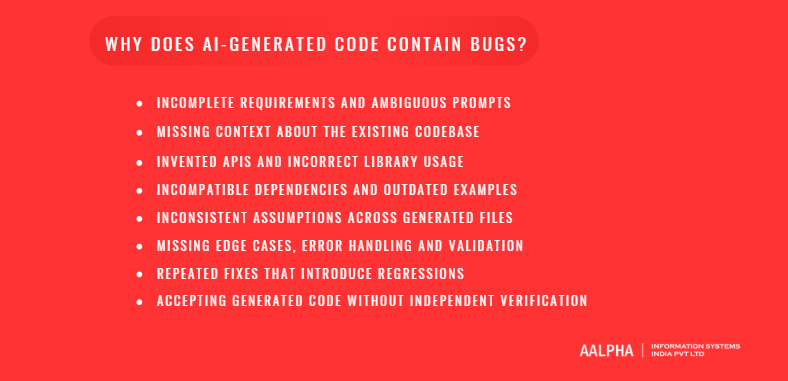
AI-generated code contains bugs because the model predicts plausible code from the prompt it was given, not verified code for the system you actually have. Gaps in the prompt, missing context, outdated training examples and unchecked output each add defects. The model rarely knows what it does not know, so errors arrive written with the same confidence as correct code.
-
Incomplete requirements and ambiguous prompts
A prompt such as “add a discount code field” leaves dozens of decisions open. Can codes stack? Do they expire? Is the discount applied before or after tax? The model picks answers silently, and they may differ from what the business needs. The bug is a wrong assumption, and it stays invisible until someone checks the totals.
-
Missing context about the existing codebase
A model sees only what fits in its context window. It may not see the helper function that already handles dates, the database column renamed last week or the middleware that wraps every route. It then writes a duplicate helper or queries a column that no longer exists. Tools that index the whole repository reduce this problem but do not remove it.
-
Invented APIs and incorrect library usage
Models sometimes call functions that do not exist, pass arguments in the wrong order or mix the syntax of two library versions. The code reads correctly and fails at runtime, often with an error that points somewhere unhelpful. Checking the call against the library’s official documentation takes two minutes and settles the question.
-
Incompatible dependencies and outdated examples
Training data lags behind current releases. A model may write code for an older major version of a framework and then install the newest one. Peer dependency conflicts, deprecated methods and changed defaults follow. The usual symptom is a build that worked yesterday and fails after a fresh install.
-
Inconsistent assumptions across generated files
Each prompt produces output shaped by that session. The frontend may send userId while the backend expects user_id. One file stores money in cents and another in decimal dollars. Each file is internally consistent, so reviewing files one at a time misses the break. It shows up at the seam between them.
-
Missing edge cases, error handling and validation
Generated code favours the success path. Empty lists, null values, duplicate submissions, timeouts and malformed input get less attention. A missing error handler or an unchecked response turns a minor upstream failure into a blank screen or a crashed process.
-
Repeated fixes that introduce regressions
When a user pastes an error and asks for a fix, the model patches the symptom, often by changing code elsewhere to suppress the message. After four or five rounds the original design is buried under workarounds. Each patch can break something that worked, and without tests nobody notices until a customer does.
-
Accepting generated code without independent verification
The largest source of defects is the human step, not the model step. Code that is accepted because it ran once has not been verified. Verification means tests with expectations written independently of the code, a review of what changed and a check of behaviour with realistic data. Later in this guide you will find how to do each of those.
What are the most common bugs in AI-generated applications?
The most common bugs in AI-generated applications fall into nine groups: compile and type errors, wrong business logic, frontend state problems, backend integration failures, database issues, authentication defects, asynchronous races, performance problems and deployment misconfiguration. Knowing the group tells you where to look first, which saves hours of guessing.
-
Syntax, compilation and type errors
These stop the build or show red in the editor. They are the easiest to fix and often come from mismatched versions or a model mixing JavaScript and TypeScript conventions. Read the first error only, because later ones are frequently side effects of it.
-
Logic errors and incorrect business rules
The code runs and gives wrong answers: a discount applied twice, tax rounded per line instead of per invoice, a date range that excludes the last day. No error appears, so only tests or careful checks against known examples find them.
-
Frontend state, rendering and navigation bugs
Stale data after an update, forms that reset on every keystroke, lists that re-render endlessly and back buttons that lose context. Most trace to state held in the wrong component or effects that run more often than intended.
-
Backend API and integration failures
Endpoints return 500 errors, timeouts or the wrong JSON shape. Third-party integrations fail when keys, scopes, callback URLs or payload formats differ from what the provider expects. The provider’s own request log usually settles the question fast.
-
Database schema, query and migration problems
Duplicate rows from a bad join, missing indexes, columns that exist in development but not in production and migrations that drop data. Schema changes deserve extra care because a bad one cannot always be undone.
Authentication and authorization defects
Login works, but any signed-in user can read another user’s records, or the admin check lives only in the interface. Sessions that never expire and carelessly stored tokens are common too. These are security bugs, not cosmetic ones.
-
Asynchronous execution and race conditions
Two requests update the same record, a promise is not awaited or a callback fires before the data loads. Results depend on timing, so the bug appears intermittently and often disappears when you add logging. Wikipedia’s entry on race conditions is a good primer.
-
Performance, memory and resource issues
Queries run once per row instead of once per page, lists grow without limit, whole files load into memory and connections are never released. Pages that load in a second with test data take a minute with real data, and servers crash under modest traffic.
-
Configuration and deployment failures
Environment variables missing in production, wrong build commands, hardcoded localhost URLs and CORS settings that block the live frontend. The code is fine. The environment differs.
The paragraphs below pair each category with the symptom you will see, the usual cause and the first thing to check.
Syntax and type errors appear as a failed build or red errors in the editor. They usually come from a version mismatch or mixed language conventions, so read the first error and check the installed versions.
Logic errors show up as wrong totals, dates or statuses with no error message. The likely cause is a wrong assumption in the prompt, so compare the output with hand-calculated examples.
Frontend state bugs show up as a stale or flickering interface. The usual cause is state held in the wrong component or effects that run too often, so inspect the state in browser developer tools.
API and integration failures appear as 500 errors, timeouts or rejected requests. A wrong payload, key or endpoint is the likely cause, so check the server logs and the provider’s request log.
Database problems show up as duplicates, missing rows or slow queries. Bad joins, missing indexes and schema drift are the usual causes, so run the query directly and read its plan.
Authentication defects appear when users see other users’ data. The likely cause is checks done in the interface only, so call the API directly as a different user.
Async and race bugs show up as intermittent wrong results. A missing await or concurrent writes are the likely causes, so add timestamped logs around the operation.
Performance problems appear as slow pages or crashes under load. Per-row queries and unbounded data are the usual causes, so profile with a realistic data volume.
Configuration failures show up when the app works locally and fails live. Missing environment variables and wrong URLs are the likely causes, so compare the environment settings side by side.
What should you do before asking AI to fix a bug?
Before asking AI to fix a bug, save a working baseline in version control, write down the expected and actual behaviour, and collect the error message, logs and steps to reproduce it. These preparations usually take under half an hour, and they decide whether your next prompt produces a fix or another guess.
-
Save a working baseline using version control
Commit the current state to Git before changing anything, even if it is broken. A commit gives you a point to return to if a fix makes things worse, and a diff that shows exactly what the AI changed. Work on a separate branch so the main branch stays deployable. The official Git documentation explains branches and commits for beginners.
-
Write down expected behaviour and actual behaviour
Write two sentences: what should happen and what happens instead. For example, “After checkout, the order status should change to paid. It stays pending.” That statement guides the diagnosis, and later it becomes the test.
-
Create reliable steps to reproduce the issue
List the exact clicks, inputs and data needed to trigger the bug, starting from a clean state. If it happens only sometimes, note how often and under what conditions. A bug you cannot reproduce cannot be shown to be fixed.
-
Capture error messages, logs and stack traces
Copy the full error text instead of describing it. Include the stack trace, the browser console output and the relevant server log lines with timestamps. The first line of a stack trace usually names the failure, and the first frame that points into your own code names the location.
-
Record relevant dependencies and environment settings
Note the language runtime, framework versions, package manager, operating system and database version, and whether the bug appears locally, in staging or only in production. Many AI fixes fail because the model assumed a different version from the one installed.
-
Remove credentials and personal data from debugging context
Strip API keys, passwords, tokens, connection strings and customer data from anything you paste into an AI tool. Replace them with placeholders such as YOUR_API_KEY. If a secret was already pasted into a prompt or committed to a repository, rotate it.
-
Prioritize bugs by user impact and severity
Rank bugs by what they do to users. Anything touching payments, security or data loss goes first, then bugs that block core journeys, then cosmetic issues. Working in this order prevents a day spent on a misaligned button while checkout charges customers twice.
What is the step-by-step workflow for fixing AI-generated code?
The workflow has ten steps: reproduce the bug, find the failing layer, trace the execution path, shrink the problem, test a root-cause hypothesis, request a focused patch, review it, add a regression test, verify related behaviour, and deploy with monitoring. Each step produces evidence that the next one needs.
Step 1: Reproduce the bug consistently
Run the steps from your notes until the bug appears every time. If it is intermittent, look for the variable that changes: data, timing, user role or browser. Write the reproduction as a short numbered list. Until it exists, you are guessing, and so is the AI.
Step 2: Determine which layer is failing
Separate frontend, backend, database, external service and infrastructure behaviour. Open the Network tab in browser developer tools. If the request is never sent, the fault is in the frontend. If the request returns an error, look at the server. If the server returns data that looks wrong, check the query. Elimination like this narrows a large codebase to one layer in minutes.
Step 3: Trace the failing execution path
Follow one request from the click to the database and back. Add temporary logs or set a debugger breakpoint at each hand-off, and compare what you expected with what arrives. The bug lives where the data first stops matching your expectation.
Step 4: Build a minimal reproducible example
Strip the problem down until the smallest code that still fails remains. Remove unrelated components, hardcode inputs and delete features. A small example makes the cause obvious more often than you would expect, and it gives the AI a focused prompt with little noise.
Step 5: Form a root-cause hypothesis and test it
State a cause in one sentence, such as “the handler reads the discount from the first item only”, then design a check that could prove it wrong. Run the check. If the evidence contradicts you, form another hypothesis. This step ends the cycle of random patching.
Step 6: Ask AI for a focused patch
Now ask for a change. Give the AI the hypothesis, the evidence and a constraint to modify only the relevant function. Ask for the smallest diff that fixes the confirmed cause. A large rewrite in response to a small bug is a warning sign.
Step 7: Review the proposed code changes
Read the diff before applying it. Check that it changes what you expect, adds no dependency without a reason, does not delete validation or error handling and does not hardcode values to satisfy your test case. If anything is unclear, ask the AI to explain each changed line.
Step 8: Add a regression test that exposes the bug
Write a test that fails on the old code and passes on the new. That proves the fix addresses the real cause and protects against the bug returning. Run the test against the unfixed code first to confirm that it fails.
Step 9: Verify the fix and related behaviour
Run the reproduction steps, the new test and the existing test suite. Then check neighbouring behaviour: other paths that use the same function, other user roles, empty inputs and large inputs. A fix that repairs one path and breaks another is common after AI patches.
Step 10: Deploy carefully and monitor the result
Deploy to staging first if you have one. Otherwise release during low traffic with a rollback plan ready. Watch error logs, response times and the specific metric tied to the bug for at least a day, and keep the previous version deployable until you are confident.
Walkthrough: from symptom to verified fix
A store owner notices that customers using a 20 percent coupon are sometimes charged more than expected. A cart with a 40 dollar item and a 60 dollar item should cost 80 dollars with the coupon. The order shows 92.
Reproduction takes a minute: add both items, apply the coupon, check out. The bug appears every time with two or more items, and never with one. The browser shows a correct discount on screen and the request carries the coupon code, so the frontend is cleared. The server’s total is wrong, which puts the fault in the backend.
Tracing the order handler with a log line shows the discount function receiving the full item list but computing 20 percent of the first item’s price only: 32 plus 60 gives 92. The hypothesis is “the discount applies to items[0] instead of the cart subtotal.” A two-line test call confirms it.
The AI is then asked for the smallest change inside the discount function, with the public interface unchanged. The diff replaces the first-item lookup with a sum over all items. A new test with the 40 and 60 dollar cart expects 80 and fails on the old code. After the fix it passes, the existing tests still pass, and new cases for one item, three items and a 100 percent coupon pass too. After release the owner watches order totals against payment records for two days. Every step produced evidence that justified the next.
How do you write better prompts for AI-assisted debugging?
A good debugging prompt states the expected behaviour, the actual behaviour, the exact error, the relevant code and the constraints on the change. It asks for a diagnosis before a patch. Prompts that include evidence produce targeted fixes, and prompts that say only “it’s broken” produce rewrites.
-
The information a useful debugging prompt should contain
Include the framework and versions, one sentence on what should happen, one sentence on what happens, the steps to reproduce, the full error text, the code involved, what you have already tried and what the model must not change. Each item removes a class of wrong guesses.
-
How to provide enough code context
Paste the failing function, the code that calls it and the shape of the data involved, not the whole repository. If your tool indexes the project, name the specific files. Too little context causes invented fixes. Too much buries the relevant lines.
-
Asking for diagnosis before implementation
Ask for the three most likely causes, ranked, with a check that would confirm each. Request code only after you have confirmed one. This keeps you in control of the reasoning and prevents the model from patching a cause it made up.
-
Requesting small changes with clear constraints
Tell the model to change only the named function, keep the public interface, add no dependencies and leave unrelated code unformatted. State the largest diff you will accept. Constraints turn a rewrite into a patch you can read in two minutes.
-
Asking AI to explain assumptions and uncertainty
Ask what the model assumed about library versions, data shapes and user roles, and which part of its answer it is least sure about. Models can often name their weak points when asked directly, and the answers tell you where to check first.
-
Requesting tests and verification commands
Ask for a failing test first, then the fix, then the exact command that runs both. Review the test expectations yourself, because later in this guide you will see why a test written by the same model can repeat its mistake.
Example prompts for frontend, backend and integration bugs
Frontend: “The product list in ProductList.jsx shows old prices after I edit a product. Expected: the list updates immediately. Actual: it updates only after a page refresh. The component and the edit handler are below. Give me the likely cause before any code.”
Backend: “POST /api/orders returns 500 when the cart has a coupon. Stack trace below. Expected: 201. List the three most likely causes with a check for each. Do not change code yet.”
Integration: “Our payment provider’s webhook arrives, but the order stays pending about one time in five. Log excerpts and handler code are below. Explain how the sequence of events could produce this and propose the smallest change.”
What to do when AI keeps repeating unsuccessful fixes
After two failed attempts, stop. Start a new conversation with a clean summary of what you learned, the evidence and the fixes already ruled out. Long chats accumulate stale assumptions that the model keeps building on. If a third fresh attempt also fails, the problem is probably structural, or it needs a person who can run the code and watch it fail.
A reusable prompt template
Copy this template and fill in the brackets.
Context: [framework and versions, relevant file names]
Expected behaviour: [one sentence]
Actual behaviour: [one sentence]
Steps to reproduce: [numbered list]
Error output: [full text, secrets removed]
Relevant code: [the function and its caller]
Already tried: [list]
Constraints: change only [file or function]; add no dependencies; keep the public interface
Task: First list the most likely causes with a check for each. Wait for my confirmation before writing code.
Weak prompt versus effective prompt
A weak prompt such as “Checkout is broken, fix it” gives the model no evidence and no limits. The typical response is a rewritten checkout flow that takes far longer than a few minutes to review.
An effective prompt reads: “Checkout returns 500 when a coupon is applied. Expected 201. Stack trace and handler attached. List likely causes first, and change only applyCoupon().” It supplies evidence, scope and a required order of work. The typical response is a null discount field identified, with a one-line diff you can review in minutes.
What do practical fixes for AI-generated bugs look like?
Practical fixes share one pattern: a visible symptom, a root cause found through evidence, a small change aimed at that cause and a check that proves it worked. The five examples below use that format. They are composites of bugs that appear often in AI-generated applications, not reports on a single project.
A React component displaying stale data
Symptom: A product list keeps showing the old name after the user edits a product, until the page is refreshed.
Root cause: The list component copies its props into local state on the first render and never updates that copy when the parent passes new data. The React documentation advises against mirroring props in state for this reason.
Focused fix: Remove the copy and render directly from the props, or lift the state to the parent that owns the data. No other component changes.
Verification: A component test renders the list, re-renders it with a changed product name and expects the new name on screen. Then edit a product in the running app and confirm that the list updates without a refresh.
An API endpoint returning an unexpected server error
Symptom: GET /api/users/:id returns a 500 error for some accounts and works for others.
Root cause: The handler reads user.profile.avatarUrl, but accounts created through social login have no profile record, so the property access throws. The endpoint also returns 500 instead of 404 for an id that does not exist.
Focused fix: Check for a missing profile and return a default avatar, and return 404 when the user is not found. The database schema stays as it is.
Verification: Three tests cover a user with a profile, a user without one and an unknown id. After release, search the server logs for new 500 responses on that route.
A database query producing duplicate results
Symptom: The customer list shows the same customer three times.
Root cause: The query joins customers to orders and selects customer columns, so each customer appears once per order. A customer with three orders appears three times.
Focused fix: Group by customer id and aggregate the order count, or filter customers with an EXISTS clause when order data is not needed. Adding DISTINCT would hide the symptom but leave the query doing extra work.
Verification: Compare the number of rows returned with the count of rows in the customers table, and add a test with a customer who has three orders and expect one result.
An asynchronous operation running in the wrong order
Symptom: Confirmation emails sometimes show an order total of zero.
Root cause: The code calculates line totals inside a forEach loop with an async callback. forEach does not wait for those callbacks, so the email is built before the totals exist.
Focused fix: Replace the loop with a for…of loop that awaits each calculation, or collect the work with Promise.all and await the result before building the email.
Verification: A test replaces the mailer with a stub and asserts that it receives the correct total. Run the test repeatedly, because a timing bug can pass once by luck.
A payment webhook processing the same event twice
Symptom: Customers receive two confirmation emails, and stock is reduced twice for the same order.
Root cause: Payment providers deliver webhooks at least once and retry when they do not receive a quick success response. Stripe’s webhook documentation tells developers to expect duplicate events and to guard against processing them twice. The handler had no such guard. A common superficial patch keeps a list of processed event ids in memory. That list disappears when the server restarts and does not work when two server instances run side by side.
Focused fix: Create a table of processed event ids with a unique constraint. Inside one database transaction, insert the event id and apply the order update. If the insert fails because the id exists, return a success response and skip the work. This is idempotency stored persistently, in the same place as the data it protects. Stripe’s guide to idempotent requests covers the same principle for outgoing calls.
Verification: Send the same event twice and confirm one email and one stock change. Send two copies at the same moment to test concurrency. Restart the server between deliveries and send it again. Finally replay the provider’s test events in a staging environment.
Which tests and tools verify AI-generated fixes?
Verify AI-generated fixes with layers of checks: compilers and linters for syntax and types, unit tests for logic, integration tests for APIs and databases, and end-to-end tests for critical journeys. Run them automatically on every change. No single tool catches every bug, so each layer covers what the one below it misses.
-
Compilers, type checkers and linters
Type checkers such as TypeScript’s compiler catch mismatched types and misspelled properties before the code runs. Linters such as ESLint or Ruff flag unused variables, unreachable code and risky patterns. Turn on strict mode for new code and fix warnings instead of silencing them.
-
Debuggers, browser developer tools and structured logs
Browser developer tools show network requests, console errors and component state. A debugger lets you pause execution and inspect values. Structured logs record events as key-value fields with a request id, so you can follow one request across services. Prefer these to scattered print statements that you later forget to remove.
-
Unit tests for isolated logic
A unit test checks one function with known inputs and expected outputs: a discount calculator, a date parser, a permission check. Unit tests run in milliseconds and suit pure logic, which is where most AI-generated logic bugs sit.
-
Integration tests for APIs, databases and services
Integration tests check how parts work together: an API route against a real test database, or a service calling a provider’s sandbox. They catch schema mismatches, wrong queries and serialization errors that unit tests with mocked dependencies cannot see.
-
End-to-end tests for critical user journeys
End-to-end tests drive a real browser through signup, checkout or any journey that earns money, using tools such as Playwright or Cypress. Keep this suite small and focused on a few critical paths, because these tests are slower and more brittle than the layers below.
-
Boundary cases, failure paths and regression testing
For each fix, test the boundaries: zero, one, many, maximum length, empty, null, duplicate, wrong role and expired session. Test failure paths by forcing timeouts and rejected requests. Keep every bug’s regression test permanently, since a bug that returned once will try again.
-
Security and dependency scanning
Run a dependency audit such as npm audit or pip-audit, a secrets scanner such as gitleaks and a static analysis tool such as Semgrep. The OWASP Top 10 is a practical checklist of what to look for. Scanners produce false positives and miss logic flaws, so treat their output as input to a review, not a verdict.
-
Automated checks in continuous integration
Configure GitHub Actions or a similar service to run linting, type checks, tests and scans on every pull request, and block merging when any of them fail. Then the same checks apply to AI-generated changes and human changes alike.
Why tests written by the same AI can mislead
When a model writes both the fix and the test, the test often asserts what the code does instead of what it should do. If the model misunderstood the requirement, the code and the test share the mistake, and everything passes.
Verify the expectations independently. Write the expected values by hand from the business rule before you look at the code. Break the code on purpose, for example by changing a plus to a minus, and confirm that the test fails. Read test names against the requirement and ask whether each one describes behaviour a user would care about. Where the stakes justify it, have a different person or a separate session write tests from the specification alone, without seeing the implementation.
How do you fix security and production issues in AI-generated code?
Security and production defects take priority over feature bugs because they expose data or money. In AI-generated code the most frequent problems are missing server-side authorization, exposed secrets, unvalidated input, leaky logs, vulnerable dependencies and untested migrations. Fix them with server-side checks, secret rotation, input validation and a tested rollback plan.
-
Missing server-side authorization checks
Hiding a button is not access control. Every API endpoint must check who is calling and whether that person may touch the requested record. Test it by signing in as user A and requesting user B’s resource by id. If the data comes back, the endpoint lacks an ownership check. Broken access control has ranked first in recent editions of the OWASP Top 10.
-
Exposed secrets and unsafe configuration
AI tools sometimes place API keys in frontend code, commit .env files or hardcode credentials in examples. Anything shipped to the browser is public. Move secrets to server-side environment variables or a secrets manager, add .env to .gitignore and rotate any key that has appeared in a repository or a prompt. Deleting it from the latest commit does not remove it from history.
-
Injection vulnerabilities and untrusted input
SQL built from strings, unescaped HTML and file paths built from user input invite injection and cross-site scripting. Use parameterised queries or an ORM, validate input on the server against a schema and encode output. Client-side validation improves usability and provides no protection.
-
Sensitive information in logs and error responses
Debug logging often prints tokens, passwords and personal data, and error responses may expose stack traces or SQL. Log identifiers instead of secrets, return generic messages to users and keep the detail in server logs with restricted access.
-
Dependency vulnerabilities
Generated code may pull packages that are unmaintained, misspelled or lookalikes of the intended library. Confirm that each package exists, is maintained and is the one you meant. Run audits regularly and pin versions with a lockfile so an update does not change behaviour overnight.
-
Failures that appear only in production
Production differs from your laptop in environment variables, data volume, HTTPS, proxies, CORS rules, file permissions and concurrent traffic. Reproduce with production-like configuration in staging, and use error tracking and structured logs to see real failures instead of guessing at them.
-
Safe database migrations, backups and rollback plans
Before any schema change, take a backup and confirm that you can restore it, which means restoring it somewhere at least once. Run the migration on a copy first. Prefer backward-compatible steps: add the new column, deploy code that uses it, and remove the old column later. Write the rollback steps before you deploy, not after something fails.
When a security incident requires more than a code patch
If secrets leaked, customer data was accessed or payments were manipulated, patching the code is one step among several. Rotate credentials, preserve logs, work out what was exposed and check what notification duties apply under the laws that cover your users, such as GDPR in Europe or India’s Digital Personal Data Protection Act. Involve a security professional and legal counsel early, because the order in which you act affects both the damage and your obligations.
When should you refactor, rebuild or hire a developer?
Use a targeted fix when one bug has one clear cause, refactor when the same kind of bug keeps returning, rebuild a component when its structure blocks every change, and hire a developer when the risk involves money, security or data. The right choice rests on evidence from diagnosis, not on frustration with the last failed prompt.
-
Signs a targeted fix is sufficient
The bug has a reproducible cause in one place, a test can cover it and the surrounding code is understandable. The fix touches a few lines, and nothing else needs to move.
-
Signs the underlying architecture needs refactoring
Similar bugs recur in different places, one file holds unrelated responsibilities, logic is duplicated across modules or every change breaks something unexpected. Refactor behind tests so behaviour stays the same while structure improves.
-
When rebuilding a component is justified
Rebuild when the data model is wrong, such as one table storing three different kinds of entity, or when understanding a component costs more than rewriting it. Rebuild one piece at a time and keep the rest of the application running. The downside is that old code often carries small behaviours nobody wrote down, and a rewrite can lose them.
-
When professional review is necessary
Get a professional review for payments, authentication, personal or health data, regulated industries, data separation between customers and any code you cannot explain. Also get one when AI patches stop working. A review costs less than a breach.
-
What to share during a developer handoff
Give the developer repository access, instructions to run the app, the names of environment variables without their values, reproduction steps, logs, the list of integrations and accounts, hosting details and your priority order. Include your prompt history if you kept it, since it records intent that the code does not.
How to evaluate a developer’s debugging approach
A good developer asks for reproduction steps, reads logs, forms hypotheses, proposes small changes with tests and explains trade-offs. Be cautious about anyone who recommends a full rewrite before reading the code, or who offers a fixed price without looking at the application.
In short, the four options compare as follows.
A targeted fix suits one reproducible bug in understandable code. It typically takes hours to a few days, and its main risk is that the fix hides a deeper design problem.
Refactoring suits applications where bugs recur, logic is duplicated or files are tangled. It typically takes days to weeks, and its main risk is that behaviour changes without tests to catch it.
A partial rebuild suits cases where one component or the data model is unsound. It typically takes weeks, and its main risk is friction between the new and old parts.
Broader redevelopment suits cases where the architecture cannot support the product roadmap. It typically takes months, and its main risks are cost, delay and lost hidden behaviours.
How much does vibe code fixing cost?
Vibe code fixing costs depend on how hard the bug is to diagnose, not on how many lines of code exist. A bug with a clear log may take two hours. An intermittent race condition can take days. A sound estimate separates a diagnosis phase, an implementation phase and a verification phase, and prices each on its own.
Factors that affect debugging effort and cost
Reproducibility matters most. Other drivers are access to the code and a working environment, existing test coverage, the number of third-party integrations, how sensitive the data is, how urgent the fix is and whether anyone can explain the intended behaviour. Poor documentation adds reading time.
Initial diagnosis versus implementation and verification
Diagnosis is often the largest share of the work, and the resulting fix may be a handful of lines. Verification, which includes tests, a review of related behaviour and monitoring after release, takes real time and should not be treated as optional. Starting with a paid diagnosis limits your risk because you see the evidence before approving further spend.
Hourly, fixed-scope and ongoing support arrangements
Hourly billing suits unknown problems where the cause is not yet found. Fixed scope suits a defined bug list once diagnosis is done. A support retainer suits an application that keeps changing and needs regular fixes. Each shifts risk differently: hourly work carries budget uncertainty, and fixed scope carries the risk that the scope was wrong.
Why code volume alone cannot predict repair costs
A 200-line payment handler with a duplicate-processing bug can cost more to fix safely than a 20,000-line marketing site with a broken layout. Risk, coupling and the cost of being wrong matter more than size.
How to request an evidence-based estimate
Share the handoff items listed earlier: repository access, reproduction steps, logs and priorities. Ask the developer to state assumptions, what the estimate includes, what would trigger a re-estimate and how verification will be done. An estimate given without looking at any code is a guess.
The scenarios below show illustrative effort ranges. They are not quotations. Multiply the hours by the hourly rate you are offered to get a budget figure.
A single reproducible interface or API bug, with clear logs, repository access and no existing tests, takes roughly 2 to 8 hours.
An intermittent bug such as a race condition or duplicate webhook, with production logs available and one integration, takes roughly 1 to 3 days.
A security review and fixes for a small application, with about 20 endpoints, one database and one hosting environment, takes roughly 1 to 2 weeks.
How can Aalpha help fix AI-generated code?
Aalpha Information Systems reviews existing applications, including AI-generated ones, diagnoses defects, prioritises repairs and fixes frontend, backend, database and integration problems. As an AI development company, Aalpha can apply the same process to AI-generated applications, with work starting with a short assessment so you see the evidence and a scoped plan before you commit to repairs or a rebuild.
-
Reviewing an existing AI-generated application
The review begins with running the application and reading the code: repository structure, data model, authentication, integrations and deployment setup. The output is a written map of what exists, which parts are sound and which are risky. Many AI-built applications have no documentation, so this map is often the first reliable description the owner has.
-
Diagnosing defects and prioritizing repairs
Findings are ranked by user impact and security risk, using the same order described earlier in this guide: money and data first, core journeys next, cosmetic issues last. Each finding comes with reproduction steps and evidence, so you can judge it without trusting anyone’s opinion.
-
Fixing frontend, backend, database and integration issues
Aalpha has built custom software, web and mobile applications, AI features and SaaS products for clients since 2008, across more than 5,500 projects. The debugging disciplines in this guide are the same ones that work applies to any codebase: reproduce, isolate, patch narrowly and verify. The language and framework of the generated code matter less than whether the team can read it and prove a fix.
-
Improving testing, maintainability and deployment practices
After the urgent repairs, the team can add regression tests for each fixed bug, set up automated checks in continuous integration, document how to run and deploy the application and separate secrets from code. The aim is that the next change, whether written by a person or generated by AI, meets the same checks.
-
Request an assessment of your AI-generated application
Send a list of the problems you see, repository access or a code export, and a short note on your users and hosting. Aalpha’s clients rate the company 4.9 out of 5 across 215+ reviews on Clutch, and you can read those reviews before you reach out. One honest limit applies: an assessment sometimes concludes that part of the application should be rebuilt instead of repaired, and you will hear that early.
To discuss your application and assessment requirements, get in touch with Aalpha Information Systems.
Frequently asked questions about vibe code fixing
What is vibe code fixing?
Vibe code fixing is the process of diagnosing, repairing and verifying defects in software that an AI tool generated from prompts. It combines debugging, testing and sometimes refactoring so that an application that looks finished in a demo works reliably with real users, real data and real traffic.
Can AI fix bugs in code it generated?
Yes, often, when you give it evidence: the error message, logs, reproduction steps and the relevant code. It performs poorly when asked to fix a bug it cannot see or reproduce. Treat its output as a proposal, review the diff and verify the result with a test you trust.
Why does AI keep introducing new bugs?
Each fix is generated from limited context, so the model may change code that other parts depend on, or suppress an error instead of removing its cause. Without regression tests those side effects go unnoticed. Small constrained prompts, tests and version control reduce the problem.
Can a nontechnical founder fix an AI-generated app?
For small, well-reproduced bugs, yes. By following the workflow in this guide, a founder can reproduce a problem, collect evidence and use AI to propose a patch. Anything involving payments, authentication, personal data or database migrations should be reviewed by an experienced developer before it reaches production.
How can I tell whether a fix actually works?
A fix works when a test that failed before now passes, the original reproduction steps no longer trigger the bug, the existing tests still pass and related behaviour is unchanged. Then watch logs and errors after release. One successful manual click is not verification.
Is AI-generated code safe to deploy?
Not without review. It can be deployed safely once you have checked authorization on the server, removed exposed secrets, validated input, scanned dependencies and tested the critical paths. Code that has only been run once in a demo has not met that standard, whether a person or a model wrote it.
Should I repair my application or rebuild it?
Repair when bugs are isolated and the structure is understandable. Rebuild when the data model is wrong, every change breaks something else or the architecture cannot support your roadmap. A short assessment gives you evidence for the decision, and it often shows that a partial rebuild beats either extreme.
What should I give a developer before requesting help?
Share repository access, instructions to run the app, the names of environment variables without their values, reproduction steps, error logs, a list of integrations and hosting details, and your priority order of problems. Include prompt history if you have it, because it records intent that the code does not.